
Tab Keeper - Chrome Tab Manager & Sync Tool
Extension Actions
- Extension status: Featured
- Live on Store
Efficiently save and synchronize tabs across devices without the need for personal logins.
★ Free Forever & Open Source
A passion project dedicated to better browsing, Tab Keeper will always remain free.
- GitHub: https://github.com/justine-george/tab-keeper-react-chrome-extension
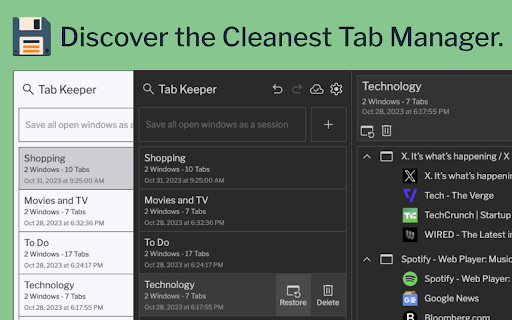
Say goodbye to a cluttered browser with Tab Keeper, your free, open-source solution for managing numerous tabs. Easily save, organize, and sync your tabs across Chrome desktop browsers, improving your productivity and browser performance.
★ Key Features:
- Efficient Tab Management: Easily organize a large number of tabs
- Multi-Language Support: Available in 10 languages
- Device Sync: Sync tabs across Chrome desktop browsers
- Privacy First: Operate securely without user logins
- Quick Search: Instantly find saved tabs
- Custom Themes: Personalize your browsing experience
- User-Driven Updates: Regular improvements based on your feedback
Join the Tab Keeper community for a streamlined browsing experience. Your feedback is invaluable – if you love Tab Keeper, consider leaving a rating!
★ Changelog
- Version 1.3.1 (Latest)
Improvements:
• Search functionality now supports searching by tab group and window titles
• Bug fixes and stability improvements
- Version 1.2.7
Improvements:
• Timestamp shown in tab group cards now reflects the time of update
• Dependent packages updated to latest versions
- Version 1.2.6
Improvements:
• Newly created chrome tab now opens right next to the current tab
• Bug fixes and stability improvements (Sessions saved using multi-monitor setup now restorable)
- Version 1.2.5
Improvements:
• Improved iconography
• Updated translations
• Bug fixes and stability improvements
- Version 1.2.2
New Features:
• Added "Optimize Memory Usage While Restoring" toggle in Data Management settings to enable memory-optimized restore mode
Latest reviews
- Theo Oliveira
- Very good, but sometimes are not consistent in the sync
- Jon “Jon”
- No synchronization functions.
- Dylan Schreurs
- Perfect. Sync between devices. Save tabs without memory save. After saving grouptabs, can individually delete tabs. Thx
- Jennifer Lee
- Very intuitive to use. Could be lack of my tech savviness but only one subfolder can be created per folder. Saves tabs even when you exit the web browser as long as said tabs are added to the extension. Nice that I can selectively save tabs, or the whole window. It's the most straightforward one i've found so far that has a clean UI and is free.
- Mr. A (07)
- Works great. It's so easy to use. :)
- KC 1920
- I ABSOLUTELY LOVE this extension. It's so easy to use. I've used it at least 4 months and do not have any complaints. It's PERFECT
- Lindsey Blake
- Most user friendly and simple tab saver and will save all tabs in all windows. easiest, fastest tab saver! Thank you for making my life easier!
- Yabbering On
- solid and reliable
- Nidal Hamdan
- It works very good
- Reda
- the best tab saver i have ever used simple design and don't ask you to pay a monthly subscription just to store more links
- LUISMI CABEZA SANCHEZ
- The only problem I see with the manager is that the changes done in a certain tab have to be manually saved or else the next time you open that tab it will be in the same state as when you first openned it (for example if in the tab youtube you openned started a new video and didn't manually save the tab before closing, the next time you open said tab it will start with the original video you already finished instead of the last one you saw). Still useful though, it's just that small things that makes me not giving it that last start, because that inconvenience can be quite annoying or problematic in certain cases. Edit: Thinking about it, maybe it could be solved with something like a prompt that appears when trying to close the tab which ask the user if they want to save the current state of the tab or not. I feel like this could be a good fix that doesn't need too much work to implement.
- Cris Chonka
- This extension works well for the most part. I have a hybrid schedule and it helps to pick up at home where I left off at the office and vice versa. Over time, however, it seems like the sync doesn't always pick up changes made from the alternate location and I can only see tabs saved on the current machine. I try to delete older sessions, and that seems to work for the *next time*, but it's frustrating when I can't see the most recent session from my other computer. There's nothing to indicate that there is a limit to how many sessions get saved/synced, and the Sync now button runs but makes no changes to the list, so I'm not sure what's causing the issue.
- Mike Rey
- it would be the PERFECT manager if it only could save bookmarks too. You can save a file of current tabs, its very useful as a person who browse a lot of tabs. But I need to sync my bookmarks too between devices with ease and fast, please consider to add this feature so it turn into a complete extension app. Iam pretty sure some ppl would buy some themes or help with donations if funds are wanted from devs
- M2 F
- Good.
- Ashish Alexander
- Cannot save individual windows and does not save tab groups
- Emil Balitzki
- The best tab saver on the market! Simple to use, does not clutter the browser UI, works flawlessly. Do you want to save the whole session with many tabs open? Just click one button in the extension window and go take a walk. I can only recommend to give it a go!
- Joe McCarthy
- SAme as what everyone else said. He does what it says and it does it well. 5*
- 眠剤
- best I've tried among all the tab manager apps! design is clean, looks nice and have all the functions I want. cloud save is a sweet little bonus too that I really appreciate!
- Sir Edward Baughns
- works well
- Geoffrey Gordon
- Works well
- Isaac Garman
- Works great.
- Peter TranPham
- neat small ui, functions well for me
- Patrik Jedlička
- top :) thanx
- Eduardo Sánchez
- Awesome extension. Simple, yet highly functional. Gets the job done beautifully!
- Massimo Fazio
- thank you
- Emil Balicki
- Excellent extension. I have been looking for such a simple and easy-to-use tool for tabs management. Tab Keeper has all the options I needed: saving the current tabs, restoring them, no additional UI or panels (except a simple extension button), and cloud sync, without cluttering your browser. I would highly recommend it. Saying that I would still love one little feature to make my life easier: being able to replace a window in the current session. My usual workflow is to open a session, work on it, save it as a new window, and delete the old one. Quick replacement would make it even easier, but still I would give it a max rating :)
- Ray Thomason
- Well it's really useful for the things that it claims to do and it does them quietly but very efficiently. I think as an old-time dos user and then Windows from the earliest days. Chrome doesn't allow me to do much behind the scenes by the way it's also the reason I don't like Max m a c s. This is a good program.
- Akhil P Nair
- One of the best chrome extension out there. Simply excellent. - Does what it says. - Clean simple UI. - Syncs to cloud without an account. - No ads/subscriptions. - Dark mode. - Light on resources. -Developer responds quickly. Thank you!
- ankush dwivedi
- FABULOUS EXTENSION WITH FABULOUS FEATURES WITH FABULOUS UI
- Natalia Hornes
- Simple, the best :) Thank you for the development. It is being helpful.
- Aditya Pola
- I love how fast and functional the extension is. Some things that would improve my user experience: 1. Ability to create a new group, currently the only way to create a group is by saving the current session, this pulls in all windows, which may not always be desirable. 2. Collapse all and open all buttons would help a lot 3. Ability to adjust the size of fonts and the extension popups. I'm switching from toby after being a regular user for half a decade. I appreciate the explicit declaration that this will always be free.
- Riley Tinbayne
- I'm a simple man. When it comes to tab managers, I only want five things. -Tabs - You can save open tabs into a menu in the extension. -Groups - You can group the tabs. -Search - You get to search for tabs, and find 'em more easily. -Sync - If your hard drive explodes, you have a backup synced to your account. -Dark mode - What it says on the tin. This extension has all five, and that's why I switched here after Toby tried to put up a paywall. I wish there was an easier way to save individual tabs to new groups, but apart from that it's got all I need.
- Dwayne Martin
- I"m a tab hoarder (admitting it is the first step to recovery) and i'm happy to say this app works great and has helped significantly. Good job.
- Laksh Bahukhandi
- Amazing for an organizing freak
- A Swand
- It is really useful for anyone operate multiple PC without fear of losing tabs
- Alex Morgun
- Too cramped. Look at Cluster for tab management, it's almost perfect. I want to dump my month or week of tabs, I need to manage them, close useless ones, make tab groups to save.
- Jirapat Thaenphromrat
- Close enough welcome back onetab
- James H
- I have been looking for a solution to my 10 billion open tabs! I really like this one, it does resolve my main issue and several side issues. When I try to go through and organize wanted tabs and close out unwanted tabs my 8 year old PC runs out of memory quick and I have to force close and reopen and start again. This great tool saves all open tabs in all chrome windows so Now I can open a few windows at a time and focus on those, save them and move on to other tabs. My suggestions/wants are pretty much the same as (Joe C) another reviewer left, but I'll mention them here too: -Ability to save tabs for just the current active Chrome window -Make the extension stay open in a side bar -Ability to Drag & Drop the tabs or groups of tabs so we can move them to different groupings and order the groupings as well (Can work around this but it is a bit of a pain, even if still easier than trying to do it via my dozens of open browser windows) Definitely a great tool that is already making my life easier! Keep up the great work!
- Joe Cretella
- Light weight solution that solves my tab organization needs just as well - if not better - than other (premium) alternatives. Other alternatives might provide additional features, but I find that in practice, a solution like this one that essentially stores bookmarks in a streamlined fashion solves for 90% of my pain points. That being said, I'll list a few features that I'd love to see in the extension: - Support chrome tab "groups" when saving & re-opening tabs (Similar to how Tab Keeper currently associates tabs to separate windows) - Ability to reorder saved tabs (currently, workaround is to re-save them in order in which you want them shown) - When creating a new Tab Keeper group, only add tabs that are selected in the window, rather than all tabs in all open windows. - Different UI options, ie: 1. displayed on an always-open tab 2. displayed in a sidebar running the length of the window In all, this is a fantastic extension that much improves my workflow and I would be happy to donate to the developer for their great work.
- Dylan Schreurs
- Perfect. Sync across different platforms. Uncluttered, clear, user friendly interface. Better than OneTab, TabManager, all the mainstream sh*?t paid extensions! 2024.06.12. Edit: I have feedback. Will you add the possibility to sort saved tabs by name or date? Also searching through saved tabs is not in there. That would be great if you have a lot of saved tabs.
- Migotes Migotes
- Thank you for developing this very helpful AddOn.
- David Pérez
- Amazing job!
- Troy Naismith
- Seems to work very well once you get the hang of it
- Vignesh Babu
- serves my exact purpose. i have multiple PC's and this makes accessing all my tabs from any of my systems convinient. god send for someone who has 100tabs open
- Fatima Adam
- Works really well! I really appreciate the option for themes as someone who exclusively uses dark mode on my devices, due to chronic migraines. This helps a bunch with eye-strain. Thanks for the great extension, cheers!
- Max G
- Can't open the saved tabs.
- Rohan Jayachandran
- Simple, clean and really useful! Like it so far and look forward to more updates.
- Shri Ganesh
- Very neat tab saving tool! I just love the fact that it lets us save tabs without logging in.
- Mr. Ryan Dunne
- Works exactly how I need it to for managing multiple projects using (especially) Google Apps. The only awkward bit is that it saves ALL windows (not just the current) by default and you have to delete the windows you do not need every time you save a set of tabs. I like that dark theme is supported, and especially appreciate the high degree of functionality provided for it being free. I really appreciate the time and effort you put into this extension!!
- Shubashree B
- Super clean interface! Would be awesome to be able to save tab groups on chrome as well. If this feature gets supported, this extension will get a five star rating from me.