
DeepL Translator
Extension Actions
- Live on Store
Translate web pages using DeepL API
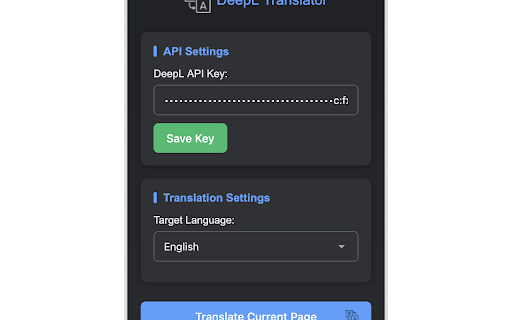
# DeepL Free Translator
A Firefox add-on that translates web pages using the DeepL API.
## Features
- Full webpage translation
- Dark mode support
- DeepL API key management
- Automatic language detection
## Getting a DeepL API Key
1. Visit [DeepL API Free](https://www.deepl.com/pro-api) and sign up for a free account
2. After registration, go to your [Account Summary](https://www.deepl.com/account/summary)
3. Your API key will be displayed under the "Authentication Key for DeepL API" section
4. Copy this key and paste it into the extension's settings
Note: The free DeepL API has a limit of 500,000 characters per month. You can check your usage in your DeepL account dashboard.
## Usage
1. Click on the extension icon to open the popup
2. Enter your DeepL API key and save it
3. Select your target language
4. Click "Translate Current Page" to translate the visible content
5. The extension will translate content as you scroll through the page
Latest reviews
- Alick Sadekov
- Works for me! thanks!
- 김효준
- Everything is fine, but when I change it from a free key to a paid key, an error saying “invalid key” appears. Please fix it.