
Countdown Timer for Each Question
Extension Actions
A countdown timer designed to help you stay focused and manage time for each question. Perfect for quizzes and timed tasks.
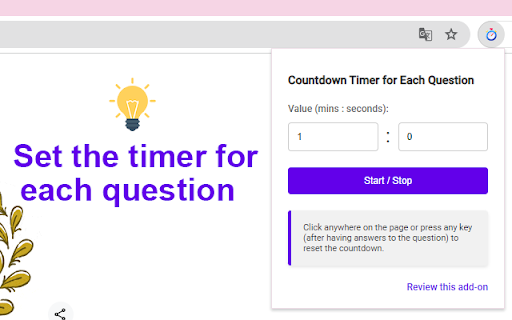
Have you ever run out of time during an exam? This extension helps you stay focused and manage your time effectively while studying, ensuring you stay on track and finish each question on time.
Setting the Timer (one time):
- Click the extension icon to open the popup.
- Enter your desired countdown value in the input field.
Starting and Stopping:
- Click on the extension icon, then click the "Start / Stop" button to start or stop the countdown.
(Pages opened before installing this extension may not work properly, please reload them.)
Resetting the Timer (by clicking anywhere, pressing any key):
- Click anywhere on the page or press any key (after having answers to the question) to reset the countdown.
If you find this extension helpful, please rate it 5 stars.
Latest reviews
- Eddie Le
- the concept is great and is very helpful for medical students, however when we are doing our question banks, we have to highlight or strike out and that will reset the timer.
- Joydip Das
- doesnt work
- Nb Nb
- Good for learning Exam
- FPTUer's Forum
- Resetting the timer by clicking anywhere or pressing any key is a convenient feature. This extension has helped me stay focused on answering on time.
- Ha Le
- I love how simple it is to start and stop the timer with a single click. It’s incredibly helpful for staying on task.