
Gov Contract Finder - Bidding Assistant
Extension Actions
Save and track federal contracts from SAM.gov in one click. Use AI to write bids, stay organized and win more contracts.
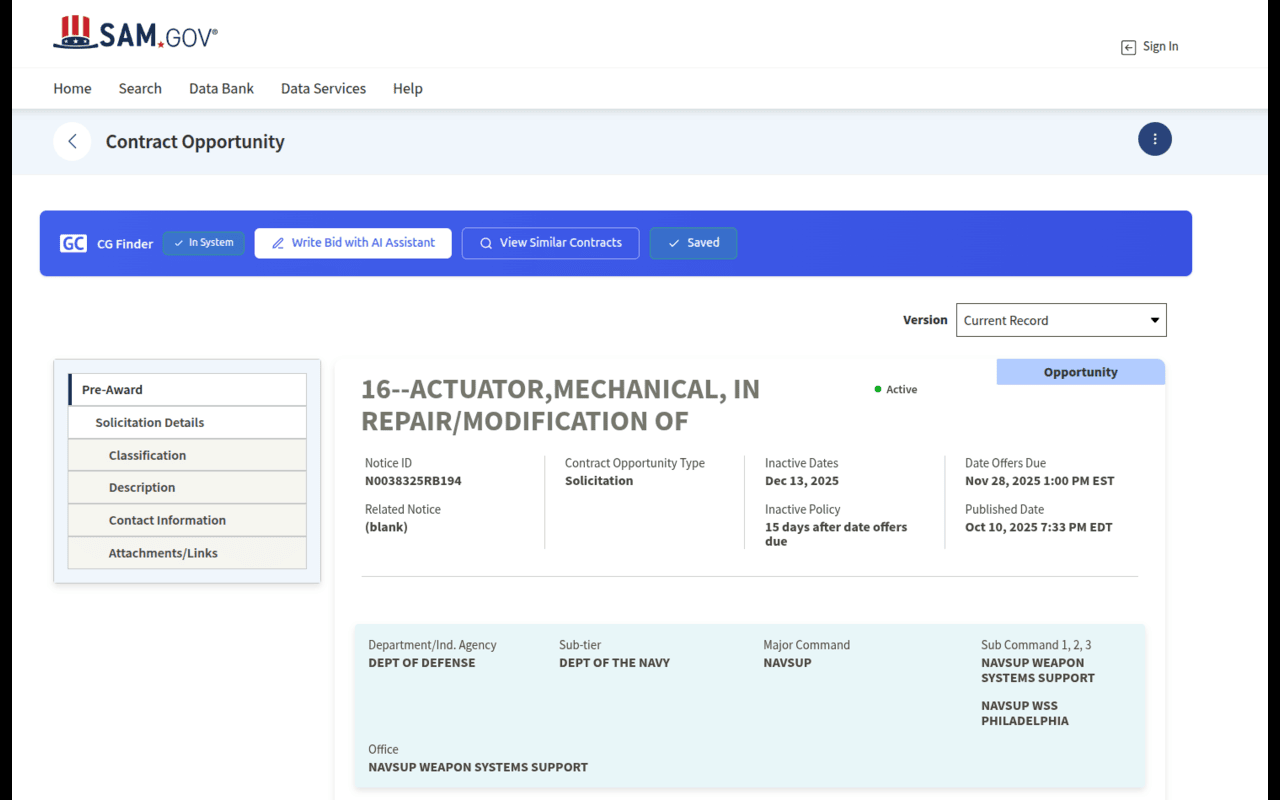
Gov Contract Finder is a browser extension that helps contractors discover, evaluate, and manage federal contract opportunities directly from SAM.gov.
It adds one-click saving, real-time tracking, and an AI-powered bidding assistant to your existing SAM.gov workflow—so you can identify the right opportunities faster and bid with confidence.
Learn more about the platform at https://govcontractfinder.com
What the Extension Does
Gov Contract Finder works alongside SAM.gov to eliminate manual tracking, copy-pasting, and spreadsheet workflows. Instead of jumping between portals, documents, and calendars, contractors can analyze and manage opportunities in one centralized system.
Key Features
One-Click Save from SAM.gov
Save RFPs, RFQs, IFBs, Sources Sought, and other federal solicitations directly from SAM.gov without leaving the page.
AI Bidding Assistant
Automatically analyze opportunities to help you:
Assess contract fit and competitiveness
Identify key requirements and compliance factors
Generate proposal outlines and compliance checklists
Prioritize opportunities based on effort vs. potential value
Real-Time Opportunity Tracking
Track saved opportunities as they move through your pipeline with automatic status updates and deadline reminders.
Personalized Contract Dashboard
Organize opportunities by agency, NAICS code, set-aside, or custom tags. Search, filter, and manage your bid pipeline from a single dashboard.
Smart Contract Alerts
Receive notifications when new federal opportunities match your NAICS codes, saved searches, or past activity.
Bid Calendar Management
Keep proposal deadlines, questions due dates, and submission timelines synced in one centralized calendar.
Set-Aside & Small Business Filtering
Quickly identify opportunities for:
8(a)
HUBZone
WOSB / EDWOSB
VOSB / SDVOSB
Other small business programs
AI Bidding Assistant Capabilities
The built-in AI assistant helps contractors:
Summarize solicitation documents instantly
Highlight evaluation criteria and submission requirements
Estimate bid difficulty and resource needs
Compare opportunities based on relevance and competitiveness
Focus time on the opportunities most likely to convert
Who It’s For
Gov Contract Finder is built for:
Small businesses entering federal contracting
8(a), HUBZone, WOSB, VOSB, and SDVOSB-certified firms
Federal proposal and capture teams
Business development and procurement professionals
Consultants and agencies managing multiple bids
How It Works
Browse SAM.gov as usual
Click the Gov Contract Finder extension to save or analyze an opportunity
Review AI-generated insights, summaries, and proposal guidance
Manage deadlines, tracking, and follow-ups in one dashboard
Supported Opportunity Types
Presolicitations
Combined Synopsis / Solicitations
RFPs, RFQs, and IFBs
Sources Sought & RFIs
Special Notices & Award Notices
Surplus Sales, Justifications & Approvals
Why Contractors Use Gov Contract Finder
Save hours each week by eliminating manual data entry
Bid smarter with AI-driven insights before committing resources
Stay organized across agencies, NAICS codes, and set-asides
Never miss deadlines with automated reminders
Enterprise-grade security with encrypted, private data
Requirements
A free Gov Contract Finder account
Sign up at https://govcontractfinder.com
Google Chrome (Microsoft Edge supported)
Internet connection
Get Started
Install the extension, sign in, and start saving and analyzing SAM.gov opportunities instantly with AI-powered insights.
Learn more: https://govcontractfinder.com
Support
Questions or feedback? Contact us at [email protected]