
cMouse - All-in-One Gesture Wizard
Extension Actions
Powerful mouse gesture extension with advanced gesture recognition
# cMouse - All-in-One Gesture Wizard 🖱️✨
cMouse is a powerful Chrome browser gesture extension that integrates mouse gestures, super drag, wheel enhancement, rocker gestures, and various other interaction methods to make your browsing experience more efficient and convenient. Based on our self-developed GestureCore algorithm, it provides smooth and accurate gesture recognition, with zero dependencies and lightweight operation. Now supports 20 languages, completely free, and ad-free.
## 🎉 版本1.5.0 概述
brings a major refactor to wheel enhancement and scrolling effects, making the experience smoother, more stable, and more compatible, with more tuning and feedback options.
The wheel settings page has also been reorganized with new in-page sub-navigation, improved advanced options, and refined interactions for the scroll indicator and cursor feedback.
This update also completes more translations, refreshes the help content, and improves backup and restore related settings.
## 🎉 Version 1.4.2 Overview
Added **Extension Page Support** feature,
Optimized the user experience of **Scroll Indicator**,
Improved the **Fast Scroll** detection logic and fixed multiple important issues. All new features support 20 languages.
Wheel function is disabled by default, as different mice have different wheel adaptation standards.
Fixed bug: Wheel settings and other settings were lost when updating the application.
### 🆕 v1.4.0 Highlights
#### 🌍 Language Pack Upgrade
- **Added support for 16 new languages**, now supporting **20 languages** in total
- Including: Korean, Italian, Turkish, Arabic, Vietnamese, Indonesian, Thai, Hindi, Swedish, Dutch, Polish, and more
- Automatically detects browser language and intelligently switches interface language
#### 🎡 Scroll Experience Optimization
- **Default fixed scroll distance**: Adjusted to 450px for more precise scrolling
- **Transition duration optimization**: Default 550ms for smoother scrolling
- **New CubicInOut easing function**: Delivers smoother scrolling feedback
- **Smart scroll animation interruption**: New scroll operations respond immediately for a smoother experience
#### 🛡️ Smart Third-Party Wheel Software Compatibility
- **Intelligent detection**: Automatically detects third-party wheel software like Smooze Pro, Mos, SteerMouse, etc.
- **User-friendly prompts**: When third-party software is detected, provides "Disable Wheel Effect" and "No Issue" options
- **Timeout detection optimization**: Enhanced detection logic to avoid false positives, automatically resets after 10 seconds of inactivity
- **Flexible handling**: Users can choose the handling method based on their actual situation
---
## ⭐ Core Features
### 🖱️ Mouse Gestures
Execute various operations by right-clicking and dragging, without clicking menus, greatly improving browsing efficiency.
**Core Features**:
- **Intuitive operation**: Right-click and drag to execute operations, simple and easy to use
- **Rich gestures**: Supports unidirectional, bidirectional, and multi-directional gestures, covering all common operations
- **Visual trajectory**: Real-time display of gesture trajectory and action hints for clearer operation
- **Customizable configuration**: Fully customizable gesture mapping for a personalized experience
- **High-precision recognition**: Based on self-developed GestureCore algorithm with extremely high recognition accuracy
**Common Gesture Examples**:
- Left swipe ← Go back
- Right swipe → Go forward
- Up swipe ↑ Scroll up one screen
- Down swipe ↓ Scroll down one screen
- Left-right swipe ↔ Close tab
- Right-left swipe ↔ Restore tab
- Right-up swipe ↗ New tab
- Left-up swipe ↖ Restore tab
- Right-down swipe ↘ Close tab
- Left-down swipe ↙ New tab
### 🚀 Super Drag
Select text, links, or images and drag them directly to perform search, translation, copy, and other operations.
**Core Features**:
- **Text drag**: Select text and drag to search, translate, or copy
- **Link drag**: Drag links to open in new tab, copy, or bookmark
- **Image drag**: Drag images to search, save, or reverse image search
- **Direction recognition**: Different drag directions trigger different actions for more flexible operation
- **Preview hints**: Display content preview and upcoming action while dragging
**Supported Operations**:
- Search (Google, Baidu, Bing, etc.)
- Translation (Google Translate, DeepL, etc.)
- Copy to clipboard
- Open in new tab
- Add to bookmarks
- Reverse image search
- Save image
### 🎡 Wheel Enhancement
Optimize scrolling experience with smooth scrolling, fixed-distance scrolling, scroll indicator, and various other features.
**Core Features**:
- **Smart scrolling**: Optimized scrolling experience with smooth scrolling and fixed-distance scrolling
- **Scroll indicator**: Real-time display of scroll progress, draggable positioning for quick navigation
- **Direction reversal**: Supports natural scroll direction settings to match usage habits
- **Speed control**: Adjustable scroll speed and transition effects for personalized customization
- **Multiple easing functions**: Supports Linear, Ease, CubicIn, CubicOut, CubicInOut, and more
- **Fixed-distance scrolling**: Supports both pixel (px) and screen units
- **Scroll animation**: Smooth scroll animation effects for better visual experience
**v1.4.0 Optimizations**:
- Default fixed scroll distance: 450px
- Default transition duration: 550ms
- Default easing function: CubicInOut
- Smart scroll animation interruption, new operations respond immediately
### 🕹️ Rocker Gestures
Press both left and right mouse buttons simultaneously to trigger specific actions for quick execution of common operations.
**Core Features**:
- **Dual-button operation**: Press both left and right buttons simultaneously to trigger specific actions
- **Quick switching**: Left + Right buttons for quick forward/backward navigation
- **Customizable actions**: Configurable rocker gesture actions
---
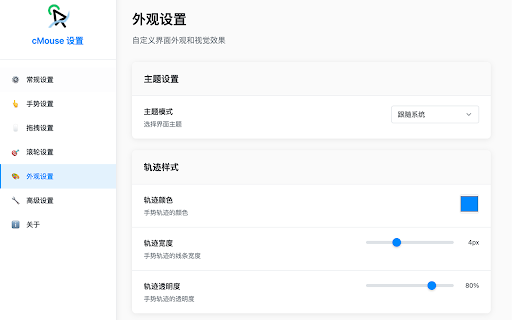
## 🎨 Appearance Customization
### 🌈 Trail Styles
Various trail effects make gesture operations more intuitive and beautiful.
**Trail Types**:
- **Line trail**: Simple line style
- **Gradient trail**: Gradient color lines for better visual effects
- **Dot trail**: Dot-style trail with minimalist design
- **Animation trail**: Cool animation effects like bubbles, particles, sparks, etc.
**Customization Options**:
- **Color customization**: Supports any color and transparency settings
- **Animation effects**: Multiple animation effects available
- **Performance optimization**: Adjustable particle density to balance effects and performance
### 🎭 Theme Modes
Intelligently follows system theme for a comfortable visual experience.
**Theme Options**:
- **Smart switching**: Automatically switches between light and dark themes based on system settings
- **Dark mode**: Eye-friendly dark interface design
- **Light mode**: Clean light interface style
---
## ⚙️ Advanced Features
### 🛡️ Smart Blacklist
Disable gesture functions on specific websites to avoid conflicts with website features.
**Core Features**:
- **Website exclusion**: Disable gesture functions on specific websites
- **Automatic recognition**: Intelligently recognizes system pages and extension pages
- **Flexible configuration**: Supports domain and URL pattern matching
### 📊 Usage Statistics
Record gesture usage to understand your operating habits.
**Core Features**:
- **Data tracking**: Records gesture usage count and frequency
- **Local storage**: All data stored locally only, protecting privacy
- **Usage analysis**: Understand your operating habits and optimize configuration
### 🔧 Developer Options
Provides debugging and performance monitoring features for troubleshooting.
**Core Features**:
- **Debug mode**: Detailed log output for troubleshooting
- **Performance monitoring**: Monitor extension performance to optimize user experience
- **Configuration import/export**: Easily backup and share configurations
---
## 🌍 Multi-Language Support
cMouse now supports **20 languages**, automatically detects browser language and intelligently switches interface language.
**Supported Languages**:
1. Simplified Chinese (zh-CN) 🇨🇳
2. Traditional Chinese (zh-TW) 🇹🇼
3. English (en) 🇺🇸
4. Japanese (ja) 🇯🇵
5. Spanish (es) 🇪🇸
6. French (fr) 🇫🇷
7. Portuguese (Brazil) (pt-BR) 🇧🇷
8. German (de) 🇩🇪
9. Russian (ru) 🇷🇺
10. Korean (ko) 🇰🇷
11. Italian (it) 🇮🇹
12. Dutch (nl) 🇳🇱
13. Polish (pl) 🇵🇱
14. Turkish (tr) 🇹🇷
15. Arabic (ar) 🇸🇦
16. Vietnamese (vi) 🇻🇳
17. Indonesian (id) 🇮🇩
18. Thai (th) 🇹🇭
19. Hindi (hi) 🇮🇳
20. Swedish (sv) 🇸🇪
---
## 🔒 Privacy & Security
cMouse highly values user privacy. All data is stored locally only, and we never collect any user information.
**Privacy Commitment**:
- ✅ **Local storage**: All settings and data stored locally only
- ✅ **No data collection**: Does not collect any user data or browsing history
- ✅ **No network requests**: Does not send data to any server
- ✅ **Open source transparency**: Open source code, accepts community supervision
- ✅ **Minimal permissions**: Only requests necessary browser permissions
**Permission Explanations**:
- `activeTab`: Execute gesture operations on the current active tab
- `storage`: Save user settings and configurations
- `tabs`: Manage tabs (forward, back, close, new, etc.)
- `contextMenus`: Provide right-click menu functionality
- `bookmarks`: Support adding to bookmarks
- `downloads`: Support downloading images
- `clipboardWrite`: Support copying to clipboard
- `scripting`: Inject content scripts to execute gesture recognition
---
## 💡 Use Cases
### 👨💻 Programmers/Developers
- Quickly switch tabs between code repositories
- Efficiently search technical documentation and APIs
- Convenient page navigation and window management
- Quickly copy code snippets and links
### 📚 Students/Researchers
- Quickly search academic materials
- Efficient literature reading and note organization
- Convenient multi-tab management
- Quickly translate foreign language materials
### 🏢 Office Workers
- Improve daily office efficiency
- Quickly process emails and documents
- Optimize web browsing experience
- Quickly switch work tabs
### 🎮 General Users
- Smoother web browsing experience
- Reduce mouse clicks
- Personalized operation methods
- Improve daily browsing efficiency
---
## 🚀 Quick Start
### Installation Steps
1. **Install extension**: One-click installation from Chrome Web Store
2. **Quick start**: Works with default configuration, no complex setup required
3. **Personalize**: Customize gestures and features according to your usage habits
4. **Enjoy efficiency**: Experience a new way of browser interaction
### Basic Usage
1. **Execute gestures**: On any webpage, hold right mouse button, drag to draw gesture trajectory, release to complete gesture recognition
2. **Super drag**: Select text, links, or images, hold left button and drag in different directions to perform different operations
3. **Wheel enhancement**: Use wheel with modifier keys (Ctrl, Alt, Shift) to perform various operations
4. **Rocker gestures**: Press both left and right mouse buttons simultaneously to trigger specific actions
### View Settings
- Click extension icon to open popup
- Click "Settings" button to enter detailed configuration
- Customize gesture parameters and action mappings
---
## 🎁 Completely Free
cMouse is completely free with no hidden costs.
**Free Commitment**:
- ✅ **Permanently free**: Core features completely free to use
- ✅ **No ads**: Pure user experience with no ad interference
- ✅ **Open source project**: Open source code, supports community contributions
- ✅ **Continuous updates**: Regularly updates features and fixes issues
---
## 📋 Version History
### v1.3.0
- 🛡️ Added third-party mouse wheel recognition, fixed wheel functionality issues caused by third-party software
### v1.2.0
- 🔧 Refactored most of the code, especially gesture, drag, and wheel settings and recognition
- ✨ Added a large number of customization features
---
## 🤝 Feedback & Support
If you encounter any issues during use or have any suggestions, please feel free to provide feedback through the following channels:
- **Chrome Web Store**: Leave reviews and ratings on the store page
- **Issue feedback**: Submit issues through the feedback function in the extension
Your feedback is the driving force for our continuous improvement!
---
**Install cMouse now and start a new efficient browsing experience!** 🚀
*Make every mouse operation smarter and more convenient*