
Open in Chrome™ Browser
Extension Actions
- Extension status: Featured
Open current page, link, or all tabs in the Chrome browser.
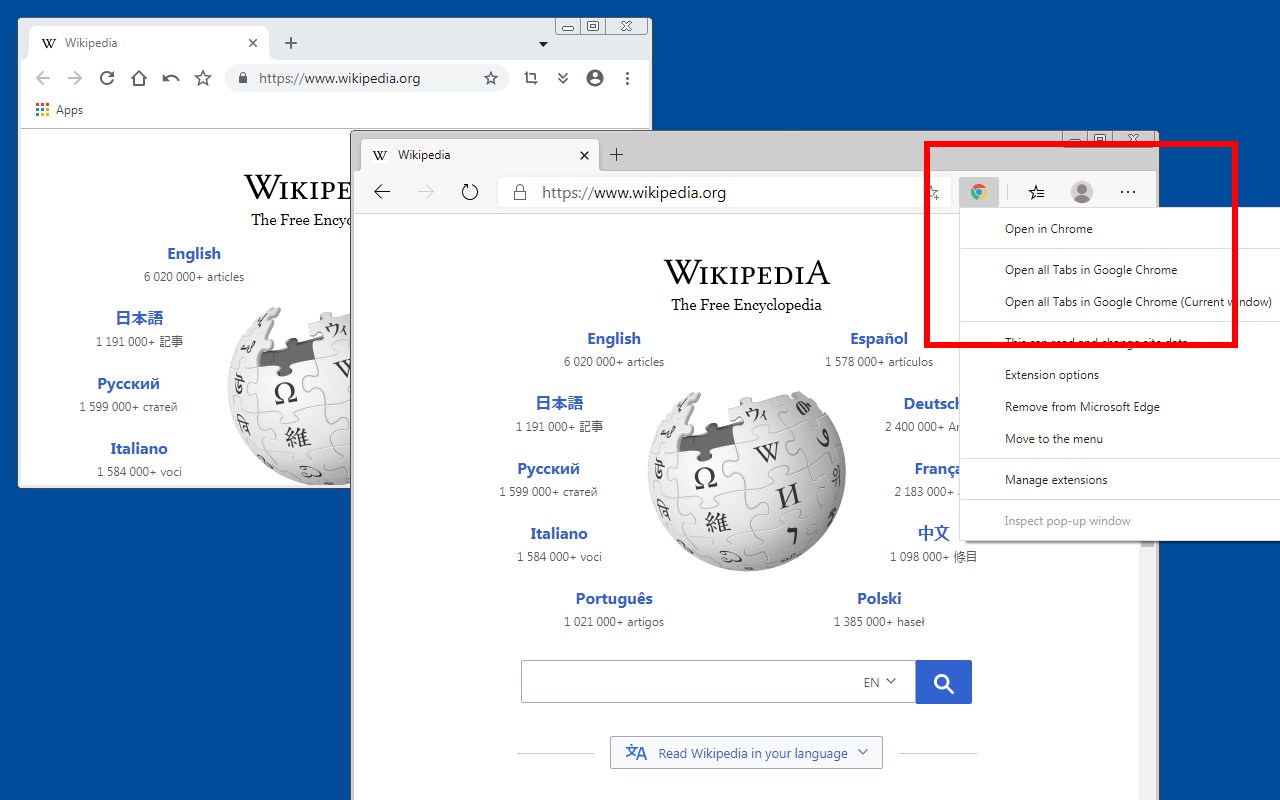
"Open in Google Chrome" extension is a browser extension that opens the current tab or links in the Google Chrome browser. Using this extension you can send links to Google Chrome without the need to manually copy and paste links. It is even possible to define keyboard shortcuts for easier access (Check the options page for more info).
Features:
Send the current page to Chrome by pressing the action button
Send a link in a page to Chrome from right-click context menu
Send a link to Chrome that matches the provided list of hostnames, URLs, or words.
Optionally close the source tab when push to Chrome
Optionally open the link in both browsers
Optionally redirect even the top-level navigation
Notes:
1. For this extension to open links in the Google Chrome browser you will need to install a minimal native client. The instruction to install the native client is displayed once a link opening is requested.
Notes:
2. This extension supports managed storage which means some preferences can be configured by the domain administrator
3. This extension can send links on left-click, a combination of the left-click and a keyboard meta key, and top-level navigation
The FAQs page of this add-on has Google Analytics code. For more info please visit the "Privacy Policy" section.
--- Legal
Chrome is a trademark of Google Inc., registered in the U.S. and other countries. This extension is an independent project and has no relationship to the Chrome team or Google Inc.
Latest reviews
- Jon
- Works flawlessly! A+ Thanks for such a convenient extension. I have it on Edge and vice-versa on Chrome. By the way, the Calvert guy below must have a skill issue.
- Vadim
- Hello developper team, I like this extension very much but somehow in past months its not working anymore, it throws all time it cant connect to native client: Cannot find the native client. Follow the 3 steps to install the native client I try all possible for me, remove, install, install node js with bat provided, all not work Please help
- Broshkina
- Отлично, очень не хватало такого инструмента. Я активно использую Chrome и Edge в течение дня, устала уже копировать-вставлять ссылки из одного браузера в другой. Установила в Chrome, чтобы открывать ссылки и вкладки в Edge, и в Edge - чтобы открывать в Chrome. Прямо волшебство какое-то: тыкнул кнопку и в другом браузере открывается вкладка. Не забудьте установить дополнительное приложение из описания, без него работать не будет. Спасибо разработчику, очень помогает!
- saisang
- https://www.bing.com/search?PC=U474&q=Too+Many+Requests&FORM=SSQNT1
- Luis
- Funciona a medias, cuando uso "Force Open in Chrome" la opción de no cerrar la pestaña no funciona. En la 1ra pestaña cuando ingreso la URL, ejemplo "youtube.com", se cierra el Edge y nunca inicia el Chrome, para que funcione bien debo tener otra pestaña abierta.
- Lorenzo
- I wanted to use it only on the following page but it doesn't work: https://copilot.microsoft.com/
- Marget
- I hope all is well with you. I'm currently exploring avenues to enhance my business portfolio through strategic investments in Chrome extensions, and I've been particularly impressed with yours. I believe there's a tremendous opportunity for growth and would love to discuss the possibility of acquisition. We can negotiate a fair price and ensure a secure transaction via trusted escrow services like Escrow.com or CryptoExchange.com. If you have any inquiries or if this aligns with your plans, feel free to reach out to us via Facebook: https://www.facebook.com/profile.php?id=100082468097071 Whatsapp: +1 6468971986 Skype: live:.cid.7ed1d897457692ce Telegram: @harryysandersonn Twitter: @Sanderson3Harry
- Solo
- it's really helpful! is it possible to open different browser just in one addons? because that will be really amazing!
- Zain
- Great app. Allows me to create web apps out of Edge in Windows but then any links I click inside the Edge apps that have a different domain, will be sent to Chrome which is my daily browser. I only use Edge for apps because it works so much better with Windows notification centre.
- Martin
- You're a legend! As I'm using edge only as the browser to keep all my communication tabs open (mail, slack, chat, whatsapp, etc...) while development and such is done in chrome, I really needed a convenient way to open links from edge to chrome. This does exactly that.... Could it be improved? Perhaps some what to direct which chrome profile should be targeted, as it now simply targets the last chrome window you had active, which might not be one that has the correct access rights, but that is nit-picking at this point, so 5 stars from me...
- Calvert,
- UX poor installation 8 attempts
- Schaedler,
- Syntax Error: Unexpected token .
- Robinson,
- How safe is installing a native client that updates registries?
- Leslie
- This worked for me the way I had hoped. READ full description - get nodejs.zip - also from link
- MATEI
- ok
- 傑齡
- Useful