
Dashly
Extension Actions
A beautiful, modern startpage with customizable bookmarks and categories
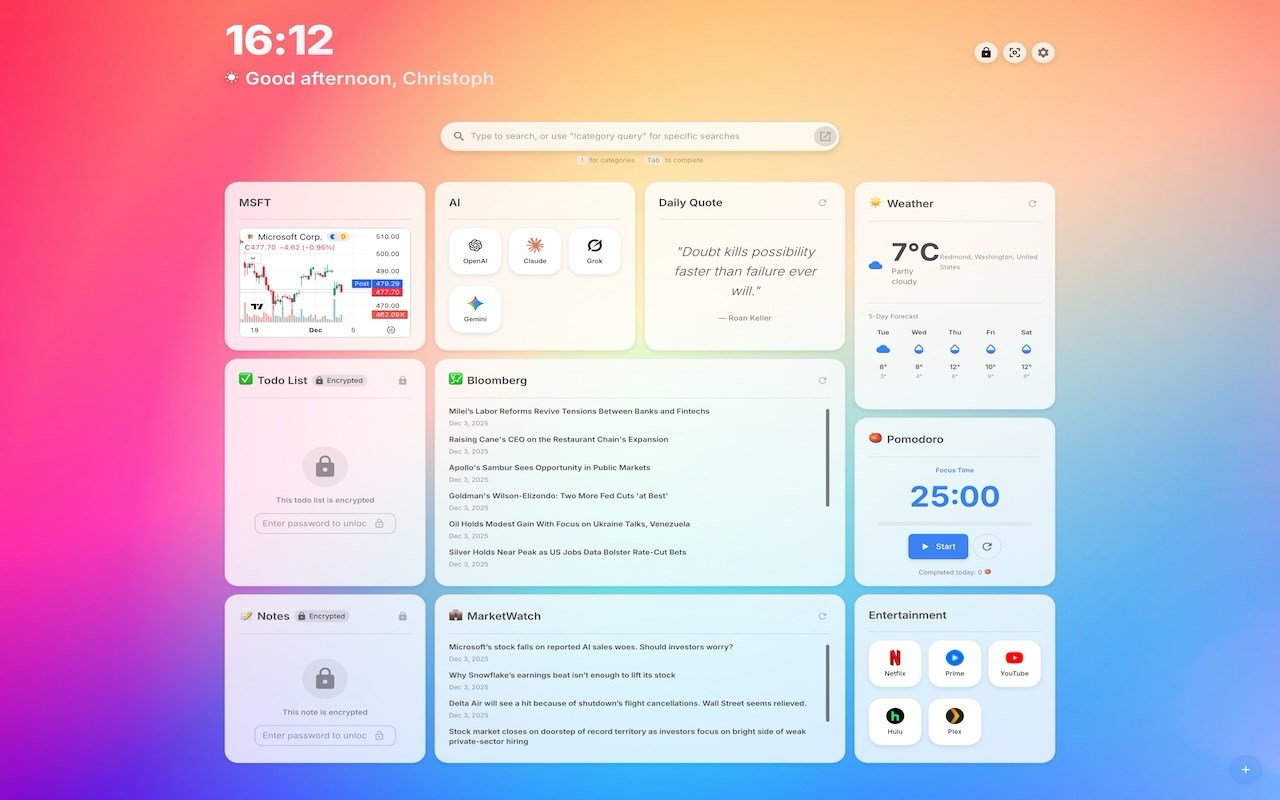
Dashly is a sophisticated and highly functional browser extension designed to transform your new tab page into a personalized and dynamic productivity dashboard. Tailored for users who value efficiency, inspiration, and seamless organization, Dashly combines a sleek, modern design with a versatile set of widgets that empower you to manage daily tasks, monitor important information, and customize your browsing experience effortlessly.
Once installed, Dashly replaces the default new tab page with a clean, responsive interface that features rich visual elements and thoughtfully arranged layouts. This extension primarily serves as a customizable startpage where you can personalize bookmarks and categorize them to streamline navigation, making it faster and more enjoyable to reach your favorite websites.
Dashly offers a variety of interactive widgets designed to boost productivity, aid organization, and support everyday enrichment. The Todo List widget helps you track tasks and actionable goals right from the new tab, while the Notes widget provides a convenient space to jot down ideas, reminders, or quick thoughts. All data for notes and tasks is securely stored locally within your browser.
Stay informed with Dashly’s Weather and World Clock widgets, which provide easy access to local forecasts and multiple time zones, ideal for monitoring different regions or coordinating with remote teams. The integrated Pomodoro widget facilitates focused work sessions and break intervals, helping you apply effective time management techniques directly within your workflow.
For those interested in current events and market trends, Dashly includes Market and RSS widgets, bringing financial information and news feeds front and center without needing to open additional tabs. Additionally, the Quotes widget offers daily motivational and inspirational messages to keep you encouraged throughout your day.
Customization is intuitive and flexible thanks to advanced drag-and-drop controls and context menu actions. You can effortlessly rearrange widgets, bookmarks, and categories, as well as edit or interact with items via right-click menus to create a workspace perfectly aligned with your personal preferences.
All your Dashly data—including notes, todos, layouts, and bookmarks—is stored privately in your browser’s local storage, ensuring that no registration or cloud connectivity is required. This approach keeps your personal information secure and readily accessible whenever you open a new tab.
Dashly is well-suited for professionals, students, and anyone looking to enhance productivity, clarity, and speed in their online activities. Whether you want quick access to tools, want to monitor global happenings at a glance, or simply desire a smarter start to your browsing sessions, Dashly delivers a perfect blend of customization and practical utility.
Key Features:
- Custom Bookmarks & Categories: Organize your favorite websites into personalized folders for quick and easy access right from your startpage.
- Powerful Todo List Widget: Manage your tasks efficiently by capturing to-dos, setting priorities, and monitoring your daily goals seamlessly.
- Quick Notes Widget: Take fast notes, write reminders, or brainstorm ideas with a simple, accessible tool stored securely within your browser.
- Information Widgets: Access real-time weather updates, world clocks for multiple time zones, and market statistics immediately from your dashboard.
- Pomodoro Timer Widget: Use built-in timers to manage focused work intervals and breaks, enabling you to enhance productivity using a proven technique.
- RSS & Market Widgets: Stay updated with the latest news headlines, blog posts, and financial data without leaving your new tab.
- Daily Inspiration: Receive motivational quotes each day to boost your mood and sustain your motivation through the workday.
- Drag-and-Drop Personalization: Rearrange widgets, categories, and bookmarks with simple drag-and-drop controls for a customized layout.
- Context Menu Actions: Utilize a right-click menu to quickly edit, customize, or otherwise interact with widgets and bookmarks for smoother management.
How It Works:
1. Install Dashly from the browser's extension store.
2. Open a new tab to see Dashly replace the default page with your new customizable dashboard.
3. Arrange widgets and bookmarks by dragging and dropping them into your preferred positions.
4. Add, edit, or remove bookmarks and categories to organize your favorite websites efficiently.
5. Create and manage to-dos and notes that are saved locally for instant access anytime.
6. View real-time information such as weather forecasts, world clocks, market updates, and news headlines through integrated widgets.
7. Use the Pomodoro timer to schedule focus sessions and breaks, enhancing your time management directly from the dashboard.
Privacy: - No personal data collected. All bookmarks, tasks, and notes are stored locally in your browser, ensuring your data remains private and secure.
Latest reviews
- Sahith
- Good extension