
स्क्रीन रेकॉर्डर - Screen Recorder
Extension Actions
CRX ID
hniebljpgcogalllopnjokppmgbhaden
Status
- Extension status: Featured
- Live on Store
Description from extension meta
कॅमेर्यामधून व्हिडिओ रेकॉर्ड करा किंवा स्क्रीनवरून तो कॅप्चर करा (डेस्कटॉप, विशिष्ट अनुप्रयोग विंडो किंवा ब्राउझर टॅब)
Image from store
Description from store
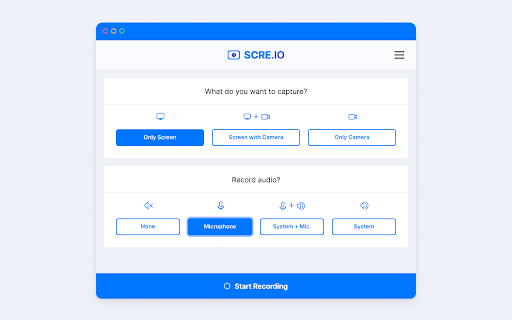
Chrome extension to record a video from the camera or capture it from the screen (desktop, specific application window or Chrome tab).
Free to use
No signup required
No watermarks
Record unlimited videos
What's new
- Autosave videos and recover your recordings after a crash.
- Record audio from microphone and system together.
- Recorded video can be seeked/skipped while playing.
- Record screen and camera (more settings coming soon).
- Warning before permanently deleting an unsaved video.
Latest reviews
- Soheil
- its good, but the recorded format is not optimized to play on all devices
- Jeffrey Ou
- Doesn't record, once I stopped recording it was not responsive.
- customer service BO5 41O 5OO3 Jeera
- A lightweight screen recording extension that’s easy to use and delivers solid results
- EFFECT kt1
- Free and easy to use
- ozielll
- ily
- Loise R. Kline
- Best one
- That one Guy
- w extension bro it was super good ! I will rate u 5 out of 5 man
- Ali Mohammed
- it good and there no lag
- Jonefer Codillo
- Screen Recoder is a reliable and easy-to-use screen recording tool. The interface is clean, and it works smoothly without unnecessary complications. It’s especially useful for quick recordings, tutorials, or sharing ideas efficiently. Overall, it delivers exactly what you need in a simple and effective way.
- J Kwon (JKIM)
- just installed another extension that does the same thing, and found out it only allows to record up to 5 mins to local. this one has no limit imposed. great extension! thank you!
- Matt Rudd
- it is the best software! Also to the people in the comments about webm, go to video converter online and make it mp4 which is not that hard.
- Jia Kwon
- I'm using this program daily because it works quite well as long as the duration of recording is not too long. However, if the recording is long - I don't know the exact duration. Likely a couple of hours to longer... Then the recording cannot be saved as the extension becomes unresponsive. I have lost a few recording due to this.
- Kathleen J Hilton
- only saves as webm, why not another file choice???
- Christine
- Maxing out GoNoodle champs
- JONAH
- Worked great until recently, I don't know if today my computer is just being particularly picky but when I hit record, and then end recording, the menu that lets me save it doesn't pop up.
- Azyan Ghouri
- So easy and awesome for users like me, fast, secure, and instant.
- AinakTheReal
- I find this extension very useful from my experience. it's smooth and efficient even on a chromebook.
- Aaron Huang
- Using webm gets one star.
- Elijah Wittman
- only saves as webm.
- Snowy
- simple to use but unfortunately saves videos as only a .webm that isnt skimmable, which is very useless
- UA_denys1992.48
- its wery good
- Graham Rodrick
- THIS IS A GOOD ONE
- Lamborghini Breezy
- doesn't have a countdown timer. very annoying at the start of the video
- Maddhusudan Laguri
- Google meet screen record
- Anonymous
- everything is ok ! except unable to stop@continue the recorded video wherever i want ??? cant we download the video in mp4 format ???
- Anonymous
- absolutely no instructions how to use this useful tool. i appreciate its (allegedly) free, but if its useless too?
- Anonymous
- All is well. we need to support mp4 as seeking is destroyed , but i believe the sizes of videos are smaller because of that.
- Anonymous
- the extension is great, only needs to export to mp4
- Anonymous
- can I record My Game with This? since it says it supports all
- Anonymous
- Should have options to export in mp4 directly and seekable
- Anonymous
- amazing
- Anonymous
- Doesn't seem to work on Brave.
- Anonymous
- don't download it, it isn't record the audio
- Anonymous
- was working great a few months ago, used it to record tv broadcasts online until when i finished recording it doesnt show the final recording, please fix Edit: It works now
- Anonymous
- Bad
- Anonymous
- nice apps
- Anonymous
- When I first downloaded it a few months ago it was great because it was easy too use, did not require signing up or creating an account and I could select "save as" as name the file for the screen recording immediately after recording. But I downloaded it today on another chrome profile and it doesn't seem to allow this feature anymore which I used extensively since it was easy and simplified my workflow.
- Anonymous
- Won't record audio no matter what I do.
- Anonymous
- Very Good
- Anonymous
- how am I am going to get in
- Anonymous
- F*** this extension, I recorded my lecture for 30mins and when took out the output, the output was a mess, all efforts wasted
- Anonymous
- It's a good plugin, but lacks video format selection. webm is not supported by many apps, like whatsapp, so recording my screen with this requires format conversion first - not really user friendly. I know it's really other apps fault for not supporting the most obvious format, but the feature would be good. For other purposes it's great.
- Anonymous
- ok
- Anonymous
- Free, easy to use, and great for short recordings (it might be excellent for longer ones as well, but I haven't needed to record for more than a minute or so), it saves the videos directly to my downloads folder, and there are no ads. 10/10 recommend.
- Anonymous
- when I record a vid more then 10 minutes it just doesn't work
- Anonymous
- nice one
- Anonymous
- Seems to have stopped working for recording video in apps outside of browser.
- Anonymous
- works perfectly
- Anonymous
- If I could give this worthless piece of trash a 0 star rating I would. Nothing EVER saves. Worthless piece of junk.
- Anonymous
- Free and works perfectly