
CRX id
hoaompfiokdedaleilfcmmincofjopgf
hoaompfiokdedaleilfcmmincofjopgf
Description from extension meta
Simple user scripts for Chrome
Image from store
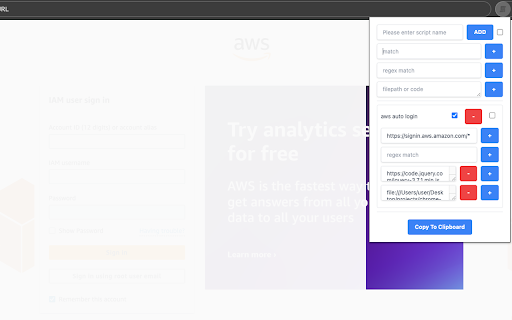
Description from store
※Needs Chrome Extensions Develop Mode to be enabled.
Go to chrome://extensions/.
At the top right, turn on Developer mode.
https://support.google.com/chrome/a/answer/2714278?hl=en#:~:text=Go%20to%20chrome%3A%2F%2Fextensions,right%2C%20turn%20on%20Developer%20mode.
Simple User Scripts is a powerful Chrome extension designed for users who want to inject custom JavaScript into specific webpages seamlessly. Similar to Tampermonkey, this tool allows you to personalize and automate your browsing experience by running predefined scripts on chosen websites.
Key Features
User-Friendly Interface
Navigate easily through an intuitive dashboard to upload, edit, and manage your JavaScript files.
Custom Script Execution
Assign scripts to specified URLs or URL patterns, ensuring they run only where you want them to.
Real-time execution lets you see the immediate effects of your scripts upon loading the target webpage.
Advanced Configuration
Utilize wildcard characters and regular expressions for precise script targeting.
Manage execution order to account for dependencies between multiple scripts.
Export Functionality
Export your entire script setup, including all configurations, into a single file.
Easily share your setup with others or import it onto another device.
Security and Privacy
Runs only user-defined scripts, protecting against unauthorized code execution.
Simple User Scripts offers a robust yet straightforward way to customize website behaviors, enhance productivity, and streamline your web development workflow.