
Clipboard History Manager
Extension Actions
A powerful clipboard history manager with a modern UI
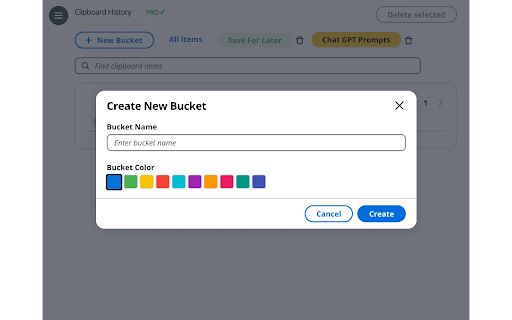
Clipboard History Manager – Boost Your Productivity with Seamless Clipboard Management
Unlock the full potential of your clipboard with this powerful Clipboard History Manager.
Designed with a sleek, modern UI, this tool makes organizing and managing your clipboard history easier than ever, whether you're working in Chrome, using AI-based tools, or switching between different applications.
Key Features:
- Comprehensive Clipboard Tracking: With PRO support, track all your clipboard activity across Chrome and other apps, ensuring nothing is lost and everything stays accessible.
- Secure, Local Storage: All clipboard copy history is saved locally only on your machine in the Chrome browser API. No Cloud data connection necessary, works offline.
- Organizational Buckets: Keep your clips organized by categorizing them into different buckets for fast access and streamlined workflow.
- Cross-Application Support: Extend your clipboard history management beyond just Chrome to other applications, making your clipboard truly universal.
- Optimized for AI Users: If you're frequently interacting with browser-based AI tools, this manager will make switching between copied data and responses effortless.
Why Choose Clipboard History Manager?
- Enhanced Productivity: Quickly organize and retrieve your past clips, allowing for smoother transitions between tasks.
- Streamlined Experience: A clean, modern interface ensures you stay focused while managing your clipboard.
- Perfect for Power Users: Whether you're a multitasker or someone who needs to manage various clips for different projects, this tool is built to help you stay on top of your work.
Modes:
Regular Mode: Limited to Chrome only, with no organizational buckets.
PRO Mode: Unlock full clipboard history tracking across all apps, plus organizational features to maximize efficiency with tabbed buckets to easily save items for later.