
Smart TOC
Extension Actions
Webpage outliner
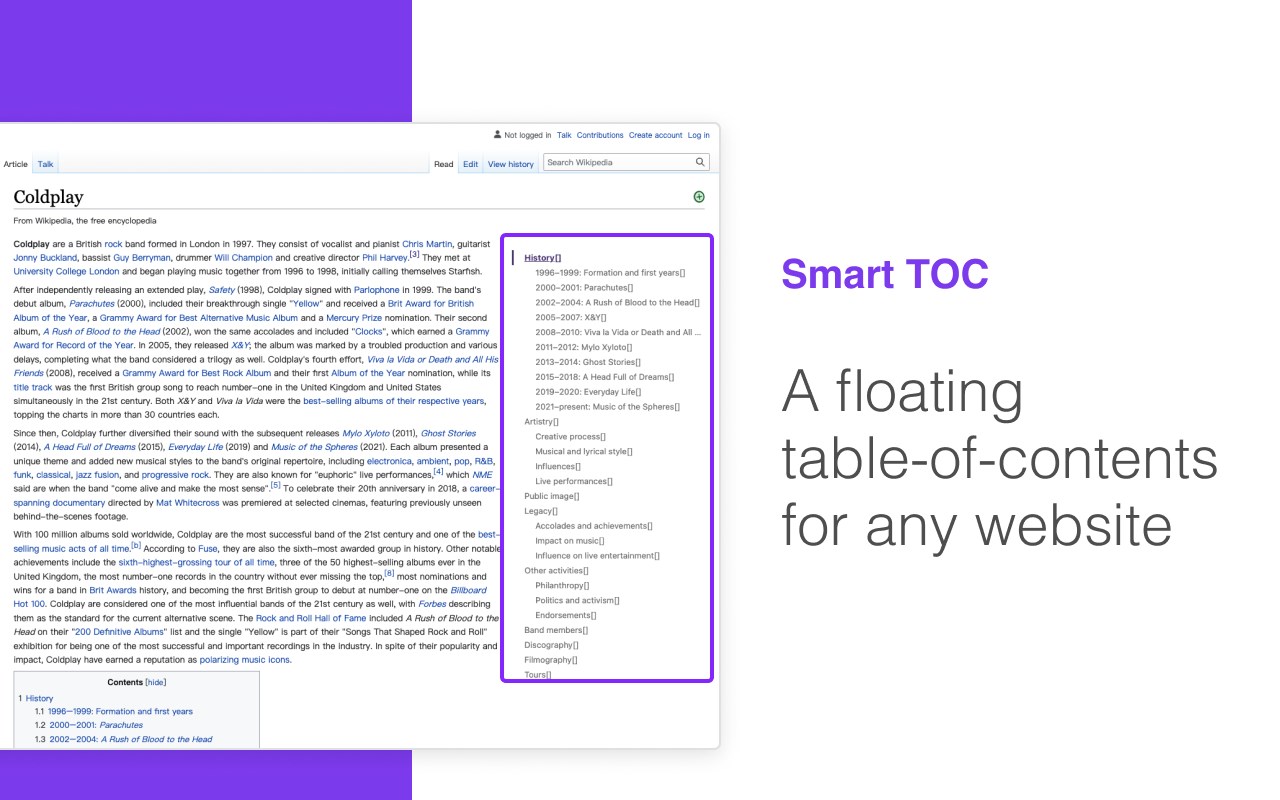
Displays a table of contents for any website, making it easier to read and navigate long articles, documentations, and online books.
## Features
- Auto detects article and headings, with our smart algorithm
- Highlights current heading
- Click to jump to heading
- Expand/fold headings, or to specified level
- Floating panel, drag, resize, or dock to side
- Mouse hover while holding Alt/Option key to glance
- Copy to clipboard
- Clean user interface
- Only runs when you use it
The Pro version offers extra features:
- Dark mode, automatically
- Up to 6 heading levels (free version capped to 3)
- Quickly go to headings, with full-keyboard support
## Usage
Click the browser button to toggle table of contents for the current site
## Supported websites
Any website that conforms to the HTML standard and uses HTML heading tags properly (e.g. Wikipedia.com).
You can also enable Smart TOC for local html in the extension settings.
## Support
- Feature requests: https://smart-toc.canny.io/feature-requests
- Bug report: https://smart-toc.canny.io/bug-report
- Contact author: [email protected]
Latest reviews
- Z
- 完美解决我的需求!
- e38086
- 发现一个好用的扩展 直接商店搜索 ilink网络加速器 看高清视频速度嘎嘎快
- 帅
- DAMN GOOD!
- L
- good