
Noted - Minimalist Notebook
Extension Actions
- Extension status: Featured
Write notes in a minimalist, gorgeous and private notebook.
🌟 Noted: The Simple, Private Note-Taking App 📝
New Features:
👁️ Find text in notes (press Ctrl+F to open the search bar)
🖋️ Use the system's default font face
😇 Select Icon for notes
✅ Improved UI
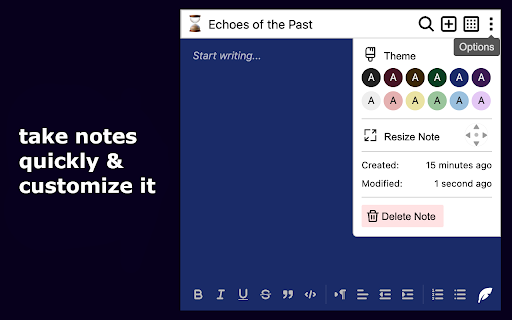
🚀 Effortless Note-Taking: Experience the simplicity of Noted, a lightweight Chrome extension designed for quick and efficient note-taking. Perfect for jotting down thoughts, ideas, to-do lists, code snippets, and more. Noted is your go-to solution for organizing your digital notes.
💻 Intuitive Interface & Customization: Enjoy a fast and user-friendly interface that makes note management effortless. Personalize your experience with customizable color themes 🎨, tailoring your note-taking environment to your preferences.
🔒 Local Storage for Privacy: Prioritize your privacy with Noted. All notes are securely stored locally on your device, ensuring your information stays private and is never uploaded to external servers.
👥 For Every User: Whether you're a developer👨💻, student 🎓, professional 💼, writer ✍️, or anyone in need of a reliable note-keeping tool, Noted is tailored to suit all your needs. It's the ideal companion for those who value simplicity and privacy in their digital note-taking.
Key Features:
Quick and lightweight note-taking ⚡
Easy-to-use, minimalist interface 📋
Customizable note color themes 🎨
Secure, local storage for enhanced privacy 🔐
Ideal for personal or professional use 👤
Download Noted today and transform the way you keep track of your notes and ideas! 🚀
Latest reviews
- Landon Hopkins
- pretty good! not as modern as i thought
- Marjan Hosseini
- It is fine to have all your daily notes at hand on every screen that you have access to your google account!!
- Behnam Sohrabi
- It is very practical thank you
- Behnam Sohrabi
- It is very practical thank you