
Drive Files to Dropbox™
Extension Actions
CRX ID
idamojobbhfpcbdnkekoinbmobhkjojk
Status
- Live on Store
Description from extension meta
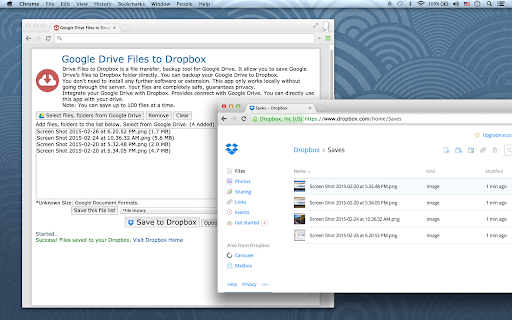
This app is a file transfer, backup tool for Google Drive. It allow you to save Google Drive's files to Dropbox™ folder directly.
Image from store
Description from store
Google Drive Files to Dropbox is a file transfer, backup tool for Google Drive.
It allow you to save Google Drive's files to Dropbox folder directly. You can backup your Google Drive to Dropbox.
You don't need to install any further software or extension. This app only works locally without going through the server. Your files are completely safe, guarantees privacy.
Integrate your Google Drive with Dropbox. Provides connect with Google Drive. You can directly use this app with your drive.
Latest reviews
- Dann Clark
- Keeps resetting progress and starting over
- Jo
- Feb 2020. after faultless transfers this app has stopped working and PDF transfers time out.
- Hieu Loc Nguyen
- Good. Thanks
- Jessica
- Unable to share photos to drop box.
- foppsi pinrang
- ok
- Kwame Tetteh
- ok
- Now What
- it doesn't work.
- Elliot Walton
- Didn't work at all... said request failed on every attempt
- xii anjan
- I love it's
- tim babel
- good
- Juan Jose de la Calle Rodriguez
- Nice App
- Cheryl Waller
- Does not work
- pramod kumar
- good
- Hairi Hairi
- nice
- fateme mohamadi
- good
- crsfan1 at gmail dot com crsfan1 at gmail dot com
- love it
- Rely Tok
- very good
- Collin E. Cooper, M.D.
- Worked perfectly for me. A great asset.
- Aiva Light
- It doesn't work! Even cannot log in into Google account!
- Caroll Souza
- It doesnt update automatically and the worst part is that I am for like 15 mins like a stupid trying to remove it from my browser but it wont allow me to
- Dave Edwards
- not very thoroughly designed for common use case. clunky, non-intuitive interface which doesn't even resolve duplicate filenames
- Sunil Kumar
- better
- Maurizio Russo
- virus
- Rainald Lance Enriquez
- nicenice
- Enes Simão Alberto (EnysDesigner)
- nice
- Christopher Daemen
- Just great. Practical. It's crazy.
- Kate Rendle
- Lucky I had the files backed up elsewhere. While testing this, I selected 100 images exactly, it deleted the files from my google drive, but errored and refused to transfer to dropbox because of a "max 100 files". Illogical. But then, the files were gone. No where. Dreadful.
- Jan Michael Dervish
- 100 files at a time, and forces you to completely disable AdBlock. No thanks!
- Thushar T.P
- Awesome
- Anonymous
- THIS THIS THIS GOPET DGOPET
- Milad Ebrahimy
- just trash
- mclain allen
- Cannot disable adblock
- Bhavya Jain
- did not work at all
- Jay L Himes
- Useless. Does nothing even after whitelisting AdBlock. Sometimes I get window "the API developer key is invalid. Sometimes the app just does nothing.
- Anonymous
- How do I use this with 2 different google drives into 1 dropbox? I already paid the 10$ for the 1T storage on the first box.
- رضا اسکویی
- if you have adblock it doesnot work. I remove adblock but still not work!
- Trần Thanh Tâm
- super!
- Tamrin palestina
- good
- Keyner Office
- Can't get it to work at all!
- Gerald Privin
- not working at all
- dang do
- ok
- Ricky Graham
- Won't work if you have Adblock.
- Mister Entrepreneur
- Did not work....kept giving a "time out" message
- Wally Ayad
- does not let you move files in current folders. You need to move them item by item. can be frustrating, but better than nothing
- eUsahawan Shah Alam
- It should vice versa also.. like dropbox to googledrive
- Kỳ Lâm
- Good
- Clark Hunter
- Only lets you transfer 100 files at a time so true back up is not available. Instructions written by someone with bad sense of the english language.
- Deborah Burstyn
- Totally frustrated. Needed to transfer photos from Google Drive to Dropbox and this didn't work. Not a bit.
- Claudio Finizio
- Not clear how it works, not intuitive. No icon on Chrome. A user wants an app that shows an icon on chrome toolbar and click it... that's it.
- Tricia Premo
- 100 files at a time means I'll be at it for the next 5 days at least. Not exactly productive.