
Cookie Control Center
Extension Actions
一个功能强大的Cookie管理工具,支持侧边栏显示、内联编辑、搜索、过滤、导入和导出功能。
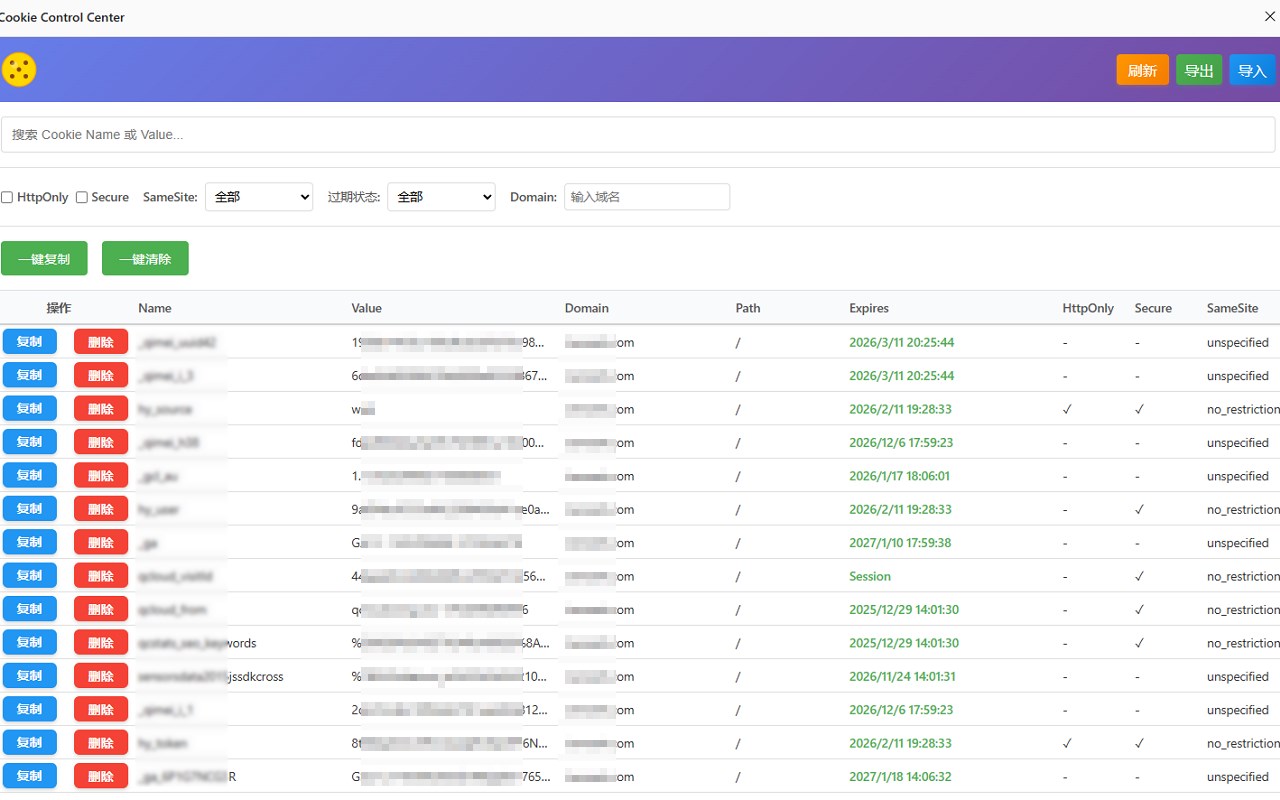
Powerful Cookie Management Tool is an advanced browser extension designed to give users comprehensive control over their browser cookies.
强大的 Cookie 管理工具是一款先进的浏览器扩展,旨在为用户提供对其浏览器 Cookie 的全面控制。
This tool supports sidebar display, inline editing, searching, filtering, importing, and exporting functionalities.
该工具支持侧边栏显示、内联编辑、搜索、过滤、导入与导出功能。
It is built to handle multiple sites effectively, offering features such as management, backup, and synchronization of cookie data.
它能够有效处理多个站点的 Cookie,并提供管理、备份及同步 Cookie 数据的功能。
Key Features:
核心功能:
• Sidebar Display: Conveniently view and manage cookies within a sidebar interface for quick access.
• 侧边栏显示:在侧边栏界面中便捷查看和管理 Cookie,快速访问所需信息。
• Inline Editing: Modify cookie details directly within the extension without needing to navigate away.
• 内联编辑:无需跳转页面,可直接在扩展内修改 Cookie 详细信息。
• Search and Filter: Easily locate specific cookies using built-in search and filter options.
• 搜索与过滤:使用内置的搜索和过滤选项,轻松定位特定 Cookie。
• Import and Export: Seamlessly transfer cookie data by importing from or exporting to various formats.
• 导入与导出:支持从多种格式导入或导出 Cookie 数据,实现无缝迁移。
• Multi-site Management: Handle cookies from multiple websites efficiently with easy switching.
• 多站点管理:高效处理来自多个网站的 Cookie,可轻松切换不同站点的列表。
• Backup and Synchronization: Safeguard cookie data through backup features and sync across devices for consistency.
• 备份与同步:通过备份功能保护 Cookie 数据,并可在设备间同步,保持一致性。
How It Works:
使用方法:
1. Install the extension to access cookie management features within your browser.
1. 安装扩展后,即可在浏览器中使用 Cookie 管理功能。
2. Open the sidebar to view all cookies stored by your browser, organized by site.
2. 打开侧边栏,查看浏览器存储的所有 Cookie,按站点分类显示。
3. Use search and filter tools to find specific cookies quickly.
3. 使用搜索和过滤工具,快速找到目标 Cookie。
4. Edit cookie parameters inline to update values, expiration, or permissions.
4. 直接内联编辑 Cookie 参数,更新其值、过期时间或权限设置。
5. Import or export your cookies to maintain backups or migrate data.
5. 导入或导出 Cookie 数据,以便进行备份或迁移。
6. Manage multiple sites by switching between their cookie lists in the sidebar.
6. 在侧边栏中切换不同站点的 Cookie 列表,实现多站点管理。
7. Enable backup and synchronization options to keep your cookie settings consistent across devices.
7. 启用备份与同步选项,确保各设备的 Cookie 设置保持一致。
Privacy: - No personal data collected.
隐私声明:不收集任何个人数据。
Latest reviews
- 豪
- 可以的好用
- mm
- 实测,管用,简单便捷
- 海滨
- baidu搜索了好多方法,这个最靠谱。谢谢!
- 大胖
- 支持所有网站!实测有效!