
Snooze Master
Extension Actions
- No Privacy Policy
- Live on Store
Snooze the selected tabs by clicking and selecting a wake up time. The tab's browser history is restored too if recently closed.
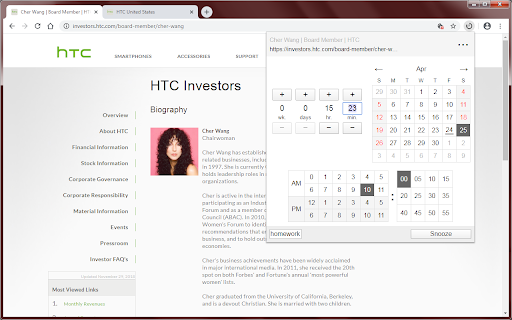
Snooze the selected tabs by clicking on the toolbar icon and selecting a wake up time. The tab closes and will reopen itself at the designated time.
Features:
* Choose using a relative time (e.g., 1 hour later)
* Choose using an absolute time (e.g., 10:00 am)
* Add a short reminder that appears when the tab wakes up
* Restores the tab's history if the tab was recently closed
* Snooze multiple tabs by ctrl+clicking on multiple tabs
* View a list of your snoozed tabs with their wake up times
* Quickly snooze a tab by right clicking on the toolbar icon (choose 1 hour, 5pm, 9am tomorrow, or 1 week)
* This extension requires very few permissions
Use case scenarios:
* Remind yourself to view something in the future
* Don't bog your browser with so many open tabs
* Turn tabs into a todo list
Latest reviews
- tr ya
- NOT WORKING. not working
- Adrian Zamfira
- near perfect extension. if it would have recurent/repeated tasks it would be perfect.
- Adrian Zamfira
- near perfect extension. if it would have recurent/repeated tasks it would be perfect.
- Bob Loucks
- So far it's working great. Lots of versatility in scheduling the return of the tab AND comes with notification option of tab returns as well : )
- Bob Loucks
- So far it's working great. Lots of versatility in scheduling the return of the tab AND comes with notification option of tab returns as well : )