
下载器增效
Extension Actions
增强型浏览器下载管理器,可通过链接快速下载文件,智能分类管理等便捷功能。
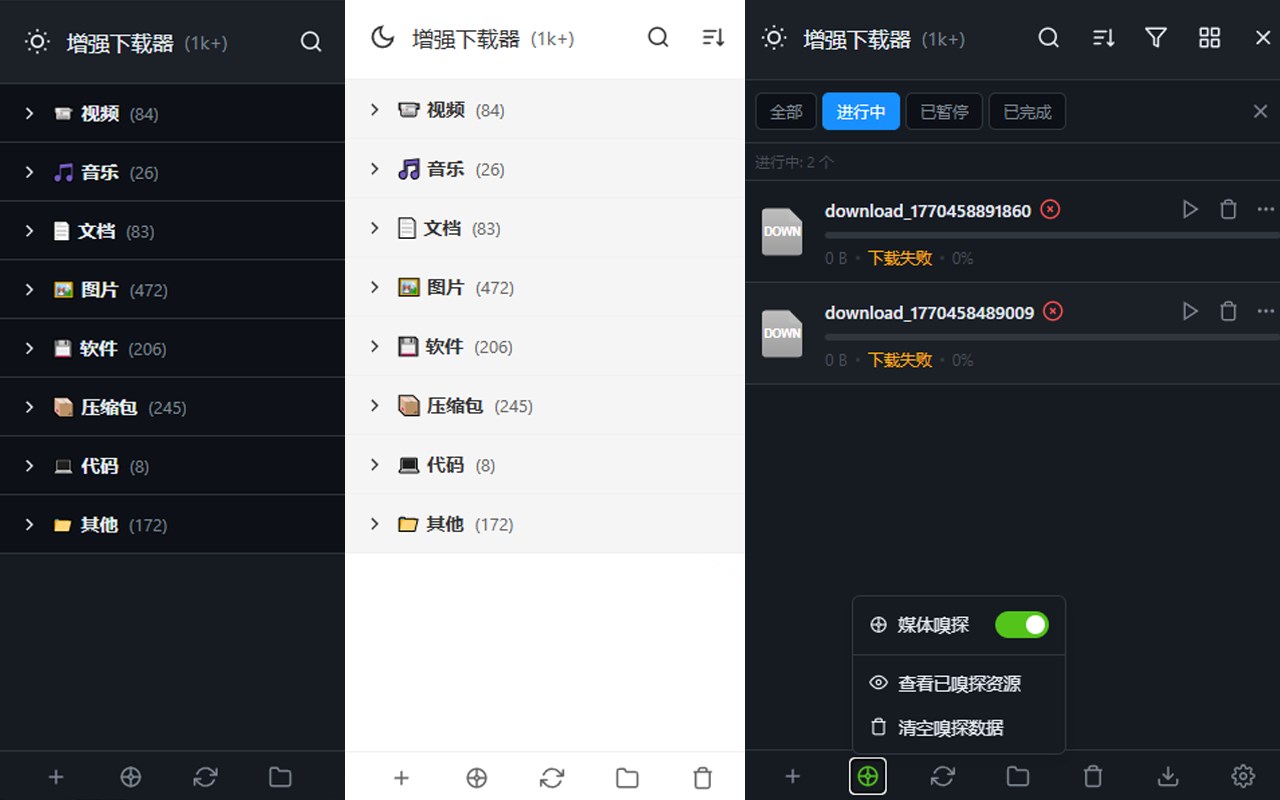
相较于原生默认浏览器,本工具在基础功能之上,新增多项实用便捷特性,主要包括:
1、支持自定义下载链接下载,可便捷保存浏览器默认不支持直接下载的 JS、CSS 等文件。
2、提供按文件类型分类的视图模式,提升文件管理效率。
3、支持一键提取当前页面中的媒体文件。
4、支持快速跳转至下载路径设置页面,简化操作流程。
5、内置主题,支持自由切换显示风格。
6、界面设计简洁清爽,视觉体验更舒适。
7、支持按文件类型进行筛选与分类管理。
8、支持多维度条件排序,方便快速定位文件。
主要特色:
- 集中式下载仪表盘:将所有下载整合在一个统一弹窗中,提供当前和历史下载记录访问,包括直接文件链接。
- 智能分类:自动按类型分组下载内容——视频、音乐、文档、软件、档案、代码、图片等——方便在分类或列表模式下浏览。
- 强大的搜索与筛选:通过文件名或网址即时定位下载;按状态(完成、进行中、暂停、失败)或文件类别筛选,以简化工作流程。
- 批处理作:高效清除失败下载,移除已完成的下载,或通过批量作选项清理整个下载列表;可以轻松重试或删除中断或错误的文件。
- 主题适应:轻松切换光色、暗色或自动主题,动态响应你的系统或浏览器偏好,使界面舒适且视觉统一。
- 详细的下载统计与进度:可视化进度指标、精确的字节计数、时间戳及每项项目的全面状态更新,提升透明度。
- 直接 URL 下载与媒体捕获:直接从粘贴的 URL 下载,或从当前网页捕获默认浏览器不支持的媒体文件。
- 弹窗面板与通知:用户友好的弹窗,可通过工具栏图标访问,配备上下文菜单和动态通知,实现实时下载管理。
工作原理:
1. 从浏览器扩展市场安装增强版下载管理器。
2. 点击工具栏图标,打开弹出面板,显示你的活跃和历史下载,分类整齐。
3. 直接将任意下载URL粘贴到弹窗中,即可立即开始新下载或管理当前下载——如暂停、继续、重试或删除。
4. 使用标签页按状态(完成、进行中、暂停、失败)过滤下载内容,或切换到分类视图进行分组浏览。
5. 利用搜索栏快速按姓名或网址查找任何下载内容;结果动态显示,并允许立即采取行动。
6. 选择你喜欢的主题模式——光、暗或自动——以确保界面符合你的系统设置和视觉舒适度。
7. 进行批量管理以清除失败下载、移除所有已完成的作业或清理整个列表,保持下载历史整洁有序。
隐私:- 不收集个人数据。所有下载记录和用户设置都存储在浏览器本地,不会将浏览活动或文件传输到外部。
Key Features:
- Centralized Download Dashboard: Manage and monitor all your downloads in one cohesive popup, with access to current and historical download records, including direct file links.
- Intelligent Categorization: Automatically groups downloads by type—video, music, documents, software, archives, code, pictures, and more—for convenient browsing in category or list modes.
- Powerful Search & Filter: Instantly locate downloads by filename or URL; filter by status (completed, in-progress, paused, failed) or by file category to streamline workflow.
- Batch Operations: Efficiently clear failed downloads, remove completed ones, or clean the entire download list with bulk action options; retry or delete interrupted or errored files with ease.
- Theme Adaptation: Easily switch between Light, Dark, or Auto themes that dynamically follow your system or browser preferences, making the interface comfortable and visually coherent.
- Detailed Download Statistics & Progress: Visual progress indicators, precise byte counts, timestamps, and comprehensive status updates for each item enhance transparency.
- Direct URL Downloads & Media Capture: Initiate downloads directly from pasted URLs or capture media files from the current webpage that aren’t supported by default browser downloads.
- Popup Panel & Notifications: User-friendly popup accessed from the toolbar icon, with contextual menus and dynamic notifications for real-time download management.
How It Works:
1. Install Enhanced Download Manager from your browser’s extension marketplace.
2. Click the toolbar icon to open the popup panel displaying your active and historical downloads, neatly categorized and sorted.
3. Paste any download URL directly into the popup to start new downloads instantly or manage current downloads—pause, resume, retry, or delete as needed.
4. Use tabs to filter your downloads by status (completed, in-progress, paused, failed) or switch to the category view for grouped browsing.
5. Utilize the search bar to find any download by name or URL quickly; results appear dynamically and allow immediate action.
6. Select your preferred theme mode—Light, Dark, or Auto—to ensure the interface matches your system settings and visual comfort.
7. Perform batch management to clear failed downloads, remove all completed jobs, or clean the entire list, keeping your download history tidy and organized.
Privacy: - No personal data collected. All download records and user settings are stored locally within your browser, and no browsing activity or files are transmitted externally.