
Refresh & Monitor
Extension Actions
Refresh page periodically and if wished monitor it's content change
I was inspired by some plugins which were not suited for my needs. So I developed that plugin which can be used by Chromium users and also Firefox users.
The extension allows you to refresh a Tab (URL) periodically and automatically.
It can also monitor page content and if specific text on the page either appears or disappears notify you using browser notification with sound (if wished).
In monitor mode, the extension stop refreshing when it find (or loss) a key strings.
Time Intervals
--------------
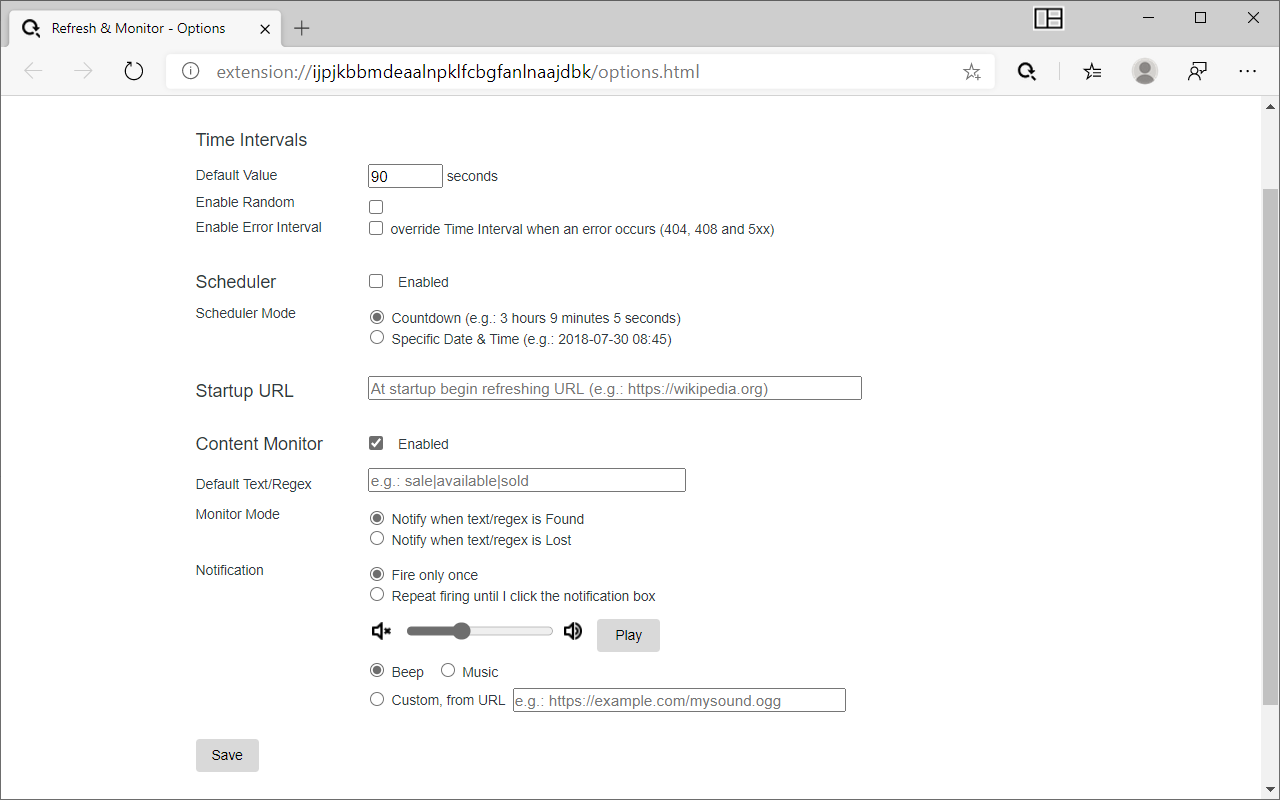
To refresh a page, Time interval can be fixed or random with default value.
We can also define an Error interval which override Time interval and only used to refresh a Tab after an error occurs (404, 408 and 5xx).
Scheduler
----------
Any Tab (URL) can be scheduled to begin refreshed at an exact date & time or with countdown timer.
Startup URL
------------
We can also define an URL which will be opened in new Tab by the extension when the browser starts and then refreshed periodically and automatically.
URL must use http or https protocol; e.g: (http/https)://
Content monitor
-----------------
The content of the refreshed page can be monitored after each refresh to check if a some text or keyword on the page either appears or disappears. When happened, notification is displayed and a refresh stopped.
There is a possibility to set a default Text/Regex to monitor. It's useful specially when a Startup URL is set. So each time the page is refreshed, it's content is also monitored.
Internationalization (i18n)
--------------------------
English and French (you are a welcome to participate in the translation to other languages).
Latest reviews
- Joe
- Doesn't seem to work. I can't get the page to keep refreshing while monitoring a word. It just refreshes once initially, then nothing happens.
- Praveen
- Really helpful and works very well. Can you also add this extension to Chrome store? Thanks
- Praveen
- Really helpful and works very well.
- John
- Works pretty well, until the notification starts firing. How do you stop the notification?
- Martín
- Please update for more characters :)
- Min-Chun
- I noticed that the reload stopped after a while if it's in the background. I had to click the tab and the the next refresh would work again. Is this something can be changed from settings?
- Stephen
- Exactly what I was looking for. Though it's not working...
- Stewart
- Feature request: per-tab/site settings, support for more than simply html text parsing, and combinations to trigger it. If I'm looking at two tabs, and one uses "sold out", and the other uses "Out of Stock", it'd be nice to be able to set up the notification on different (or multiple) criteria. It would also be nice to be able to notify on button text. It doesn't seem to.