
PDF Color Inverter
Extension Actions
CRX ID
ikkeapgomkpbcpaiompapjdlhmafgkpg
Status
- Live on Store
Description from extension meta
Inverts colors on PDFs
Image from store
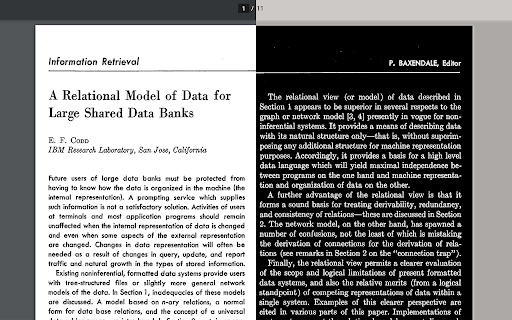
Description from store
Make PDFs easier on the eyes.
Lightweight, simple, and easy to use. Turn your normal chrome pdf reader into one that can invert colors.
IMPORTANT:
To invert colors on locally downloaded PDFs, make sure to "allow access to file URLs" in the extension manager.
Latest reviews
- Abhay Singh
- best to invert pdf colours. Just dont forget to give permission to access to URL files in extension setting otherwise it will not work.
- Lorenzo Milanesio
- Not supported anymore. Please make it work again, it was perfect
- Frederick Hofmann
- Works perfectly if you follow the instructions : D Would be cool if you could only invert the page itself and not the usually grey-coloured things around it
- Div_ om
- Crajyyyy
- Soham M
- best
- Tejas Chaudhari
- working perfectly. thank you!
- Tuvel out
- Worked for me, so we good 👍👍
- Milan Mazik
- Nice tool to save your eyes through reading long documentations. I've recommend it for everyone who need to read a lot at their job.
- Samir Khanal
- Only for reading? Is there a way to download the inverted pdfs too?
- Shady Medic
- Works well enough, just one complaint: It also inverts the colour of highlighting, which isn't exactly wanted (see screenshot: https://prnt.sc/4-bvva7YCDD_). Thumbs up for inverting images though.
- Shady Medic
- Works well enough, just one complaint: It also inverts the colour of highlighting, which isn't exactly wanted (see screenshot: https://prnt.sc/4-bvva7YCDD_). Thumbs up for inverting images though.
- 阿毛
- make shure let it access the url of downloaded pdf file, or it won't work. Nice plugin.
- 阿毛
- make shure let it access the url of downloaded pdf file, or it won't work. Nice plugin.
- Dennis
- nice
- Bharath Bera
- This extension just changes the PDF color to the opposite one, for example white to black and red to blue and vice versa. If someone find that it is not working, then give permission to read file and whenever you a PDF then click on the extension. I found it very helpful because while reading black color is preferred as it has less strain.
- Bharath Bera
- This extension just changes the PDF color to the opposite one, for example white to black and red to blue and vice versa. If someone find that it is not working, then give permission to read file and whenever you a PDF then click on the extension. I found it very helpful because while reading black color is preferred as it has less strain.
- Henry Post
- It works great! Make sure to follow the instructions ( chrome://extensions/?id=ikkeapgomkpbcpaiompapjdlhmafgkpg > Allow Access to file URLs)
- Henry Post
- It works great! Make sure to follow the instructions ( chrome://extensions/?id=ikkeapgomkpbcpaiompapjdlhmafgkpg > Allow Access to file URLs)
- Forya Beats
- Inverts even images in a PDF. Exactly what I was looking for. Thank you!
- Forya Beats
- Inverts even images in a PDF. Exactly what I was looking for. Thank you!
- brtogl
- it either didn't work at all, or it cant modify large PDFs.
- brtogl
- it either didn't work at all, or it cant modify large PDFs.
- EpicFailv2
- You really should note in description that it does not actually modify (or even touch or is in any way related to) the PDF. All it does is add another HTML tag, which covers all content and inverts all shown colors - this would work for anything opened in Chrome...
- EpicFailv2
- You really should note in description that it does not actually modify (or even touch or is in any way related to) the PDF. All it does is add another HTML tag, which covers all content and inverts all shown colors - this would work for anything opened in Chrome...
- Dylan Barone
- Wanted to clarify some things, because I thought it wasn't working, when it really was. I clicked "allow access to file URLs" and the pdfs I was viewing still didn't invert. So I googled something random that I knew would bring up pdfs in the results. It worked for these ones. The pdfs I was viewing (the ones that didn't work) were secure, and you had to log in to view them, but it worked on the ones that anyone could pull from the internet. I assume that this was issue, maybe the extension didn't have access to the ones that I had to log in to see. I checked this with other pdf inverters, and the same thing happened. Just guessing to what the issue is, but it doesn't seem like it's the fault of the extension and it works well for what it's supposed to work for.
- Dylan Barone
- Wanted to clarify some things, because I thought it wasn't working, when it really was. I clicked "allow access to file URLs" and the pdfs I was viewing still didn't invert. So I googled something random that I knew would bring up pdfs in the results. It worked for these ones. The pdfs I was viewing (the ones that didn't work) were secure, and you had to log in to view them, but it worked on the ones that anyone could pull from the internet. I assume that this was issue, maybe the extension didn't have access to the ones that I had to log in to see. I checked this with other pdf inverters, and the same thing happened. Just guessing to what the issue is, but it doesn't seem like it's the fault of the extension and it works well for what it's supposed to work for.
- Vamika Pai
- Its useful only to read , Would have been better if it was printable
- Vamika Pai
- Its useful only to read , Would have been better if it was printable
- Mohamed Magdy
- not working
- Mohamed Magdy
- not working
- Darshika Singh
- How do I print/ download the INverted PDF, it inverts the colours but prints in original ones so no use then.
- Darshika Singh
- How do I print/ download the INverted PDF, it inverts the colours but prints in original ones so no use then.
- Space Babe
- Best app ever.
- Space Babe
- Best app ever.
- Chetan Chauhan
- it doesn't work don't waste time here
- Chetan Chauhan
- it doesn't work don't waste time here
- Alex Barnes
- With some difficulty, I found the place where I could "allow access to file URLs" and then when I click on the 'PDF Color Inverter' extension, the window in Chrome changes to its color inversion. Unfortunately, I don't seem to be able to print or save inverted version of the file.
- Alex Barnes
- With some difficulty, I found the place where I could "allow access to file URLs" and then when I click on the 'PDF Color Inverter' extension, the window in Chrome changes to its color inversion. Unfortunately, I don't seem to be able to print or save inverted version of the file.
- Mark Brown.
- Not working with online or offline docs, at time of testing.
- Mark Brown.
- Not working with online or offline docs, at time of testing.
- Rune Thorsen
- Not working for PDF files
- Rune Thorsen
- Not working for PDF files
- thph
- Does not work (as others have noted).
- thph
- Does not work (as others have noted).
- ridhwaan any
- Useful, works.
- ridhwaan any
- Useful, works.
- Chris Antley
- does exactly what it says
- Chris Antley
- does exactly what it says
- Anonymous
- You get 5 stars for saving my eyes
- Chin Hoi Wong
- The accessibility function in adobe acrobat reader and foxit reader don't work for some pdf files. This app solves the problem and is much faster when switching.