
Element Inspect
Extension Actions
Inspect padding, margin, tag, class, and size by hovering over elements.
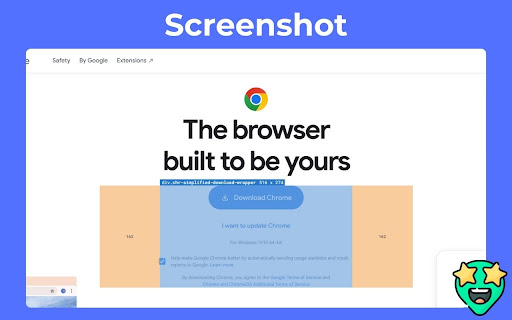
Inspect HTML elements visually — instantly.
Element Inspect is a powerful Chrome extension designed for web developers and designers to effortlessly inspect and debug layout properties by simply hovering over any element on a webpage.
With Element Inspect, you can see:
1. Tag name
2. Class names
3. Element dimensions (width × height)
4. Padding and margin values
All displayed in a smart overlay directly on the page — no more digging through the DevTools!
Whether you're refining pixel-perfect layouts, fixing spacing issues, or learning how a site is structured, Element Inspect gives you an instant, visual understanding of how elements are styled and spaced.
Key Features:
1. Hover-based inspection without clicking
2. Clean overlay showing box model properties
3. Works on any webpage (no setup required)
4. Lightweight, fast, and privacy-focused
Great for developers, designers, and learners
Save time, stay focused, and inspect like a pro — directly on the live page.
Latest reviews
- Gulshan Kumar
- helpful for beginners to get batter idea to get the web layout
- RANJEET KUMAR
- very helpful extension for me.
- Ritik Kumar
- It makes easy to inspect element. Best extension for developers ^_*