
Extension for Duolingo
Extension Actions
- Extension status: Featured
- Live on Store
Extension for Duolingo to support some features like: remove tournament board, short-cut in practice and more...
Click on extension icon in toolbar to update setting of extension.
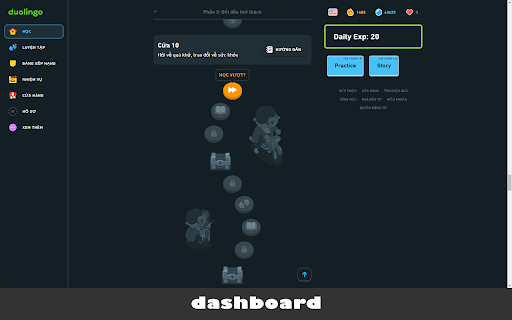
Add up some features when access Duolingo exam: change dashboard UI, add shortcuts in dashboard, exam and story context.
Note:
This extention will make your learning more difficult with no hints any more and you must use keyboard to enter answer without vocabularies.
---
** Keyboard Shortcuts **
* Exam Context
`Digit Keyboard`: to select on selectable buttons correspondingly in exam context.
`Esc`: To ignore the current question.
`Ctrl + Space`: To make Duo speaking again current sentence.
* Home Context
`Shift + L`: start entering next lesson.
`Shift + P`: start entering practice (to recover hearts).
`Alt + Shift + Q`: start entering story.
---
* Only show custom panel for your EXP and spent study time today
* See config options of this extension for more options
* Automatic shortcuts for wordbanks and other elements
* Auto-click "Next" button for more focus on the exam
-------
[Source of project]: https://gitlab.com/nmhillusion/duolingo-chrome-extension/
Latest reviews
- Tim Ryan
- Works well, makes reviews a lot quicker and never have to use the mouse! I use with TypeLingo which I also highly recommend: https://chromewebstore.google.com/detail/typelingo/lkfdecookegdklhpafhikjebeflcgepc
- Dalibor
- Hello, Please have a look at: https://forum.duome.eu/viewtopic.php?p=59881-unable-to-use-my-keyboard-anymore-only-a-words-bank-after-a-365-day-streak-i-ll-have-to-stop-using#p59881 Would you manage to make these two little changes in the files using your Chrome extension? It would be perfectly splendid. Note: The filenames are changed from time to time. And also the variable names. If you will be able to make changes in the js scripts, it will be necessary to find the file by content and then the block to change. When finding, avoid variable names (use Regular Expressions ?). Or override these two functions somehow. Thank You Very Much, even if you just try it. EDIT: Thank You Very Much to everyone who participated in it. The solution is here: https://chrome.google.com/webstore/detail/typelingo/lkfdecookegdklhpafhikjebeflcgepc _____________________________________________________________________________ SUPER, I'll send you an email. First I missed it was listed here.
- Dalibor
- Hello, Please have a look at: https://forum.duome.eu/viewtopic.php?p=59881-unable-to-use-my-keyboard-anymore-only-a-words-bank-after-a-365-day-streak-i-ll-have-to-stop-using#p59881 Would you manage to make these two little changes in the files using your Chrome extension? It would be perfectly splendid. Note: The filenames are changed from time to time. And also the variable names. If you will be able to make changes in the js scripts, it will be necessary to find the file by content and then the block to change. When finding, avoid variable names (use Regular Expressions ?). Or override these two functions somehow. Thank You Very Much, even if you just try it. EDIT: Thank You Very Much to everyone who participated in it. The solution is here: https://chrome.google.com/webstore/detail/typelingo/lkfdecookegdklhpafhikjebeflcgepc _____________________________________________________________________________ SUPER, I'll send you an email. First I missed it was listed here.
- Ella
- As the other comment mentioned, please could you update the app so we can still use the keyboard? Duolingo did the dumbest update ever and now you can only use wordbanks.
- Ella
- As the other comment mentioned, please could you update the app so we can still use the keyboard? Duolingo did the dumbest update ever and now you can only use wordbanks.