
Table Column Copy
Extension Actions
- Extension status: In-App Purchases
Elite Table Copying: Smart data extraction, productivity dashboard, and instant onboarding.
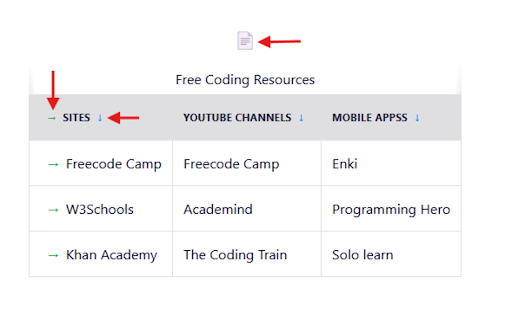
Table Column Copy - Elite Data Extraction Tool
Extract data from any web table in seconds. Table Column Copy is the ultimate productivity tool for researchers, developers, and data analysts who need cleanliness, speed, and precision.
KEY FEATURES:
Smart Copying (Lazy-Loaded UI)
Copy Columns: Hover over any header to see the export arrow (↓).
Copy Rows: Hover over any row to grab it instantly (→).
Copy Entire Table: One-click table export button (📄).
Zero Lag: Buttons only load when you need them, ensuring 100% browsing speed.
Advanced Multi-Select
Hold 'Ctrl' (or 'Cmd') to select specific cells.
Hold 'Shift' to select a range.
Copy mixed selections cleanly with automatic formatting.
Productivity Dashboard
Track your efficiency with the built-in Stats Dashboard.
See total rows copied and estimated time saved.
Manage your clipboard history with search and format badges.
Powerful Data Cleaning
Automatically trim whitespace.
Deduping: Configure to remove duplicate rows instantly.
Regex Filtering: Export only the data that matches your rules.
Universal Export Formats
Excel-ready Text (TSV)
CSV (Standard)
JSON
Markdown Tables
Clean HTML
EXTRAS:
Keyboard Shortcuts: Alt+Shift+C (Column) / R (Row).
Google Sheets Integration: Connect directly to your spreadsheets.
Stop wasting time manually selecting text. Install Table Column Copy and turn any website into your database.
v4.2.0 - The Update Featuring: Interactive Onboarding, Performance Optimization, and New Dashboard.