
JumpCloud Go™
Extension Actions
JumpCloud Go™ enables faster, safer, seamless user authentication. Enhance security and productivity without compromise.
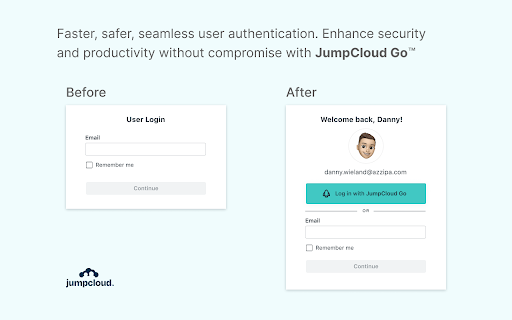
Enable faster, safer, and frictionless user authentication with JumpCloud Go™. Seamlessly connect users from a trusted device to any JumpCloud managed resource using hardware backed device platform authentication with biometric support. Reduce the risk of phishing or other credential based threats by streamlining authentication workflows and reducing user authentication fatigue.
If this extension is installed on a JumpCloud-managed device that is enrolled in an organization with the JumpCloud Go feature enabled, users working from their JumpCloud managed device accounts will be able to authenticate to their JumpCloud protected web-based resources using JumpCloud Go.
Currently, this extension is supported on MacOS and Windows devices.
Latest reviews
- Nathan Hug
- The seamless, easy-to-use authentication and passwordless authorization in JC GO has spared me a lot of gray hair, and as an IT professional, that’s a big win.
- Shane Dixon
- JumpCloud GO made passwordless security work for us. Very easy for end users.
- Kapil Paliwal
- Enhanced productivity from the Get Go. Timesaver, no hindrance, feels secure and up to date.
- Shreya Hegde
- A great approach to passwordless login.
- Kevin Oliveira
- JumpCloud Go changed the way I work. If I go on a quick break and return to my desk - I don't have to type my complex password to authenticate back in. The certificate based passwordless experience increases security and streamlined my day-to-day.
- Harshan Rajan
- Makes me productive from the Get Go. Timesaver, zero friction, I know that I'm secure and up to date.
- Jordan Berry
- Love how easy this app is to use. Logging in is effortless, and the push notifications are straightforward and hard to miss.
- Mike Thomas
- After a few weeks of JC Go I wonder how I ever operated without it. Passwordless access to everything I need at the push of a button, all while taking security to a whole new level - it's the kind of functionality that makes an immediate and lasting impact on productivity.
- Sean Blanton
- This really makes everything we do easy. Simple and works every time. I do NOT miss entering passwords dozens of times a day :) this app is a real game-changer.
- Ranjyoti Prakash
- Awesome passwordless experience. JumpCloud Go is super amazing product to access work apps.
- Rahul Kumar
- Loved the seamless authentication part. The feeling of managing fewer passwords is just awesome.
- Itzel Ortega
- Super Helpful and Easy to Adopt! I'd never used a dedicated tool like this before, but it immediately proved to be an essential part of my daily workflow
- Jayesh Patil
- Painless navigation between apps. Work life becomes a bit easy
- Binoy Pandey
- It is among the most innovative product I have experienced that seamlessly enables passwordless logins and reduces dependencies on entering your email, password, and MFA every time you access your resources.
- Parth Gujar
- Good enough
- Rajat Bhargava
- JumpCloud Go is almost life changing at work. Being able to login passwordlessly virtually everywhere and increase security at the same time is magical.
- Danny Williams
- Really easy to sign into everything I need to get work done.
- James Herbert
- Makes signing into my apps super easy and painless.
- Jeff Magnusson
- Does not work. We're a JumpCloud customer, and the extension will not work at all. It fails to register the browser/device, reliably, over many attempts. Advice from support is "uninstall browser and reinstall browser" which.... no. Fix your extension.
- Jake Dalton
- We really need shortcut support for the extension. Specifically a shortcut to open an application such as cmd + shift + o, then begin typing "slack", then hit enter to just launch the application
- Sébastien Foutrier
- Contains corrupted data that make any attempt to use the SSO lead to a blank page. As my chrome is managed by my organization, I can’t clear it, and can’t access to any service. As a result I can only access to any SSO service only on incognito mode where that extension is disabled after reloging from there. That’s not a single sign on, that’s a sign on a buggy service on every window you open.
- Martin S.
- does not work for me with windows 11
- Tom Grabowski
- Doesn't work.