
AI Chat Exporter: Gemini to PDF, MD and more
Extension Actions
- Extension status: In-App Purchases
- Live on Store
Export Gemini chats to PDF, Markdown, Text, CSV... Free and fully customizable.
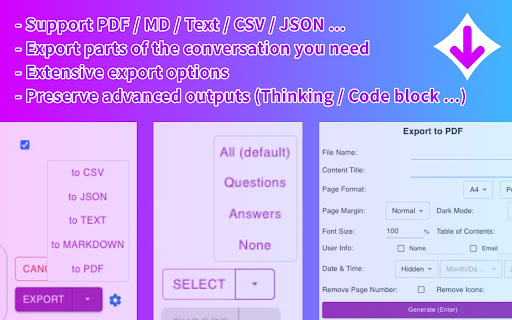
Gem Chat Exporter lets you save your conversations with Gemini AI to your computer. You can save your chats as PDF, Markdown, Text, CSV, or JSON files with just a couple of clicks.
With Gem Chat Exporter, you can save your conversations and refer back to them whenever you need!
## Main Features 💼
### Multiple File Formats 📋
Choose the format that works best for you:
- PDF - Perfect for printing or sharing with others
- Markdown - Great for editing in note-taking apps
- Text - Simple and works everywhere
- CSV - Useful for data analysis
- JSON - Ideal for developers or data processing
### Customization Options ⚙️
Make your exports look exactly how you want:
- Choose which messages to export
- Include or exclude timestamps(created, updated, exported)
- Adjust Date & Time format
- More settings for PDF:
- File name & Content title
- Light or dark theme
- Page format (A4, Letter, etc. Portrait or Landscape)
- Page margin
- Font size
- Table of content
- User info (name & email)
- Include page numbers
- Customize footer (page number)
- Include Thinking process
- Page break for each conversation turn
### Complete Content Support 🧩
Gemini Exporter captures everything in your conversations:
- Regular text messages
- Code blocks with proper formatting
- Math formulas
- Tables and charts
- Thinking Process displays
### Easy to Use 👍
Save your chats in just 2 clicks! No complicated settings or steps required unless you want to customize.
## How to Use Gemini Exporter 🔍
1. Install the extension from the Chrome Web Store
2. Visit Gemini's website and have a conversation
3. The export button displays next to your input field
3. Click "Select" and choose which parts of the conversation you want to export
4. Choose your export format (PDF, Markdown, Text, CSV, or JSON)
5. Click "Export" and your file will download automatically
That's it! Your conversation is now saved on your computer.
## Privacy First Approach 🔒
We take your privacy seriously. Gemini Exporter:
- Doesn't access your data for any purpose other than exporting
- Never save, share or analyze your conversation data
Your conversations stay between you and your computer - exactly how it should be!
## Pricing and Free Usage 💰
Gemini Exporter offers generous free usage:
- **PDF Exports**: 3 free exports per day
- **All Other Formats** (Markdown, Text, CSV, JSON): Unlimited and permanently free!
We offer PRO plans for users who need more PDF exports. All other export formats remain free forever, no subscription required.
## Frequently Asked Questions ❓
### Is Gemini Exporter free?
Yes! Gemini Exporter offers free usage for all export formats. PDF exports are free 3 times per day, while Markdown, Text, CSV, and JSON exports are completely free with no limits. We offer PRO plans for users who need more PDF exports.
### Do I need an account to start using Gemini Exporter?
No account needed! Just install the extension and start exporting.
### Will Gemini Exporter work with other AI chat tools?
Currently, Gemini Exporter works specifically with Gemini AI. Support for other platforms may be added in the future.
### Will my formatting be preserved in exports?
Yes! We work hard to maintain formatting, including code blocks, tables, and special outputs.
### Is there a limit to how long a conversation I can export?
There's no set limit, but very long conversations may take longer to process, especially for PDF exports.
### Can I customize how my exports look?
Absolutely! Check out the Customization Options section for details.
### Does Gemini Exporter work with the latest version of Gemini?
Yes! We regularly update the extension to ensure compatibility with the latest Gemini features.
## Support and Contact 📞
Have questions, suggestions, or found a bug? We'd love to hear from you!
- Email: [email protected]
Latest reviews
- Elianis Web3
- Top
- 朱世良
- Okay, so on further inspection the truncated lines are actually a document index. Should be in the program desciption. The formatting of the text is actually very nice, but also took a 40 page document and made it 70. Upgrading from 1 star to 4. Truncated responses and as I tried to debug goes into "give me money" mode after 2 tries. It also dropped formatting. Just select all and paste into a Word document. I only ended up here because it wasn't possible to easily do that with the search version of Gemini and this program doesn't work with that either.
- Elwin Robinson
- only exported a very small percent of the conversation and seemed incapable of exporting more, even when i scrolled repeatedly myself to load more of the conversation. Useless for me
- BRIAN ANEKEA
- Great!
- Muhammad Zubair
- Being free , it deserves 5 star, however as a whole I would give 4 Star because its working nicely and providing better solutions to my work. great utility, thanks.
- R1ft3R Enterprises Inc
- Works as it should, haven't used it enough to give it 5 plus I'm cheap and prefer free. Great extension though.
- RoboterHund87 “Roboterhund” ADCh
- Fantastic. As others have said, this fills a glaring gap in Gemini's feature set.
- Shahin Kordasti
- Works great. Crazy that Gemini does not have a native export functionality!
- Ryan Paul
- Phenomenal, sensational and lord this was amazing
- Sean Gelfand
- very easy to follow, generates good files, thank you!
- 74_ROSHAN S.K
- best free
- Cyan Lightning
- Very neat
- Gabriel
- Valuable.
- Never buy Braswell
- does exactly what I wanted, has pictures, keeps them on one page, exports text, loads full chat eventually with some input, doesn't make me feel like throwing bricks at google and chrome for making me download other god awful exporters for gemini.
- very good!
- yotta117
- love it <3, much better than native gemini export to docs
- Pat Kelly
- Hands down the best absolutely love this program you guys are terrific thank you for making this you have no idea what a lifesaver is it's the best to use the easiest work especially since the last upgrade I haven't used it in maybe a month or two and wow what a difference this thing is the greatest of all time
- Csa Ma
- Perfect!
- Gregor Strehovec (Roger)
- Works perfectly, but older messages cant export, coz there is no chat window. On longer chats it shows it for a moment, then it removes the chat and gives this notification: "This conversation was created with Gemini Advanced. Gemini Advanced isn't available for you, but you can start a new chat about this topic." Great extension, tho I would like to export all my messages.
- Matthew Hull
- Formats it perfectly. Looks great. Thankful for this tool!
- Steven Heller
- Worked as expected!
- Tony States
- Worked perfect! thanks for creating this.
- Danilo Araújo
- Does what it says it would without unecessary shenanigans. Very good, exports all the content avaiable. Cheers
- Azalia Licón Sandoval
- Great, it saves me a lot of time!
- Jemimah
- love it saves time and energy!!!
- Tomas X
- Though not perfect, before this everything I did was a mess. Much needed - very grateful! Thank you!
- MAN YOYO
- very good !
- Rish C
- This extension is a damn godsend and hats off to the developers, I am thoroughly impressed.
- peach 157
- it only works once and you must rerun browser to make it work again in android lemur browser.
- Luiz Machado lutz
- NICE!!!!!!!!
- Trường Trần Hoàng
- Good work!
- Vernon Jones Mwaba
- Glad and impressed with the lazy loading. And the fact that there are different save options.
- Christopher Cummings
- Used to work great
- Marcelo Rocha
- It works nice!
- Utkarsh Adepwar
- amazing work
- Snehal Bhalerao
- best as it has now recording tool also to export discussions.
- Josie Belanger
- doesn't work for 365 copilot only GEMini and then you have to go to their site etc, This does not suit my needs.
- Suzanne Alderman
- Fantastic tool for preserving valuable discussions with Gemini. Thank you!
- skymisty01
- good tool to export chat in gemini, saved me alot of work.
- i i
- great plug
- Las Locke
- I love this tool , so easy to use to export GEMINI chat, highly recommend
- G A
- Thank you, working solution
- Charles Spalding
- Work pretty well to export MD files, PDF, not so much and it doesn't include images
- Martin Dimitrov
- Does its job perfectly! I would be glad if it can export all conversations at once instead one having to click on each one by one. I know it's probably a UI limitation harder to script.
- Nick Croft
- Does exactly what it says on the tin and it does it VERY well. Sorely needed basic capability that doesn't exist in the solution without it. Great work!
- Sebastian Adlercreutz
- Top smooth and works really well!
- Aditya Jaiswal
- really helpful, works smoothly
- Kyle Santos
- The best and the only web ai chat exporter. Support this dev!!
- L Ramesh
- Excellent Extension.
- Sandeep Tiwari
- Very good app. it saved my days of work.