
Glitter AI
Extension Actions
- Live on Store
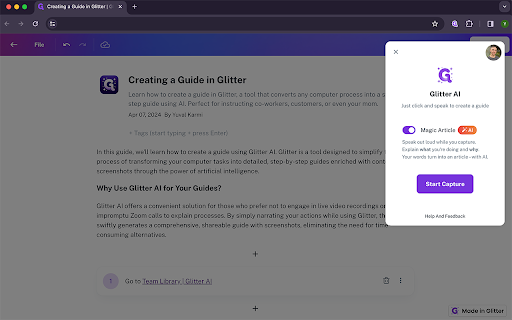
Glitter AI turns any process you do in Google Chrome into a step-by-step guide, complete with context and screenshots, using AI.…
Glitter AI turns any process you do in Google Chrome into a step-by-step guide, complete with context and screenshots, using AI.
Do customers or co-workers ask you for "quick Zoom calls" to teach them how to get stuff done? Are you, like most people, not excited to record a live video?
Instead, let AI generate a shareable, easy-to-follow guide for you, in seconds.
Simply click and speak out loud to explain what you're doing, and Glitter AI will turn what you say into a shareable, written article complete with screenshots of everything you do.
With Glitter AI, you can easily teach your co-workers, customers, or even your mom how to get stuff done – in seconds.
Latest reviews
- Adam Scott
- Going on 42 years in the industry now. One of the utmost challenges has always been passing knowledge from person to person. Especially when we go through the now third private equity acquisition. So naturally people change and processes need to be documented. Despite the silly name, Glitter holds true to its promise of translating what I speak to a written guide. I have seen many ads for another tool called ScribeHow, but when I tried it it missed many steps that Glitter AI captures correctly. And by far much better than how we used to document our internal SOPs; manually, with screenshots.
- Meital Schwartz
- I run a small business (jewelry design) and there a lot of processes that repeat themselves. It can get pretty overwhelming. This extension is really cool. I like that I can just talk through what I'm doing and it auto-documents it. Someone else on here commented that it doesn't write what they're clicking on, but that hasn't been my experience. It's one of the most impressive uses of AI I've seen so far (as a non tech person) outside of ChatGPT. Very cool. The one thing I wish it did was also allow me to add steps with the recorder extension to an existing guide, but their founder said that's coming soon. Cool I can talk to him directly over chat. I recommend this to anyone who needs to document their admin processes.
- Itay Adler
- Really like this one. Switched to Glitter after getting frustrated with Scribe's clunky auto-generated text. The transcription actually sounds like something a human wrote. I talk through the process while I work and the guide comes out ready to share. Documented 12 workflows in one afternoon last month. I really like that the extension just works without all the frills. A keeper for my documentation toolbox :)
- Johan Hereora Hummerhielm
- I still think Scribe works better. Gliter AI doesn't write _what_ I'm clicking on (eg. the name of the button). Scribe does. Tried Dubble also which has the pro that it records a video AND put's a step-list on the lefthand side. Dubble.so do miss other things. Also, Glitter AI only allows 10 guides in the free vierson. Neither Scribe nor Dubble has these limitations
- vitor zucher
- I'm absolutely thrilled with Glitter.io! 🌟 This AI-powered tutorial tool has completely transformed the way I teach technical processes. It’s super intuitive, which means I was up and running in no time, creating engaging and clear tutorials that my clients love. The best part? It saves me so much time and hassle, boosting my productivity like crazy! 🚀 If you're looking to streamline your training workflow, Glitter.io is a total game-changer.
- Sanchit Shangari
- Absolutely, loved this tool. Recording SOP and how-to-guides will become extremely easy with Glitter. This product is highly recommended!
- Danni Friedland
- A real time-saver for written how-to guides. In my last two companies, I used to spend hours creating these for my team, but it was very manual. To make things faster, I would default to screen recordings, but then I would have to redo them every time I messed up or the process changed. For many processes, it's better to have written how-to guides that are easier for the team to follow. There are some tools out there that make taking screenshots for how-tos easy, but this is the only tool I know where I just talk, and it writes the how-to content for me. Really helpful.
- Yuval Karmi
- I don't usually write product reviews for things I have built myself, but this is too good of an opportunity to pass up. I'm Yuval and I'm the CEO of Glitter AI. I am absolutely stoked to have you here, on this extension page, reading this review. Glitter AI is an absolute time saver and anxiety-reducer if you, like me, love having processes documented, but just don't do it because it takes forever. I built Glitter AI for type-A managers like me, who realize they have to delegate to get stuff done, but need to make sure the job is done right. If you relate, give this thing a try, I think you'll be really happy with it. And if you love it, ping me personally or write a review here <3