


Add More Colors to Calendar
Extension Actions
- ★Featured
- In-App Purchases
- Live on Store
Enhance your Google Calendar with a Chrome extension that adds custom colors to each event for a personalized, organized schedule.
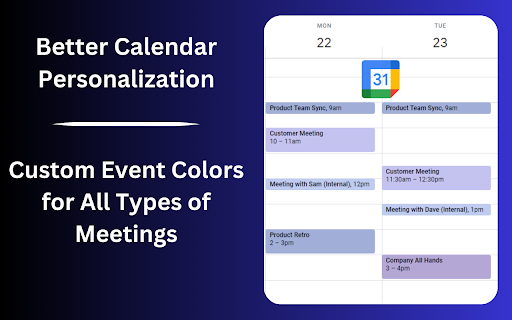
Add More Colors to Calendar turns Google Calendar into a color-coded system that works for you automatically. Google now lets you pick custom colors — but only one event at a time, shown as tiny dots on timed events. Our extension goes further: set color RULES once and every matching event is colored automatically, as a full, easy-to-scan color bar in every view. Plus manual overrides whenever you want.
NEW — Your Google Tasks get colors too
Tasks used to be stuck in a single default color, impossible to tell apart at a glance. Now they follow your rules like everything else: color all your tasks at once, or only the ones matching a keyword. Works in Month, Week and Day view, and keeps the task's shape and checkbox intact.
WHAT YOU CAN DO
• Automatic coloring rules — "Title contains Meeting" → orange. Set it once, it applies to every matching event, forever. • Events and Tasks kept separate — two tabs, two independent rule lists. An event rule never touches your tasks, and vice versa. • Full color bars, every view — timed events get a full colored bar instead of a tiny dot, so you can scan a whole week at a glance. • Your own palette — save the colors you actually use and reuse them in one click. No duplicates. • Color a single item by hand — recolor one event or task on the fly whenever you need an exception. • Edit a color anytime — change a saved color and every event using it updates instantly. No recoloring one by one. • Always readable — black or white text is picked automatically for contrast, or you choose it yourself. • Smart conditions — match by keyword, regular expression, all-day, recurring, or "all tasks".
HOW IT WORKS
Click the extension icon
Pick the Events or Tasks tab
Choose a condition, pick a color, click Add
That's it. Your calendar recolors instantly, and stays that way.
FREE AND PRO
Free: up to 3 rules with keyword matching, your color palette, manual coloring, and full color bars.
Pro ($8/month or $40/year): unlimited rules and smart conditions (regular expressions, all-day, recurring, all tasks), plus every future feature.
PRIVACY
Your colors and rules are stored in your account so they follow you across devices. The extension does not read your event contents beyond the title shown on screen, and never shares your calendar with anyone.
Questions or ideas? Use the "Suggest a feature" box in the extension, or write to [email protected] — we read everything.
Color a single event manually:
1. Open or create an event, then click "🎨 More colors" next to Google's color option and pick any color.
2. Or, on the calendar grid, hover an event and click the color button that appears.
3. A manual color always overrides any rule for that event.
Tip: text color (black/white) is set automatically for legibility — or choose it yourself per rule.
WHY COLOR-CODE YOUR CALENDAR?
• Enhanced organization: categorize meetings, focus time, personal events and deadlines by color — automatically.
• Scan at a glance: full color bars (not dots) let you read a busy week in seconds.
• Set it and forget it: rules do the work; you stop recoloring events by hand.
• Aesthetic & branding: match your calendar to your style, or your company's colors.
KEY FEATURES
• Automatic, rule-based coloring (by keyword in the title, and more).
• Manual per-event override that beats the rules.
• Full-height color bars on timed events, in day, week and month views.
• Unlimited colors and exact custom shades.
• Automatic, legible text contrast.
• Cross-device sync tied to your account.
HOW TO CANCEL YOUR PRO SUBSCRIPTION
1. Click the Add More Colors to Calendar icon in your browser bar.
2. Click the "Manage Subscription" link.
3. Log in to your account in Stripe.
4. Click "Cancel Subscription".
HOW TO DELETE A SAVED COLOR
1. Click the extension icon and log in if needed.
2. Click the "✕" beside a saved color.
3. It is removed; you can then add a new one in its place.
SUPPORT & SUGGESTIONS
Love the extension? A one-time $5 keeps it alive and improving. Have an idea? Use the built-in "Suggest a feature" form in the popup — we read every message.
Ready to make your Google Calendar effortless to read? Install Add More Colors to Calendar and let your schedule color itself.
Work also on Firefox
Latest reviews
- Tomasz Korytkowski
- Please add option to edit colors. If removing a color removes it from all events that use it, then editing a color should also be possible (then update all the events also with new color)
- Laura Bierstedt
- I'm also getting the same error code "failed to fetch." Please fix soon!! Had zero problems with this app before, but will have to get a replacement
- Gas-Pro LLC
- It worked great up until today. I keep getting error code in red Type Error Failed to fetch. I have tried relaunching it, uninstalled it and installed it back. Nothing is working.
- Nick Patterson
- This is a super-useful enhancement to organizing things in Calendar! You can easily pick and apply custom colors to calendar events, both "all-day" and scheduled events. One persistent wish-list item: It is currently not possible to assign black or white text; the app picks for you. This makes several darker colors unviable, as they are too hard to read with black text. Also, when looking that the palette of custom colors one has created, you don't see what text color is assigned. It would be useful to see that. Hoping for continuing enhancements to this very useful utility!
- Samantha Johnstone
- Would give zero's stars if I could. Doesn't work as expected. Have tried removing this several times but they still charge me.
- Jack Dougherty
- This is exactly what I was looking for. Was able to get my teams colors organized for each calendar event! For the people who can't get it to work, I just right clicked on the calendar event I created then was able to hit that plus sign to select a new color. Hope that helped
- John McMillan
- Super helpful tool! Made it easy to add more colors to my calendar events and had run out of the default colors google offers. I was using a different calendar to have different events but this was way easier and allowed me to keep everything segregated to one single calendar and worked with more than 20 events.
- Support Email
- Works great! Exactly what I needed. I have a million things I need to schedule and didn't have enough colors to keep everything organized. This fixed it! THANK YOU!
- Firas Aguel
- Having to pay a monthly subscription to use hex codes for colors in a browser extension is crazy
- Sarah Fry
- can't get this to work, any advice for troubleshooting?
- Tess Dornfeld
- Doesn't solve anything - if I want to add color options, I can just create an additional calendar and give it a custom color, and switch events to that calendar as easily as changing an event's color. I wanted this to preserve the sidebar on the left of each event bubble that's in the primary color of the calendar, to easily identify that they're all events of different types on the same calendar. But this doesn't do that, it changes the whole bubble to the custom color, just like changing it to a different calendar in a custom color already does. ETA, second the text color issue too, which is also a problem with Google's custom calendar colors. I just want a light and a dark blue and purple, and the light purple still uses white text, but I can't get either Google or the extension to create a light blue that still has white text. This shouldn't be so hard!
- Emily L'Esperance
- Agree with another reviewer- Love the ability to choose colors, but when I do so it automatically changes the font from white to black, even though I have the color set (Gear icon > Appearance > Color Set) as Modern (with white text). If this were fixed I would continue using the extension. It would also be nice to be able to select custom colors for labels.
- Susan Weiner
- I added the extension and logged into Google. Followed the instructions but there was no "+" sign or other way to access custom colors. Very disappointing.
- S T
- Nice, but 40 bucks per year or you can only add 3 more colours. Would go for it if it was a one-time payment of 3-6 USD but 40 USD for simply adding a few more colours?
- Alexander Ronzino
- Works for a day and then stops
- Joseph Anderson
- Was loving this, but for the past few days it's not working anymore
- Shegufta Rahman
- Is there any way for the colours to show up on my iphone app? at the moment i only see the colours on my laptop, but when i go on my calendar app on my phone, they arent there.
- Tara Franklin
- I keep getting black and now I have 4 black dots. It will not let me remove them and I have reached my color limit.
- Kayla
- Awesome! Wondering how to switch colors though without paying subscription, I accidently made the same blue (so it's on there twice) and can't figure out how to switch it
- Anuhas Hennayake
- Perfect
- Avi Dankner
- Love it ! wondering if there is a way to make those custom colors appear in the calendar mobile app as well ??
- Jason Forsette
- This is awesome! Was looking for an alternative to the extension I used to use for this because the other stopped working and this one is actually better. Thank you!!
- Barney Rubble
- And here's the error - "please open the extension popup and sign in to add custom colors to events." I already am signed in!
- Eric Wu
- So far great, but is there a way to sequence the colors that I added to look like the color bar itself?
- Toni Allen
- As a teacher this extension has helped me stay organized more than anything else I have tried. I can format each lesson plan by color then print it out and give the schedule to my students. Great idea! I always wanted more colors than the google default ones. Thank you for making this!
- S K Haridharan
- This is an excellent extension and well maintained by its developers who respond promptly when you have issues. I moved here from a different extension that stopped its support. This one works really well and has great functionality and customization for the colors.
- jackelyn saquique
- i LOVE this extension, but is it possible to keep the font to white? it automatically changes the events to black font...
- Danielle Jones
- Please consider adding an option for a PRO one-time payment/lifetime subscription...I hate subscriptions (as I'm sure many others do). Otherwise, this is amazing!
- Ellie Knudsvig
- THANK YOU FOR MAKING THIS. My life is complete.
- Catherine Paek
- Adding and removing colors work easily enough, but when it comes to a repeated series of events, it automatically applies the new color to ALL the events without first asking "This event only", "This and following events", or "All events". Therefore I cannot apply a color to only one of the events in the series as needed.
- Kayleigh C
- I got this extension after a previous one was not working. However this one is not working for me either. It just keep putting my events in red. Very upsetting.
- Elizabeth Woodcock (Lisa)
- Using the free version and love it! However, I chose one of my colors as black by accident. How to I delete a color choice to replace with a different color? I couldn't find directions on your site or in FAQs. Also, don't see an email to ask for support so this seems like the only way to ask. Update: Thanks for the response! 5 stars!!
- Jacky Manheim
- Love this! Works great for making my calendar not SO bland. I just switched to using colors on my events instead of the default blue event color that Google uses and it makes my day just a little better. I am looking at my calendar probably 50 times a day so anything to make it not so boring is HUGE for me.
- Jim Glover
- Does exactly what I was looking for! Been using it for a few weeks and has helped my organization a lot. Definitely look forward to any updates.
- Samantha Kaletha
- Great extension for managing day to day meetings by color coding for organization! Easy to use and great/quick customer support if you have any questions. Would highly recommend!
- Patrick Welton
- This is by far the best extension I use day to day. Thank you for making this! I always wondered why it wasn't a default by Google to be able to make custom calendar colors. Super simple to use and has helped me a ton. My calendar fills up super fast and this has helped me organize by what department I am meeting with and what priority the meeting is all based on the color I add.
- Ambre Aubry
- Fantastic customer service - responded to my emails so fast and were incredibly helpful in solving the technical issues I was having!
- Maddie Murphy
- I like this extension, but I'm wondering if it would be possible to add a feature: - Could you make it so you could change the color of one instance of a recurring event without changing all of the events? I like to change the events gray as I complete them, but don't want the following events to turn gray as well. I was using "More colors for Calendar!" but it stopped working. I prefer the functionality of this extension, but would really love to be able to turn things gray as I complete them without messing up my following weeks. I would also prefer for the text to be white, but I'm not sure if that's related to this app or GCal. Thanks for your consideration!
- Rajashree Venkatraman
- I was having some problem with it initially but works pretty good now!
- Jana N. Ramsay
- I'm here because "More colors for Calendar!" stopped working. This is a very good replacement--better, in some aspects. In "week" view, the other extension wouldn't let me select colors for events that spanned multiple days. This one does. Will be sticking with it. PS. I would LOVE to see a feature to rearrange the color order, if possible.
- Joan Mason
- Hello, I keep receiving a prompt to sign in and add my google account when I try to use this. I've signed in multiple times and I'm unable to add colors to the calendar. Please advise.
- Michael Killen
- Love this extension. It makes so much sense that I can't believe it's not baked into Google Cal already. 4/5 because (even though I did pay for the upgrade) I'd love to see the #hex colour as I'm selecting it, not just afterwards. Really smart app, I've already had people ask how I get my calendar looking so slick.