
ChatGPT Sticky Notes
Extension Actions
- Live on Store
Add sticky notes to your ChatGPT conversations.
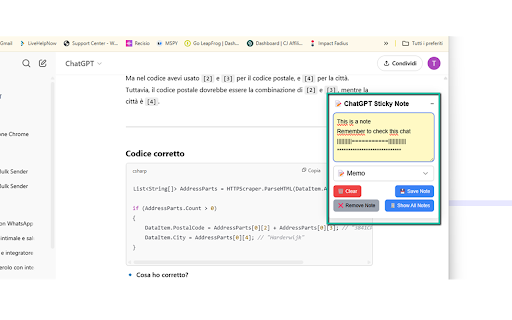
ChatGPT Sticky Notes is a lightweight Chrome extension that allows users to attach personal notes to individual ChatGPT conversations. Instead of copying information into separate note-taking apps or losing track of context, you can now create and view sticky notes right inside ChatGPT’s interface.
Key Features
1) Sticky Note UI Embedded in ChatGPT: The extension adds a beautifully styled sticky note panel on the right side of the ChatGPT interface.
2) Per-Conversation Notes: Notes are tied to the specific conversation based on the chat URL.
3) Auto-Save and Manual Save: You can either let your notes auto-save or manually save them when you’re done.
4) Icon Marker in Sidebar: A small icon (e.g., 📌, 📟, 🌟) appears next to the chat title in the sidebar, indicating that a note is saved for that conversation.
5) Modal to View All Notes: Easily browse through all saved notes in a modal with quick links to open the corresponding chat.
6) Note Removal Option: You can delete individual notes or clear all notes from the popup menu.
Icon Customization: Choose your favorite icon for each note.