Chronos: Visual Context Manager
Extension Actions
Organize your workflow into visual projects. Stop losing tabs, start keeping context.
Chronos: Visual Context Manager – The Ultimate Workflow Organizer for Your Browser
Chronos: Visual Context Manager is an innovative browser extension designed to revolutionize the way you handle research, productivity, and tab management by maintaining the full context of your workflow. This extension organizes your open tabs, bookmarks, snippets, and notes into visually engaging projects, helping you stay focused and organized across your digital tasks. Whether you are a student, researcher, developer, or a multitasking professional, Chronos offers a seamless way to manage complex sessions without losing track of your ideas or workflow.
Modern browsers often serve as hubs for extensive work, but the problem of tab overload and constant context switching can severely disrupt productivity. Chronos addresses this challenge by allowing you to save entire browsing sessions—comprising multiple tabs—as distinct projects. Each project acts like a dedicated workspace, holding not just your open tabs but also related notes, highlighted text, images, and tags. You can effortlessly save, visualize, restore, and archive these projects through an intuitive interface featuring interactive project cards. This system ensures that you can revisit any work context exactly as you left it, dramatically reducing the cognitive load involved in switching tasks.
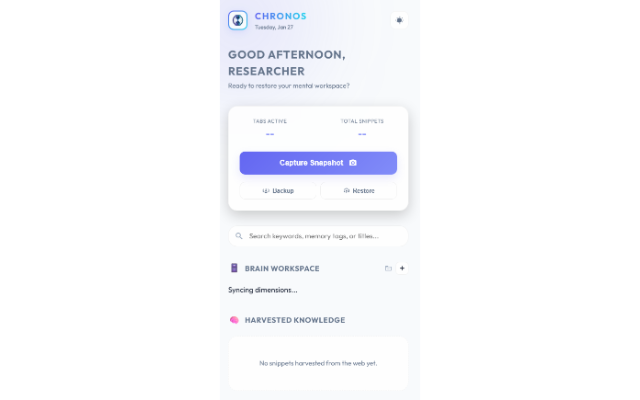
The extension includes powerful snippet capture functionality: you can save bookmarks, highlighted text snippets, and images directly into your projects using right-click context menu options or hotkeys. This capability makes content harvesting efficient and integrated within your browsing experience. Chronos also supports the new “Brain Workspace” dashboard that showcases your projects as visually rich, glassmorphic cards with dynamic atmospheres adapting to day and night modes. Physics-based interactions make working within the extension engaging and fluid.
A key feature is the built-in focus timer, inspired by Pomodoro techniques, which encourages deep work sessions by helping you maintain sustained attention on a selected project. The timer comes with visual badge indicators and browser notifications, reinforcing focused productivity and reducing distractions. You can tag projects contextually—whether naming by research topic, client, or subject—making retrieval effective with comprehensive search that spans names, tabs, and tags.
To keep your workspace clutter-free, Chronos lets you pin frequently used projects for quick access and archive older projects that are no longer active. Backup and import/export functionalities ensure your valuable data is easily migrated or protected against loss. Importantly, Chronos prioritizes privacy: all your project data and snippets are stored locally on your device, never sent to remote servers, guaranteeing data confidentiality and zero latency.
With a refined glassmorphic design and ambient visualization, Chronos blends beautiful aesthetics with powerful functionality. Its context-operating system approach turns your browser into a structured environment where your digital workflow is intelligently managed and visually orchestrated.
Key Features:
- Visual Project Cards: Organize numerous tabs, notes, tags, and snippets into distinct projects shown as interactive cards.
- Tab Group & Session Management: Save, restore, and archive entire tab sessions; integrates with browser tab groups and color coding.
- Powerful Snippet Capture: Save page bookmarks, selected text, and images via right-click or quick hotkey for contextual content harvesting.
- Focus Timer: Integrated Pomodoro-style timer with notifications and badge indicators to encourage deep, uninterrupted work sessions.
- Contextual Search & Tagging: Search projects by name, tab title, or tags; tag projects for easy categorization by subject, client, or other criteria.
- Archive & Pin Projects: Pin important projects for instant access or archive less active projects to declutter your workspace.
- Backup & Import/Export: Easily back up your Chronos data or move it between devices using import/export features.
- Dark & Light Mode Toggle: Switch effortlessly between themes with a dynamic atmosphere engine that responds to day and night.
- Glassmorphic Interface: Stunning level-3 glassmorphism design with physics-based interactions creates a beautiful and immersive environment.
How It Works:
1. Install Chronos: Visual Context Manager and open the dashboard by clicking the extension icon.
2. Create a new project or use quick-save options or right-click menu to capture tabs, text, images, or bookmarks into projects.
3. Organize your workflow by managing projects through visual cards that show tab quantities, snippets, and tags; pin or archive as needed.
4. Restore any project with one click, reopening all saved tabs and accessing notes or snippets within the project workspace.
5. Use the focus timer to set work sessions, helping maintain sustained attention and productivity with visible countdowns and notifications.
6. Securely back up data or export/import your project contexts to avoid data loss and conveniently migrate between browsers or machines.
7. Utilize the powerful search and tagging tools to quickly find and filter projects, even after long periods, ensuring workflows remain accessible and organized.
Privacy: - No personal data collected. All your Chronos project data and snippets are securely stored locally in your browser; no information is transmitted externally.