
Tab Group Generator
Extension Actions
- Extension status: Featured
- Live on Store
Organize your tabs by groups automatically according to the rules by URL Host saved by the user.
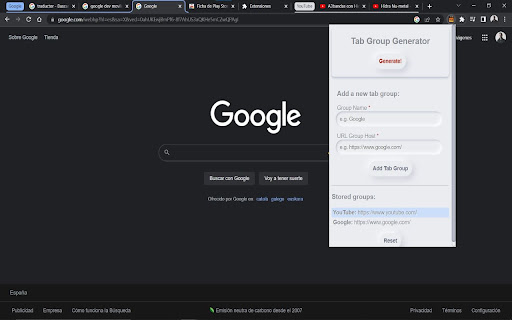
Organize all your tabs by groups automatically and easily with a single click.
Save your preferred tab groups with a custom name.
Just save the name of the group, the URL of the tab group host, e.g. https://www.google.com/ and with a simple click, all the tabs that contain the previously saved host will be grouped together.
You can establish as many groups as you want in a simple way and with an easy and intuitive interface.
You can have work groups, mail, applications or whatever you want!
You can even save a group of tabs as host+path, e.g. https://www.youtube.com/@Hidra3c/ in this way you can make your organization more efficient.
To save a new tab group, enter the name of the group and then the host or host + path of the tab group you want to group, it is important to save it with the following format, e.g. https://www.google.com/ for a host group, and in the case of host + path https://www.youtube.com/@Hidra3c/
Once saved, clicking Generate! all the open tabs that contain that url will be grouped automatically! you can save all the groups you want and when you open the browser again, you just have to press Generate! to group everything you have open. No more chaos in your browser!
Latest reviews
- Caye García
- Really god , It do navigation much easier when I have many tabs open
- Caye García
- Really god , It do navigation much easier when I have many tabs open
- Jorge Sanz
- Very useful!
- Jorge Sanz
- Very useful!
- Recycled store
- effective and easy to use
- Recycled store
- effective and easy to use