
Chromebook Recovery Utility
Extension Actions
CRX ID
jndclpdbaamdhonoechobihbbiimdgai
Status
- Extension status: Unlisted
- Live on Store
Description from extension meta
Create recovery media for your Chromebook.
Image from store
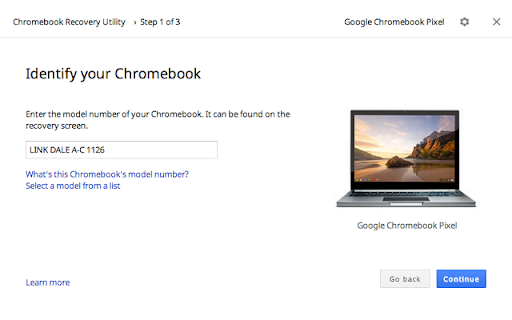
Description from store
Use this tool on M38+ Chromebooks, Windows, and Mac devices to create recovery media. Instructions on how to use the tool can be found here: https://support.google.com/chromebook/answer/6002417
By installing this item, you agree to the Google Terms of Service and Privacy Policy at https://www.google.com/intl/en/policies/.
Latest reviews
- Simon Scholes
- Idiots...lost v2 nhours of my life for u to tell me Chrome recovery tool no longer works on chromOS.. then GET RID OF IT from the store!!!!! TY
- Gaje
- works for more than recovering chromebooks. i've used it to flash raspian many times. the only* app that can flash drives. *that i know of
- Jorge Rivera
- at the beginning I had a problem launching the extension. It was showing a message ''not supported''. I just uninstall and reinstall. Then I went directly to my extensions I clicked and it finally lunched the app. I rate 5 stars because my Chromebox recovered very fast. Very simple and easy to use. Thanks.
- Michael C
- As of July 14, 2023 this extension was working correctly if the user uses it correctly! I needed to burn a custom firmware onto an sd card using my chromebook. in order for this extension to recognize the firmware i had to rename it .bin as instructed by Arun Kumar in his tutorial "How to burn an ISO to a USB drive on Chromebook". It really was that simple.
- Sherri Klemow Shevlin
- I have read all the reviews and recommendations, open Google as administrator, typed in the exact model, ran it on stable and still when I got to end and do it wouldn't finish writing onto the disk. Love my chromebook but this extension to help fix an issue took 2 hours of my life and a 9 pm trip to buy a disk I didn't use.
- Tanvir bhuiyan
- my chromebook is samsung chromebook xe303c12 and it dosent work on my chromebook please fix it
- Marie-P
- It partitioned my flash drive and made all but 1 partition unreadable. Chromebook to recover wasn't able read anything on the flash drive. wasted my time and a flash drive.
- J H
- Absolute Garbage. Downloads recovery tools but hangs at 0% when it comes time to download it to a usb device. have tried multiple devices. I should have expected this though, since Alphabet is a big proponent of the "You'll own nothing and be happy" Cabal. "Computer software outmoded? just buy a shiney new model that's still receiving updates!" "Want support? - lease this phone instead and you'll always have tech support!" "Why be YOU when you could be NEW!"
- Sherif Aliti
- When on the earth Google developers make something to work!!!
- S S
- Garbage app when it does not work on Linux.
- Dibash Sapkota
- It is not supported in linux.
- Victor H
- Doesn't work at all on my Chromebook Acer C720. On Windows it creates USB with bunch of partitions, which does nor boot on Chromebook . And USB is basically trashed, unless lot's of work to restore it to a use.
- Preeti Mehta
- no work
- David Harvan
- Failed four times ,took more than an hour out of my life, don't waste your time
- king jelly
- I really want this to work but whenever i press ''launch app'' it brings up a line of text and i try to search it online and it does not show anyone eles that has this problem. It does not even show me the screen where i have to put a Usb stick in it. there is like a setting button on it but it is just unresponsive so please i you have or fix this issue please message me back.
- w0nderhoy
- does not work on acer cbs-311-t2t6 chromebook that is fully functional. all that shows up is a settings icon.
- RikMish
- Can't open app. There is no Launch app button on my chromebook. Just a button saying remove from chrome.
- Edward Chambers
- Karen Broomfield's method worked just fine. hold Shift & D at the same time then follow instructions ! thanks Karen.
- MeYosemite
- I think I have some clues about what people are complaining about. But for me. It was a walk in the park. Simple, Fast, and incredibly easy.👍
- Anna Paulowna
- When it's about to finish to write to a USB drive, Chrome closes entirely and this extension along with it. It's impossible to create recovery media with this extension. It makes me wonder why this has to be an extension rather than something that can just be downloaded and run on its own... I have to send many Chromebooks back to the manufacturer because this extension doesn't work.
- Lawrence Siegfried
- Can't complete the "Write" portion it just drops out and closes google.. :(
- Edward Samuel
- Hi All, Need Help, I have a problem with my Dell 5400 Chromebook. I installed this app in windows 10. This app is installed in Chrome browser - after running this app in windows. i plug in the pen drive. Then it says download, extracting, verifying and but nothing is copied in the pen drive. however, i noticed that my C:\ drive has go up by 5-6GB, which i have lost that much of space on C:\ drive. Question now is... where are the chrome recovery files saved in windows folder... looks like the files are not getting copied to pen drive, rather is download in the windows system itself. please help to identify the folder where i can delete them..
- Phil Seaman
- One of the most abysmal utilities ever created and the fact that it came from Google should be a complete embarrassment. Adding this and running it from Chrome on a Windows laptop initially goes well. It downloads, verifies and extracts. Then I get a UAC prompt, to which I click Yes and it just bombs out. No errors at all. Tried it on 2 other Windows machines with plenty of resource and got the same results. To get it to go past this point I had to download and install a Chrome clone but even then, things started to fail because part way through writing (about 4%) I was returned to the main interface with 'Try again' in red. No error code or help in any way. I tested all USB sticks with adding Windows boot utilities and all worked flawlessly. After a writing fail there was no USB removal option in Windows and when removing a re-inserting manually a USB stick would then have either 12 partitions that windows saw as requiring formatting or it would create a lost+found folder and rename the stick to OEM. To make matters worse, whenever you retry, instead of using files from a previous failed process, it proceeds to begin a new download, creating another scoped_dir... that eats up disk space unless you are aware, so zero amount of intelligence from the tool to detect a prior download. So I am left with a 2.5Gb extracted .bin file and no process to actually get this damned thing to work. A true abomination with next to zero practical support options from Google. Ironically, one of the reasons for using a Chromebook/box is ease and speed of set-up. In the time taken so far to get nowhere, I could have set-up half a dozen Windows installations.
- SCAR-H “Miles45” -Chan
- I must be doing something wrong, I'm not to sure. I attempted to create a recovery media only for the app to claim it worked. Not only did it not work, it broke the flash drive I was using permanently. The device I had bought came with 1 tb of storage and after using the recovery tool, it was bought down to just 8 mb with no way of recovering it back to full capacity, even after formatting the drive multiple times. This happened to 2 of my flash drives and now I cant trust this tool
- David Herrington
- It doesn't restore Chrome OS.
- Jenna
- Doesn't work
- Kiera Diamond
- Said the USB did not contain Chrome OS. Please send help.
- Katherine Luhrman
- I have tried it several times. Almost every time it gets downloaded I get 20 format disk/card opening. And if that does not happen then after I insert into the Chromebook it starts the verifying and as soon that is done it pops up "an unexpected error occurred. please refer to this URL for troubleshooting. I have used and done it exactly the way it says and have got zero results.
- Andrew Fletcher
- Unstable results! Tried recovering by installing the app on a 2nd chromebook and downloading to a USB stick, but the failed Chromebook said the recovery media was not installed on the device. Tried different sticks and SD cards, also got multiple download failures whilst trying.... But today I had one more go, installed Chrome on my laptop and added the recovery plug-in, created a brand new recovery drive and hey presto it finally worked. So from my perspective - don't use a chromebook to recover another chromebook. Or maybe just don't use chromebooks?
- Swim Fan
- I'm onto you guys.. Give my mousepad back it's super powers and restore keyboard functionality. Pros-Everything Cons- None Best little program ever!
- Black Magic
- Hello everyone, this app it create a bootabe USB flash drive, i installed linux mint on my usb flash drive it was awesome and it worked, i am very happy with this app. if you want to run a VM on a usb flash drive well this is the app. good work guys it i works its stable its strong its secure
- SLICK RICK 666
- i need help it keeps failing to unzip
- Radek Błędowski
- lack of linux support
- Dan G
- does not work stuck at 0% for about 2 hours...
- Jeremy Southerling
- This software will not work on AMD computers. Make sure you use an Intel computer. You may also have to create a MBR partition on the flash drive. I had to do that for the flash drive to work.
- Raily Roy Herrera
- My uncle bought a second hand ACER SPIN 13 and gave it to me, it seems like the device is still registered from work or school and I can't use it. I searched online about hard resetting and after that it is asking me to insert a recovery disk/card. Now, here's my question. Can I use this app with another Chromebook (another model) and install the OS then use it from the one that is not working?
- Victor Radzicki
- i am hooping to have a pc on chromebook im on step unpacking working great sp far.
- Stelios Mavridis
- Worst app ever.. I'm trying two days to create a recovery image.. FYN
- Kenyon
- Was able to use this to erase/recover a corrupted 64gb flash drive that diskpart would not reformat.
- Bruno Różycki
- Perfect application! Allows me to create another CloudReady USB from my DIY chromebook! (For example to reinstall Chrome OS)
- Louis Lagios
- Just did not work. Plain and simple.
- Thunder Parley
- Used it yesterday to recover a corrupt / dusty Dell 3100 2-in-1. Wrote the image on a Gigastone 32GB microsd card (in a SD adapter) from my Chromebook 2015. Popped the micro into the Dell and success. * Make sure the device writing the image does not go to sleep / power save or you need to start over. Love that my chromebook can also reformat the card when done. Point and click.
- Samuel Nickels
- Inconsistent OS version. Me and my coworker both use this app on our PCs to create restore images for the Chromebooks we service. I use it and it gives me OS version 85. Coworker uses it, and it gives him OS version 87. The exact same MicroSD card is used, and that card is used to restore the exact same Chromebook, in both cases using the image the app automatically downloads off the internet. After I write the restore image, it restores Chromebooks to version 85, but after he writes it, it restores to version 87. This was done in the exact same day. Our customers (who use enterprise-enrolled units that we are locked out of by default) are complaining that we haven't updated the OS to a new enough version if it's not at least 87, and the Chromebook will only update itself up to version 86 via the internet.
- harun keles
- This is a big scam It messed up my usb drive and everytime I try it is still messing up. I tried with micro Sd card and result is the same .I dont know when the recovery load is that it just pops up a lot of spereted sd card drive a: drive b: drive c: ...... what a mess
- Dj
- I need a SD Card Data Recovery tool.....
- Alvin Ngah
- does not work at all a waste of time there is no model name " jerry chromebook"
- Anonymous
- 3 different USB 16 and 32 GB goes through the motions then when put into locked unit, says device does not contain Chrome OS. Waste of time.
- Barbara Middlemast-Neal
- My Acer (manufactured 2020) isn't listed, so I can't reinstall OS.
- Hetal Patel
- WOO-HOO! I was about to give in and pay to get my toshiba chromebook 2 cb35-b3340 fixed. I didn't know chrome OS was damaged until I finally after so many days after research ran across a blog about this issue. Followed instructions and it worked perfectly! Saved money and from getting ripped off from the BS repair guys.
- Cam
- I don't know what I'm doing wrong, every time I try and to the recovery, it states its complete then spams a lot of other files stating to format it and it never works, I don't know what I am doing wrong in this situation