
Attendance for Google Meet™
Extension Actions
Simple way to take an attendance on Google Meet
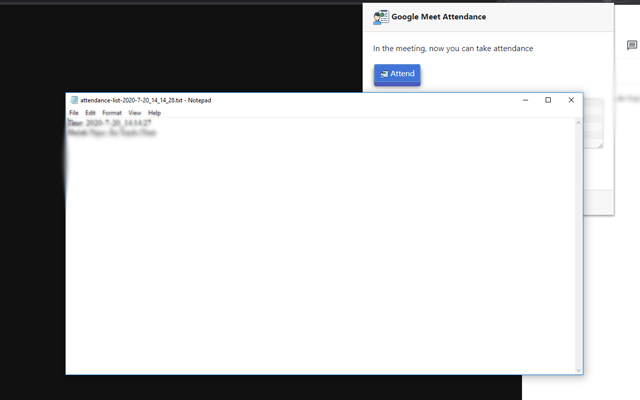
Attendance Taking for Google Meet
This extension is intended for users who need a simple way to take attendance during a Google Meet.
This extension adds a button to the top right bar (next to chat & participant list) to help remember who joined a meeting in Google Meet. Attendance taking allows you to remember who joined an online meeting and see who is not here.
(With more online video conferences taking place, its important to have an automatic solution to take attendance ).
This extension helps to remember when an attendee joined, how long they stayed for the meeting and helps you keep track of the meeting time
It is the easiest way to record down attendance : you can follow up later with participants who were unable to make the call.
To begin using this extension, here is what you need to do
Install the Software Extension
Go inside a Google Meet meeting.
Click on the extension icon when you are IN the meeting to activate the extension.
Attendance taking will be enabled once you click on the extension icon when you are in a Google Meet online video call.
Latest reviews
- Ignativs
- 这个插件太好用了吧~~~
- Ignativs
- 这个插件太好用了吧~~~
- Hayden
- 这个插件太好用了吧~~~
- Gary
- 这个插件太好用了吧~~~
- Fred
- 这个插件太好用了吧~~~
- Evan
- 这个插件太好用了吧~~~
- Elijah
- 这个插件太好用了吧~~~
- Dennis
- 这个插件太好用了吧~~~
- Daniel
- 这个插件太好用了吧~~~
- Cecil
- 这个插件太好用了吧~~~
- Cecil
- 这个插件太好用了吧~~~
- Cary
- 这个插件太好用了吧~~~
- Brown
- 这个插件太好用了吧~~~
- Bert
- 这个插件太好用了吧~~~
- Ben
- 这个插件太好用了吧~~~
- Aaron
- 这个插件太好用了吧~~~
- Aaron
- 这个插件太好用了吧~~~
- Joseph
- Requires joining a meeting when I am already in a meeting.
- George
- O app não funciona. Ao clicar no ícone, informa que "você precisa estar entrar numa reunião". Isso é dito no início, meio ou final da reunião que eu estou realizando. Vou desinstalar e alertar da sua inutilidade.
- Yogesh
- It's Good For An Attendance But When We Click On it A Black Screen And Extension. But it's Can't Work On Microsoft Edge But On Google Chrome It's Working
- SÍLVIO
- Não funcionou, pedi tempo tentando fazer funcionar...
- Silvano
- Atendeu às minhas necessidades, pois trabalho com turmas de até 40 pessoas. Abraços.
- Thắng
- Good
- Rene
- Doesn't work at all!
- Sukonthaya
- try to use it this time.
- DHIYA
- can't use
- kevin
- k
- Microsoft
- cant use
- César
- No toma asistencia, solo aparece que debes unirte a un meet pero en cuanto lo haces no pasa nada
- Hussein
- the best one (between his brothers) in web
- florguaneme
- No funciona, SOLO TOMA ACISTENCIA DE UNO MISMO no es útil definitivamente no
- Juan
- Solo toma la asistencia personal, no toma la asistencia de todos los participantes de la reunión.
- Noemí
- No me toma la asistencia.
- Camila
- No me aparece ninguna estudiante en la lista, solo aparece la fecha.
- NELSON
- No funciona, entra a la interfaz, dice que el llamado es exitoso, peor cuando se mira el documento esta vacío
- Elsa
- Después de 2 semanas de uso, al hacer clic en "Asistir" ya no devuelve la lista de participantes del Meet, solo puedo descargar el archivo de texto con la fecha/hora actual.
- DRACEA
- I will give it 5 stars but it dosent show all the students, please fix that.
- June
- This type of extension is okay, but it can only record a total of 11 people. Hope it can record more than that number of attendees.
- Dr.
- Records 12/60, its not a good one for edge
- Yuri
- Não registra a lista completa de alunos na sala.
- Surya
- Records only 10 or 12 participants on the total population of 70+. Moreover, it has to be clicked and made active again and again. Hope the developers resolve these issues soon!
- brusly
- It is giving attendance 10/50 participants
- Rifki
- Works, Tutorial - Join To A Meet - Go To People - Click Google Meet Attendance Icon - You can Attendance
- Raj
- Work good in google chrome, but not work in Microsoft edge.
- Jayakrishnan
- Its working and very useful for taking attendance. Thanks