
MQTTBox
Extension Actions
- Live on Store
Developers helper program to create and test MQTT connectivity protocol.
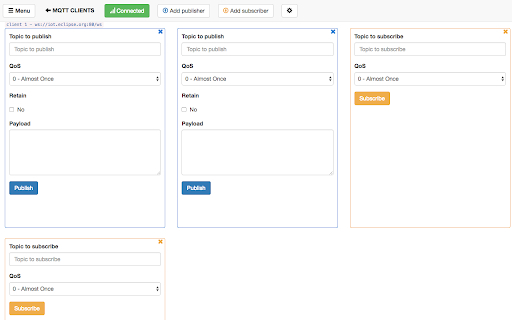
Supercharge your MQTT workflow with MQTTBox for Chrome!
MQTTBox apps are also available for Linux, Mac, Web and Windows. Please check download link http://workswithweb.com/html/mqttbox/downloads.html
MQTTBox features:
1. MQTT Clients
-Connect to multiple mqtt brokers with TCP or Web Sockets
-Connect with wide range of mqtt client connection settings
-Publish/Subscribe to multiple topics
-Supports Single Level(+) and Multilevel(#) subscription to topics
-Copy/Republish payload
-History of published/subscribed messages for each topic
2. MQTT Load
-Load test your MQTT broker or MQTT devices
-Load test both publish or subscribe to a topic by defining message publish/subscribe rate
-Publish/Subscribe load with upto 6 instances simultaneously
-Send upto 10 different payloads while publishing one after the other
-View progress in real time on dashboard
-View all load test data sent or received in separate window (Includes smart search)
-View load test results in graphs.
-Ability to change sampling rates while generating graphs
Please report Feature Requests, Enhancements and Bugs to [email protected]
Check source code on github.
https://github.com/workswithweb/MQTTBox
Latest reviews
- Florian Castellane
- mqttbox does not work on linux anymore: https://support.google.com/chrome/thread/174381169?visit_id=638343283972610600-2715709414&p=chrome_app_deprecation&rd=1
- Yogi PG
- Very good program.
- 邱冠智
- Can not uninstall this
- 林俊成
- the app can run, but no any windows show.
- Bill VerSteeg
- Very nice app to monitor mqqt topics
- Marco Glasbergen
- Clean, useful and easy to install MQTT client.
- Anonymous
- The cleanest and most functional MQTT client out there.
- Preetam Joshi
- clean to use.. does most of the functionality
- thanh tin Nguyen
- good
- I.B.P Mayun
- Very good, and very easy
- Richard S
- Very good, clean, easy to read screen layout. Recommended. Agreed with Alex S about removal (or an option to hide) Raw Payload. Option to display JSON output would also be good
- Abdelmadjid Hammou
- Very useful, thanks!
- Alex S
- its nice but would like to turn off the Raw Payload. I have no use for this and it just takes up space
- Li Kailin
- usefull tool,simple & clean. I can't select & copy any field from the msg,not topic, not content ,not anything.
- Tarik Haque
- It is nice for testing.. Would be nice if the subscribed message come as a notification.
- Hicaro Adriano
- It keeps adding more characters on my client ID. e.g. my client ID is fde1d08e09067b7d4a3ff13 and it connects with fde1d08e09067b7d4a3ff131472122475806.
- Jinhui Chan
- When I add a broker, but can't select broker from what I created.
- Paul Chen
- Very Good to use. But I find a but that the username and password used for connection seem not working.
- QuảngCáo BaSáuMươi
- Cannot sub for topic with wildcard, such as : #