
Geoguessr Helper
Extension Actions
- Live on Store
A Geoguessr helper that improves your skills and provides answers.
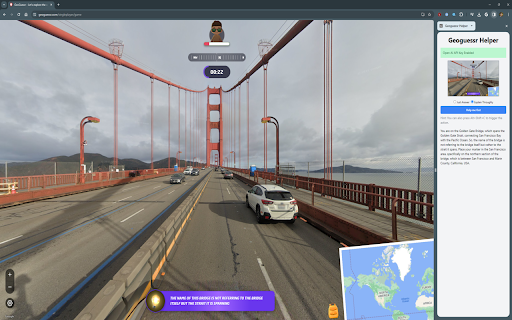
Now with the ability to select different models! The default is GPT 5-mini, but the o3 and o4 models are available too.
Introducing an innovative Chrome extension designed to enhance your Geoguessr experience - powered by OpenAI's models. This extension adds a helpful sidebar to Chrome, providing you with intelligent assistance to not only find answers but also improve your Geoguessr skills.
To get started:
1. Install this extension
2. Create an Open AI API key at https://platform.openai.com/api-keys
3. Click on the Geoguessr Helper Chrome extension action and enter in your Open AI API key
4. Visit Geoguessr
5. Open the Geoguessr Helper sidebar and have fun!
** Due to limitations with Chrome's permission system this extension can only run reliably when it requests access to all websites. Despite this the extension will refuse to capture any tabs that are not Geoguessr. **
Latest reviews
- Brian Pedersen
- Typing in the OpenAI key does not work.
- Aaron Corella
- it keeps saying error