
Launch for Google Meet
Extension Actions
Quick Launch Google Meet just 1 click and Save Transcript
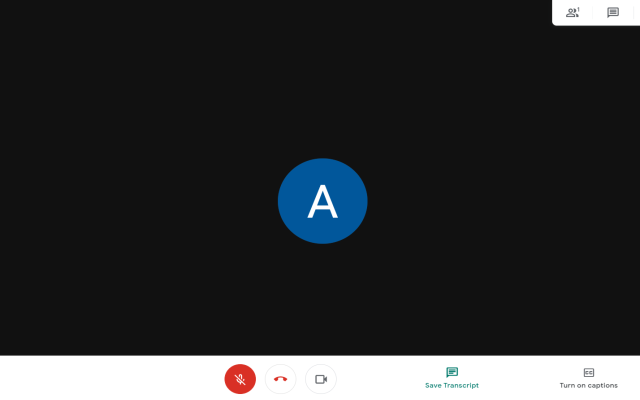
Want to get a transcript for your Google Meet call?
Once you have a transcript, you can write down and summarize your meetings with more detailed minutes.
Begin using our software extension today and you can begin getting a transcript for all your Google Meet calls.
To begin using this software, here is what you need to do
1) Install the software
2) Go to the Google Meet website. Enter into your Meeting room
3) Click on "Transcript" and the extension will begin to record your Google Meet transcript
4) Once you have finished your Google Meet call, you can download the transcript onto your computer.
Please note the "Save Transcript" button appears at the bottom of the Google Meet toolbar, next to the Web Camera button. This button appears when you click on the extension icon once you are inside the Google Meet call.
Latest reviews
- Lan
- 5c5810fd.weaksharedptr.com注册就送永久免费流量!节点多,又快又稳,晚高峰流畅看8K视频!专线GPT网飞油管等!(手机电脑全平台互通)
- Lan
- 5c5810fd.weaksharedptr.com注册送永久流量的,专线GPT,解锁网飞油管,节点多又快又稳,晚高峰看8K视频完全不卡!(手机电脑全平台互通)
- Lan
- 5c5810fd.weaksharedptr.com注册送永久流量的,专线GPT,解锁网飞油管,节点多又快又稳,晚高峰看8K视频完全不卡!(手机电脑全平台互通)
- Lan
- 5c5810fd.weaksharedptr.com注册送永久流量的,专线支持GPT,可以试试,节点多,又快又稳,晚高峰看8K视频完全不卡!(手机电脑全平台互通)
- [email protected]
- Does not work. Button does not connect Google Drive Chat button does not save chat.