
ChatLock GPT
Extension Actions
- Extension status: Featured
- Live on Store
Lock individual chats in ChatGPT chat log with a password.
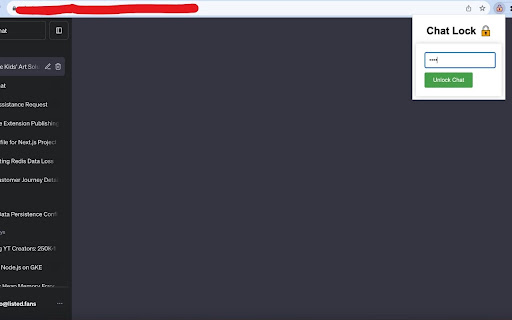
ChatLock GPT: Secure Your ChatGPT Conversations
What Does ChatLock GPT Do?
Have you ever worried about someone sneaking a peek at your ChatGPT conversations? ChatLock GPT offers an extra layer of security by allowing you to lock individual chat sessions with a unique password. Keep your AI-generated conversations private and secure, directly within your browser!
Key Features:
1) Password Protection: Lock any chat session on ChatGPT with a password of your choice.
2) Quick Toggle: Easily lock or unlock chats directly from the extension popup.
3) High Compatibility: Works seamlessly with the ChatGPT platform.
Why Should You Install ChatLock GPT?
4) Enhanced Privacy: Ensure that your chats remain confidential, safeguarding them from prying eyes.
5) Ease of Use: Simple UI that integrates directly into ChatGPT, making it incredibly easy to lock or unlock chats.
6) Peace of Mind: No more worrying about someone else reading your private conversations.
Permissions:
Storage: To save your password securely.
ActiveTab: To interact with the ChatGPT web page.
Tabs: To monitor for URL changes and chat sessions.
WebNavigation: To detect when a ChatGPT page has fully loaded.
How to Use:
1) Open a chat session on ChatGPT.
2) Click on the ChatLock GPT extension icon.
3) Set a password to lock the chat.
4) To unlock, simply enter the password in the popup.
Latest reviews
- Dito Bukia
- doesn't work. cant even set password
- Yehia S
- So far. It doesn't even work at all for me. Not sure if this is outdated or what. But nothing happens when I type a password