
Sound Control
Extension Actions
- Extension status: Featured
Volume booster with volume control. Amplify sound by up to 600% and bass booster, equalizer. Sound booster that works! Boost audio…
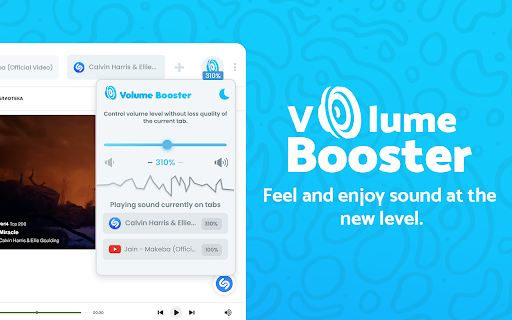
Volume Booster allows you to improve the sound quality in the Chrome browser to get more pleasure from listening to YouTube Music and watching videos. Bass boost to the full. Volume booster boosts by 600%.
Stylish Sound Booster popup with a volume switch with a list of tabs that a now playing audio content. Just regulate the sound in the current web tab through the slider.
Sound Booster is an extension that will allow you to increase the sound of your system. It can raise volume level up to 600%. Make a sound from your browser really awesome with this Volume Booster extension.
Volume Booster allows you to improve the sound quality in the Chrome browser to get more pleasure from listening to music and watching videos. Bass boost to the full. Volume boost by 600%
Here are reasons to choose Volume Booster:
- Our extension can increase the volume of the content being played up to 1000%
- This can be used on current tab, current website, or any website
- Enable/Disable with single click
- Volume booster. Control volume up to 500% boost.
- Bass boost level
- Audio Limiter / Compressor.
- Equalizer 32hz-16khz
- Volume Booster - increase volume to 400% of the standard sound power;
- Bass Booster preset - audio effect to amplify low frequencies of the sound;
The Volume Booster extension helps you set the desired speaker volume level for each individual tab in your browser. Websites are simply filled with multimedia content such as video, music, streams, audio and video ads.
We made the interface of our Volume Booster as simple and intuitive as the volume control and volume sound, keeping all its functions in a lightweight case. Lightweight and stylish window with a volume switch with a list of tabs on which the current audio content is played.
How to use Sound booster Chrome extension:
1. Install Volume Booster
2. Pin it in the toolbar
3. Click on the Volume Booster extension icon and enable the volume booster with toggle button.
4. Then, click on the extension icon and choose the Sound boost range.
Make a sound from your browser really awesome with this Sound Booster extension. Use it on your favorite websites - Youtube, Spotify, VK, Deezer ...
Volume Booster is an easy and convenient music tool for brilliant sounding of your favorite songs.
Just try to take advantage of this Equalizer and enjoy its benefits.
Volume booster extension
Optimize the sound according to the genre which you listening with equalizer for chrome browser.
Equalizer allows you to improve sound quality of your Chrome browser to get more enjoy of listening music and watching videos.
Audio Booster - chrome extension that help you to set a desired speaker volume degree for each individual tab in your browser. This app have a simple interface of sound volume control switch as it just possible with keeping all of its power in a light design. Stylish popup Volume Master with a volume switch with a list of tabs that a now playing audio content.
Full screen Volume Master
Chrome prevents you from going to a complete full-screen when using any extension manipulating with sound so you can always see the blue rectangle icon in the tab bar (to be aware of audio is being manipulated). There's no way to bypass it and after all it's a good thing that keeps you safe. However you can improve the situation a bit by pressing F11 (on Windows) or Ctr+Cmd+F (on Mac).
Bass Booster
- Sound effect to enhance the sound of low frequencies;
- Preset Vocal Booster - boost the high frequencies of the sound.
Volume Controller extension helps you to set a desired speaker volume level for each individual tab in your browser. Websites are just bursting with media content such as videos, music, streams, audio and video ads. To take control over all that audio you need a power volume adjust tool with the ability to set individual volume settings for each tab. To solve that task we developed our audio volume control extension.
Extension Volume Booster includes:
Sound Booster. Level up sound more than 600% from standard sound power.
Sound Booster. Switch off automatically in normal mode.
Volume Master - Change the volume for each individual tab with sound booster.
Sound Booster - works great on all popular sites
Volume Control. Remembers previous sound settings.
Sound Booster. Simple and stylish popup window Sound Booster extension with volume control and list of tabs.
Volume Manager will amplify your sound at a maximum and provide you with better sound quality wherever you are!
Bass Booster - chrome extension that help you to set a desired speaker volume degree for each individual tab in your browser. Bass Booster have a simple interface of sound volume control switch as it just possible with keeping all of its power in a light design. Stylish popup Volume Master with a volume switch with a list of tabs that a now playing audio content. Volume booster and sound booster
Volume Control
Volume Control to take control over all that audio you need a power volume adjust tool with the ability to set individual volume settings for each tab. To solve that task we developed our audio volume control extension. Volume Control
It helps you to get rid of high volume *auto-play* videos while browsing facebook, twitter, web.whatsapp, youtube and any other streaming sites (html5 videos)
We hope you find our Volume Master useful! We are waiting for your feedback and ratings!
Latest reviews
- Jack Sparrow
- to whos saying "dont work", refresh the page ur playing audio on, and click the power button on the extension, itll work from there on. it works really well now i can make my ears ABSOLUTELY BLEED while listening to my hard rock music.
- Ahmed
- nice
- Sansello
- In general, 5 out of 5 application no words can describe my satisfaction. I usually encounter so much videos which have sound problems that even though I turn up to volume at maximum level. So , just add this in to your browser you will love it!
- Samarth Joshi
- does not work
- Nolan Badger STUDENT
- now I can play six seven sound effects in class at 600% volume! all the teachers will hate me! this is a joke, I'm a good STUDENT, don't do this for real
- Ziyan Syuja
- nice
- Übervaag
- Tried to use it to boost the audio from a Reddit video. It says 'no tabs playing audio' even when I try to use it while the clip is playing. 1 star from me :/
- Shoestring Tom
- Doesn't crash Chrome like many others. 👍😎
- Kareem
- So easy to use and has a great volume bar since it can go up to 600% volume.
- HERBERTO SILVA
- lets make the deal for the receiver , no one more interested in amplification -
- Steve Liu
- nice
- JD Pixelforge
- fef
- 20DC0161 Mangaloram
- im glad that this actually works
- Saidi Vivo
- good
- Yusuf Khalifa
- it's pretty good so far
- David
- Best and #1 by far
- navi game club
- THIS IS SUPERB MAN
- Robert M. Papillion
- I like the on/off button because it preserves your previous Volume Booster setting.
- ADITYA RAUT
- Not working bull shut extension
- Mekonnen Merid Nigussie
- it is very nice.
- dible midas
- cool
- Tayeb Tayeb
- good thing
- Oho
- TRASH DOESNT WORK ON YOUTUBE
- Nghj Quang
- absolutely 5 star deserved
- Jeremiah Cova
- THIS WORKS
- Shahmeer Khan
- good
- iliill “iiiii” iliil
- good
- Leanne Pospisil
- I want it loud not staticky.
- Sunshine Chan
- OK
- Merika
- this isn't really good, if you use it one something like Crunchyroll it prevents Fullscreen for some reason and this will probably damage your speakers if you use it too often and too high
- abhishek gupta
- very nice application
- Linux Smart
- Good Job
- Skywatch Stories Shorts
- best
- Ferdamos X
- Nice
- nenlka neiska
- It just doesn't work
- sebastian janowski
- very good
- Andy Janssen
- I like ti
- Aditya Patel
- garbage does not even work
- Victory Love
- So LOVE & appreciate this extension!! It works EXCELLENTLY 4 ME, being hard of hearing!!
- Jay
- Amazing I love it
- Inggar 4
- its work you should try
- Shelby Johnson
- This one actually works! Hit the power button on the top right of the extension interface. I didnt think it worked at first but that fixed it.
- KORE MONA
- NO WAY THIS ACTUALLY WORK 😭😭😭
- Velga Ina Caikovska
- Doesn't work. Makes absolutely no sense.
- 50gens
- everything becomes high pitch when i turn this on. even when the volume is set to 100%, when there's no increase. it does increase the volume. my headphones were unusable, the volume is still very low but at least slightly higher.
- Felipe Pourroy
- I LOVE IT IT HELPS TOO MUCH
- savyion vreen
- i gets loud how i want
- Sumanth Bandari
- excellent
- fenix dopler
- exclente
- Ionut Avram
- best