
CRX id
kjmcnofpejpikipldkgodlhgfjdjckpn
kjmcnofpejpikipldkgodlhgfjdjckpn
Description from extension meta
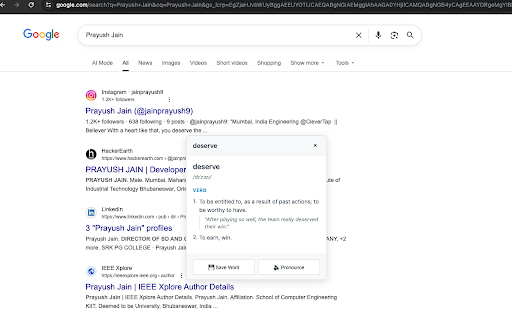
Double-click any word to get instant definitions - works on any website
Image from store
Description from store
Get instant word definitions on any website with a simple double-click. Perfect for students, professionals, and anyone who loves to learn.
📚 **Instant Definitions**
- Double-click any word on any webpage for instant definitions
- Right-click context menu for selected text
- Keyboard shortcut (Ctrl+D) for quick lookup
- Manual search via extension popup
🎯 **Key Features**
- Works on every website - news, articles, social media, documents
- Multiple definitions with parts of speech
- Example sentences and pronunciation guide
- Word history tracking with usage statistics
- Text-to-speech pronunciation
- Save favorite words for later review
🔒 **Privacy & Learning**
- No data collection - everything stored locally
- No user accounts or registration required
- Free dictionary API with comprehensive definitions
- Clean, distraction-free interface
- Offline word history access
🚀 **How to Use**
1. Double-click any word on any webpage
2. Or select text and press Ctrl+D
3. Or right-click selected text → "Define"
4. Or use the extension popup to search manually
Perfect for students, professionals, and language learners who want instant access to word definitions while reading online content.
Latest reviews
- (2025-08-22) Prayush Jain: Helpful! 🙂😂