
Link Peek
Extension Actions
Show a modern link summary on hover with modifier key support
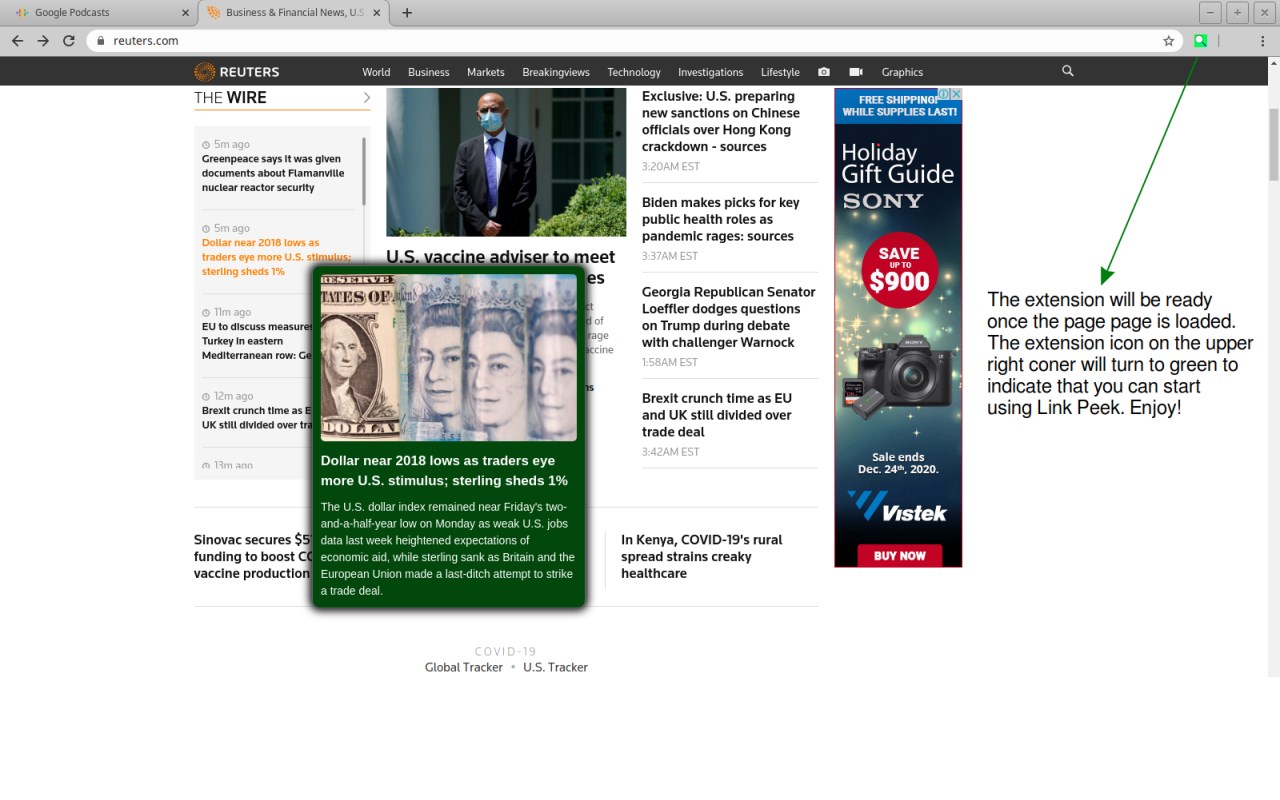
Experience the Web Faster with LinkPeek
Stop wasting time clicking through dozens of tabs. LinkPeek revolutionizes your browsing workflow by providing instant, high-fidelity summaries of links before you even click them. Whether you're scanning news headlines, browsing forums, or comparing products on shopping sites, LinkPeek helps you filter content with a simple hover.
Why Use LinkPeek?
Instant Insights: View page titles, social metadata (Open Graph), and descriptions in a clean, modern pop-up.
Maximum Efficiency: Navigate dense websites like Reddit, Wikipedia, or Amazon much faster by previewing the content behind every link.
Privacy-First Design: All metadata extraction is performed locally on your device. We never track your browsing history or transmit data to external servers.
Seamless Integration: Works quietly in the background, activating only when you need it.
How it Works:
Wait for Load: The extension icon turns green once the current page is fully loaded and ready for peeking.
Hover to Preview: By default, hold Ctrl (or Cmd) and hover over any link to see a summary.
Customize Your Flow: Don’t want to hold a key? Click the extension icon to open the Side Panel settings. You can toggle the modifier key requirement and customize the preview colors to match your dark or light mode preference.
Technical Note: For security and performance, previews are optimized for links within the same domain or standard social metadata patterns.
Upgrade your browsing experience today. Please send us an email if you want new features and we'd be more than happy to implement :)