
Hide My Email for Gmail™
Extension Actions
- Extension status: Featured
- Live on Store
Hide your emails in Gmail™ to focus and get in the flow. Unhide them whenever you're ready.
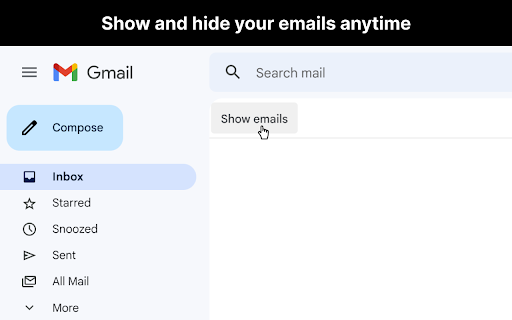
Now you can hide your emails in Gmail™ whenever you want so you can get in the flow and do more deep work.
## Overview
After you open Gmail™, click the "Hide emails" button to hide your messages. You'll still be able to search Gmail™ and use it as a reference, just without all your emails appearing and distracting you.
When you're ready to view your the emails in your inbox again, just click "Show emails".
This extension only works if you use the Gmail™ website on chrome. It doesn't work if you're using the Gmail™ desktop app.
## View the code
https://github.com/mthurmond/hide-my-email-for-gmail
## More helpful extensions
Try my other two extensions to remove distractions. Both are free & open source:
- Distraction free for Linkedin™: https://chrome.google.com/webstore/detail/distraction-free-for-link/kigfnbfbpfpgphbocdkmeablbgdbpfke
- Slack hider: https://chrome.google.com/webstore/detail/slack-hider/ojfkenmmieminleikclgocedgpggeecp
Latest reviews
- May Rashiele Sueño
- Hi Matt, awesome extension by the way! I just wanted to ask if you have any suggestions for a solution. My employer mentioned that the extension is working for his professional email, but not his personal email (both are Gmail). I tried it myself with two different emails open in one browser (I'm using Google Chrome), and it worked fine. So, I'm wondering why it doesn’t seem to work for my employer's other email. Looking forward to your reply. Thanks!
- Chris Kit
- Extension doesn't work - I am using Google Chrome Browser
- Erban Ku
- Does not work anymore
- Pietro
- It works really well! I love it! Thanks! (It would be cool to be able to enable/disable it with a keybaord shortcut)
- Pietro
- It works really well! I love it! Thanks! (It would be cool to be able to enable/disable it with a keybaord shortcut)
- Sergei Papkov
- Dear, and where i can find the buttons to hide and show the e-mails? Or it's driven by the hotkeys? The only way i found - to turn on/off this extension in the chrome menu. https://drive.google.com/file/d/1EOtljo1LrVVF-ePgBX5wMbpaTeFh2LUy/view?usp=sharing
- Sergei Papkov
- Dear, and where i can find the buttons to hide and show the e-mails? Or it's driven by the hotkeys? The only way i found - to turn on/off this extension in the chrome menu. https://drive.google.com/file/d/1EOtljo1LrVVF-ePgBX5wMbpaTeFh2LUy/view?usp=sharing
- Matt Thurmond
- I'm the developer of this free extension and use it on my home and work gmail accounts everyday to minimize distraction and get in the flow. It works well. Hope you'll give it a shot! This extension can't see, and never collects, any of your email information. You can see the code on github if interested: github.com/mthurmond/gmail-inbox-hider. Thanks, and here's to calmer email management!
- Paul Chong
- Nifty extension. Super easy to use, and helps clear the distracting clutter in your inbox when you want to focus on deep work. Definitely recommend trying it out.
- Paul Chong
- Nifty extension. Super easy to use, and helps clear the distracting clutter in your inbox when you want to focus on deep work. Definitely recommend trying it out.