
CRX id
ladkaalcnedlcimjgaldjoeahnklilnk
ladkaalcnedlcimjgaldjoeahnklilnk
Description from extension meta
Nethack
Image from store
Description from store
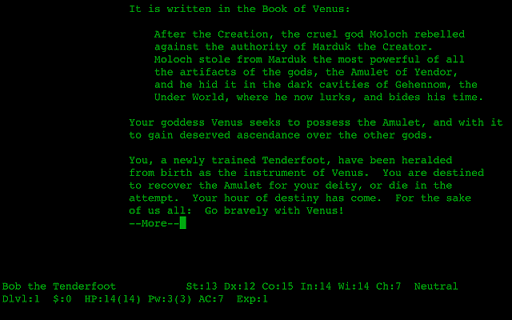
NetHack is a single player dungeon exploration game that runs on a wide variety of computer systems, with a variety of graphical and text interfaces all using the same game engine. Unlike many other Dungeons & Dragons-inspired games, the emphasis in NetHack is on discovering the detail of the dungeon and not simply killing everything in sight - in fact, killing everything in sight is a good way to die quickly. Each game presents a different landscape - the random number generator provides an essentially unlimited number of variations of the dungeon and its denizens to be discovered by the player in one of a number of characters: you can pick your race, your role, and your gender.
This is Nethack 3.4.3 ported to run under Chrome. There is both a text and a graphical tile mode available. This currently does NOT run on an ARM ChromeBook. Target date for running on ARM is 2014-01-01.
Latest reviews
- (2024-03-30) epic arrow: Was really fun, now when I open it it doesn't give me the option to start
- (2022-01-19) Lastname Firstname: Pretty fun, some levels seem impossible. Use the wiki while you play to know what things are.
- (2020-01-30) Be Mo: Very difficult, very fun. The graphical mode for this is an appreciated addition, and even allows for arrow key movement which is a godsend.
- (2019-10-20) Joey Parrish: Classic!
- (2018-05-14) David N: Persistant state across closed tabs would make this much better.
- (2016-12-23) the far look cursor is bugged.
- (2016-08-28) OkAycase: This version is out of date. Please update it to the recent one.
- (2016-08-01) Danillo Kisser: Doesnt work on chromebook
- (2016-07-29) Does not work yet.
- (2016-06-21) Ville Oras: Crashes on my Chromebook (HP 14) too. :-(
- (2016-05-25) Crashes on ChromeBook
- (2016-04-24) Jasper Koops: Does not work and does not appear to be finished
- (2016-04-14) P Park: Love the app on desktop Chrome, but it crashes ("Aw, Snap!") on my chromebook (quawks).
- (2016-02-12) William Beavis: m8 i r8 it 8/8 cos its that Gr8 m8
- (2016-01-20) pika ron: it was hard figuring it out at first but then it helped be the best at many different mmo games
- (2015-09-23) pnr: Wastes a lot of screenspace. It has enough space to display the inventory, but it doesn't. It has some weird holdouts from the ASCII game, such as the arrow keys not working, the "More" pauses, etc. And then there are screens where we have to use the mouse to make a selection. Overall, it's not a "clean" interface.
- (2015-09-19) April Rose Orandain: Cool and Addictive game
- (2015-09-13) According to the other comments, it seems cool, and I really really love Nethack, but when I try to play the graphical game, there's nothing, with "new game", it says: "not implemented yet". I didn't undestand how to use it. I tried a little the non graphical game, I don't know how to activate the numpad direction keys.
- (2015-06-30) Meredith Northup: Cool, but I really want full screen
- (2015-02-08) Gregory P. Smith: It was better than a kitten. I'm going to die in it again and again.
- (2014-12-08) Christoph Lorson: Realy cool! ... but teleporting with CTRL-T doesn't work because this opens a new tab...
- (2014-11-02) Tony Tan: A problem I found is when in graphical mode, when say trying to read something, you need to use the mouse to select instead of simply pressing the letter corresponding to that item. Another problem is in text mode, the cursor sometimes just doesn't follow Lost progress somehow ... apparently all my data under my name was lost. Don't know how, but I'm sure I saved in sokoban.
- (2014-10-03) Dave Bath: Toshiba CB30 Win. Love the "Options" from the Chrome Panel ... opening up a .nethackrc to edit. (loved it since my VT100 days!)
- (2014-09-14) Marc Meneses: Okay great took me a while to figure out how to change to the numpad movement controls but i got it! A++
- (2014-05-12) Brandon McEntire: very fun, it is like cave of epokathar
- (2014-04-15) River Smith: I don't really understand the concept. It could have been more clear. :)
- (2014-01-04) Kassidy Gordon: Refuses to run on Samsung Chromebook.
- (2013-12-15) Great, I may try to translate it to Chinese for the stable release.
- (2013-10-18) Dave: Probably most played game for me of all time.
- (2013-10-07) Artem Mukhin: I have Chromium (Debian x64), and game is really doesn't work. I don't know why.
- (2013-09-22) Adam Edwards: needs an option to type commands instead of the drop menus in graphical mode.
- (2013-09-16) Conrad Dunkerson: Works great! On one machine out of 4.
- (2013-09-13) Derick Staggs (kc7wzl): the graphic version works ok.. but the text version key set makes no sense at all and painful to play.. Tried it on acer C7 chrome book 1.1ghz intel cpu 2gig mem 16gig ssd.
- (2013-09-13) hexedbug: It does not work. I'm running it on an HP G72 notebook PC running Windows.
- (2013-08-28) Andy Bryant: Doesn't work. Samsung Chromebook. It tells me that it requires native client app that doesn't work on my computer. I can see a bar at the top that slides down, and if I click graphical I can see a bunch of stuff, but not the map.
- (2013-07-13) Ricky Adams: Nice version.
- (2013-07-10) Lucius NeoChoJin: Didn't work for me either. Black screen with a few words at the top but nothing clickable, and no keys effect it.
- (2013-06-05) Shimon Vinnik: Very original and fun to play. Saving doesn't seem to work for me though.
- (2013-05-14) Heart Blue: i love
- (2013-05-02) Chris DiBella: This is a gem you either get or don't... and it takes time to get, as learning something each life should be an objective.
- (2013-03-24) Chris G: Too bad it doesn't work on ARM Chromebook.
- (2013-03-11) Henry Spece: hold [alt]+[ctrl] to execute control key commands like ^D, hold [shift]+s to save, and bam! It's just like the real thing!
- (2013-03-09) Angela Doerksen: I have been playing this game for over 6 years - my husband introduced me when I was enormously pregnant and suffering from insomnia. I was hooked! It's always a challenge, and always interesting to play.
- (2013-02-22) Slang: I love it
- (2013-02-06) Raymond: very good~
- (2013-01-28) Abdón Barbeito Pérez: so hard development already required...
- (2012-11-14) Max Caplow: This is awesome! Is there anyway to get the tilesets working on it? *EDIT: Tilesets are now here!!! The dev is one of the best. He sent me a personal email a few days ago telling me this feature was added! It feels just like the real desktop version.
- (2012-10-17) Nethack on chrome! Works 100%, in both offline & online mode. I'm using a chromebook so your mileage may vary. Very happy with the results so far though :)
- (2012-07-15) Yasuo Yamasaki: Saving function does work on my environment. Display was corrupted, because of using non-monospace font. [My environment] - OS: MacOS Lion (10.7.4) - Browser: Chrome 20.0.1132.57