
Return Google Maps Search
Extension Actions
- Live on Store
restores the google maps button to google search
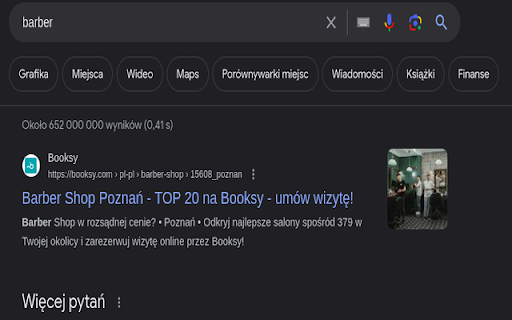
Restore the seamless integration of Google Maps with your Google Search experience using the 'Return Google Maps Search' extension. This lightweight extension brings back the familiar Google Maps button to your Google Search results, providing you with quick and direct access to location information.
Never miss a beat when searching for places, businesses, or addresses. With the 'Google Maps Search Restorer,' effortlessly navigate from your search results directly to Google Maps, gaining instant access to detailed maps and directions.
Key Features:
Reintroduces the Google Maps button to Google Search results.
Simplify your online navigation and exploration by adding the Google Maps Search Restorer extension to your browser. Save time and enjoy the convenience of having Google Maps readily available whenever you perform a search.
Latest reviews
- Marc Rodrigues
- needs a v1.2 so it can work again
- Joost Lettink
- It does not work sadly.
- Michał Droździk
- Stopped working unfortunately
- sander424
- Does not work at all
- Annie ★
- Unfortunately doesn't work any more, but thank you for the six months I could use it.
- Oleksandr Zhezhela
- Stopped working for the last 2 month.
- Axel Nilsson
- Worked flawlessly until now(December 18 2024), google must have done something
- Alexander Øyen
- Stopped working after a few days
- Artus Meyer-Toms
- Stopped working for me recently unfortunately.
- Robert Wenink
- Great, does what it says: adds a google maps button in the options bar and navigates with the search as argument to google maps when clicked.
- Michal Botka
- it works fine but instead of correctly name maps button it duplicate video button so to access maps you need to press second video button
- Nacho Tikal
- Does absolutely nothing.
- Ľubomír Suchý
- EU sometimes makes stupid decisions which makes life more complicated to users. Thanks for this addon.
- Jürgen Lücking
- Works, but at least in the German Chrome version the button "maps" does not pop up - instead the "video" button is doubled. If you then click on the right oft the two "video" buttons the map comes up as expected.
- Kerian Thibault
- Thank you for fixing the bad decision of the EU. It could have been a simple toggle in the browser...
- Fafusiaa
- The best