
RSS SYND - AI Content Intelligence
Extension Actions
- Live on Store
AI content intelligence: instant summaries, threads & shareable formats from any article or social media post.
RSS SYND - AI Content Intelligence
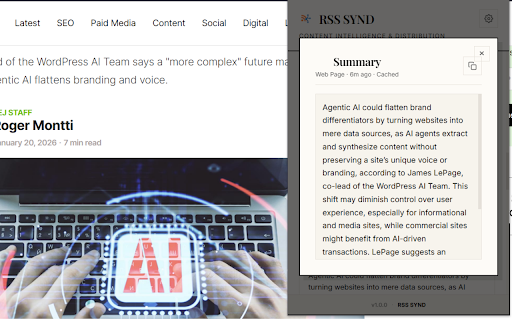
Save hours of reading with instant AI-powered summaries. Get the key points from any social media post, article, or webpage with just one click.
KEY FEATURES
• One-Click Summarization - Click the Summarize button to get instant AI summaries
• Smart Content Extraction - Automatically detects and extracts the main content from any page
• Works Everywhere - Twitter/X, LinkedIn, Facebook, Reddit, YouTube, and any website
• Summary History - Access your last 50 summaries anytime
• Smart Caching - Frequently summarized content loads instantly
PREMIUM FEATURES
Upgrade to unlock powerful additional capabilities:
• Multi-Format Outputs - Get your summary as Executive Brief, Bullet Points, ELI5, Tweet Thread, LinkedIn Post, or Study Notes
• Ask Anything - Ask unlimited questions about the content you just summarized
• Share Queue - Sync content to your dashboard for scheduled posting
• Direct X/Twitter Posting - Post threads directly from the extension
SUPPORTED PLATFORMS
• Twitter/X - Summarize any tweet or thread
• LinkedIn - Get the gist of long posts
• Facebook - Summarize posts in your feed
• Reddit - Quick summaries of posts and comments
• YouTube - Summarize video descriptions
• Any Website - Use "Summarize This Page" for any webpage
PRIVACY FOCUSED
Your privacy matters. Content is only processed when you click Summarize - we never automatically scan or store your browsing history. All data is stored locally on your device.
HOW TO USE
1. Install the extension
2. Click the RSS SYND icon in your toolbar
3. Visit any website or social media platform
4. Click "Summarize This Page" or paste content directly
5. View your AI-generated summary instantly
Questions or feedback? Contact us at [email protected]