
GCP Dark Theme
Extension Actions
Toggle with ease between dark and light theme for the Google Cloud Console.
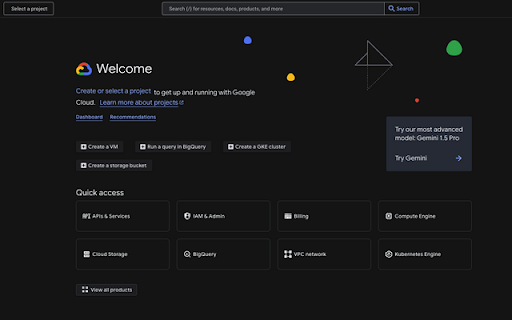
Unofficial Google Cloud Platform (GCP) Chrome Extension for Dark Mode
The Google Cloud Dark Theme Chrome extension brings dark mode to the Google Cloud Console. While an official dark theme has long been anticipated, it is yet to be introduced. This extension leverages existing CSS classes and makes minor adjustments to HTML attributes to enable a functional dark theme for the GCP Console. The goal is to support Dark Mode in GCP with this extension until the official release of Dark Mode for GCP.
Although this extension doesn't provide complete dark theme support (e.g., some assets like images remain unchanged), it covers approximately 95% of the console, delivering a visually pleasing dark mode experience for most users.
Features
- Enables a dark theme for the majority of the GCP Console interface.
- Improves usability during extended sessions or in low-light environments.
- Easy-to-install and lightweight extension.
The GCP Dark Theme extension is not affiliated, associated, authorized, endorsed by,
or in any way officially connected with Google, Google Cloud or any of it's subsidiaries.
Latest reviews
- Calvin Mbuvi
- Works very well.
- Yuvaraj Loganathan
- Nice works great
- Matthew Diaz
- God Sent
- Daniel W
- Doesn't dark-mode the query tab in BigQuery, but otherwise works well from what I saw
- Rob I
- Why is this an extension? Thank you so much! I can see stuff now
- Daniel Vicente Ibañez Gudiño
- Works fine