
CRX id
lenheondoadkgoodcgmcijcoiahhemch
lenheondoadkgoodcgmcijcoiahhemch
Description from extension meta
Adding an extra dimension to your productivity. Anywhere.
Image from store
Description from store
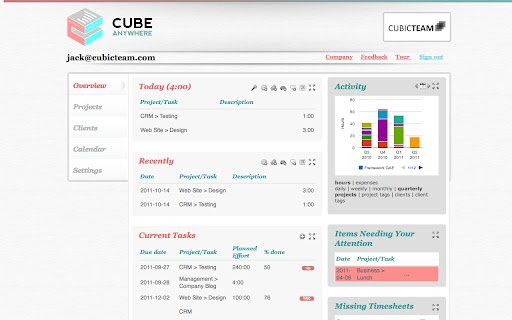
Cube Time & Expense Tracker manages your Projects, Tasks and Clients and is fully integrated with Google's services, making your time and expense reporting as easy, simple and fast as drinking an espresso!
* Simple, easy, fast - start tracking time in 15s
* Anytime, anywhere - web, iPhone, iPad and Android
* Powerful charting; Available in 6 languages
Cube is perfect for businesses, contractors, consultants, developers and freelancers that need to track their time and expenses and keep tabs on project costs.
FULLY CONNECTED
- Google Docs recently used and Google Calendar events are listed when reporting time
- Client information is retrieved from Google Contacts
- View and report your timesheets and expenses right from Google Talk
- Also integrated with Twitter, Google Buzz, GitHub, and Bitbucket
ANYWHERE ANYTIME
- Your data is available from any computer - login securely from any browser
- Using the latest HTML5 technologies, your data is with you even if you don't have a network connection
- Access your data on the move on your phone or tablet - Android, iPad and iPhone Apps available
- Rated one of the 10 Must have iPad apps for professionals by Forbes! http://bit.ly/axRxMh
THINK GLOBAL
- Available in English, Portuguese, Spanish, German, Italian, French
- Supports your currency
- Vacation calendar with your national holidays
POWERFUL
- Create project teams and assign tasks
- Approve or reject time and expenses
- Real time project costs
- Rich interactive charts at team member, project, client and company level
- Tag your data and report, chart and filter based on those tags
START TODAY
- Start in 15 seconds: your language/timezone/currency are automatically setup from your profile/account.
- 30 day, full featured, risk free, trial period - no credit card needed
Latest reviews
- (2020-09-02) Theerasak Musigawan (OLE): Very Cools Application
- (2014-11-26) H Sapien: not free. Deceptive hook!
- (2014-11-05) Jennifer H: Overall, the time tracking worked pretty well. I was able to create projects and log tasks to the projects, however the layout was a bit confusing and didn't clearly show task hours vs project hours. I was able to quickly and easily export my timesheet and apply appropriate costs to each project. Unfortunately, it's not free after 30 days. Bummer.
- (2014-06-25) Christina Fraser: I want to uninstall this app, but I can't! Avast tries to remove it but when it tries, it succeeds then it reappears in the list. It does not appear in the Extensions list of Chrome's settings, nor does it appear in my apps list. I have to "search" for it and to find and launch the app (proving it's still installed) but there, I can still find no way to uninstall it. This behaviour is EXTREMELY suspicious and I want it GONE!
- (2014-01-19) J. Argon Gardner: $6.99 a month per user is not free.
- (2014-01-06) John Savageau: They want too much access to personal information. DELETE
- (2012-10-17) Peter Mooney: Way too expensive. They say it's free on the web store, but that doesn't appear to be true. When I try to use it that way, it tells me that my acct has been disabled until I subscribe.
- (2011-12-20) Stephen Rose: Been running this for several months now. It's an amazing tool to track contract billing to clients. I run the main version on my work computer, and downloaded the free Ipad app to access the same data on the tablet for viewing and adjusting when I'm away from the office. Some people have mentioned about using a spreadsheet to accomplish the same. As a business owner I've tried this option. It was too cumbersome. Cube makes data entry and report generation very fluid. With excel I was spending more time updating the spreadsheet than doing the work. Great application if you are in need of tracking time and expense data.