
Right-click Translate
Extension Actions
Translate selected text or pages from the context menu with multiple providers, targets, and quick preview.
🌐 RIGHT-CLICK TRANSLATE - MICROSOFT EDGE STORE DESCRIPTION
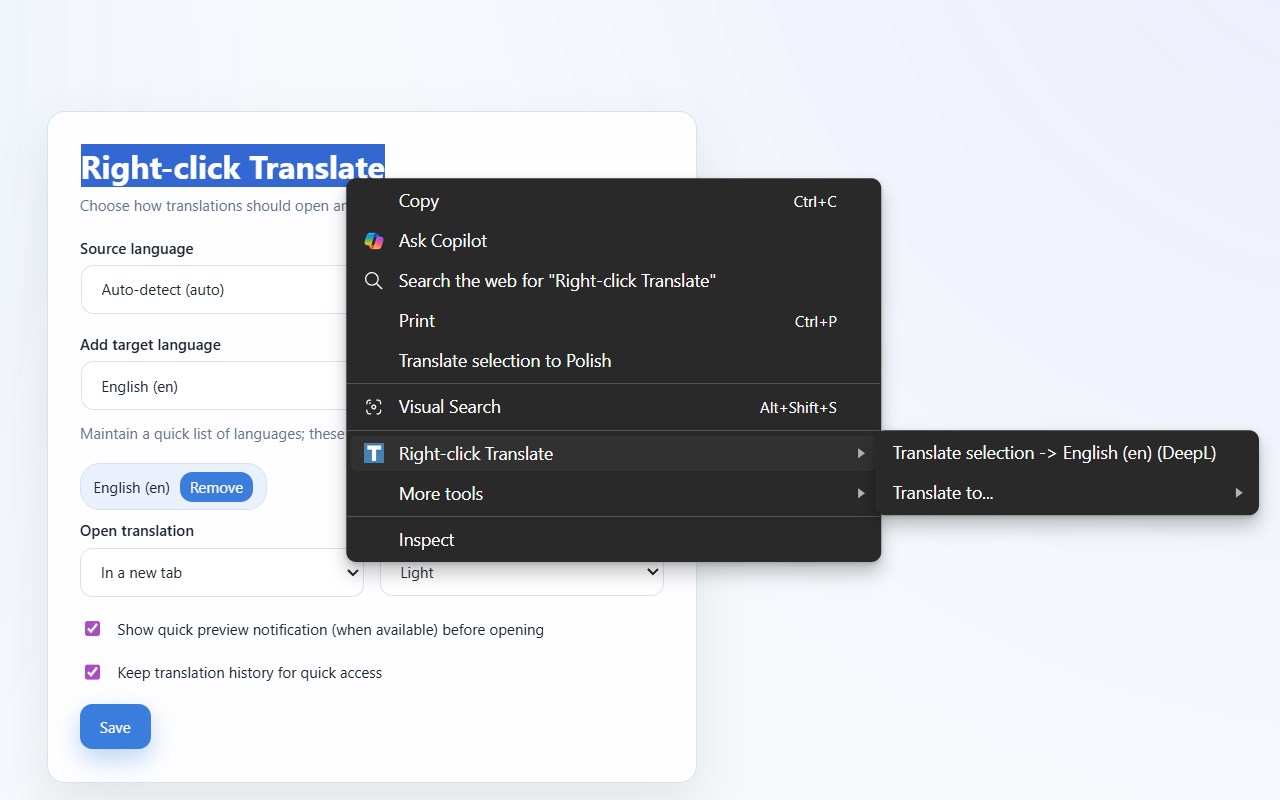
Right-click Translate makes it easy to translate selected text on any webpage without disrupting your browsing experience. Simply select any text, right-click, and choose your target language to instantly access translations through your preferred translation service.
✨ KEY FEATURES
🗣️ MULTIPLE TRANSLATION PROVIDERS
- Google Translate
- DeepL
- Bing Translator
- Yandex Translate
- Microsoft Translator
Choose your favorite provider and switch anytime from the options page.
⚡ QUICK TRANSLATION METHODS
- Right-click context menu with one-click translation
- Keyboard shortcut (Alt+Shift+T by default) for hands-free translation
- Select text → Right-click → Pick a language → Instant translation
🎯 SMART LANGUAGE MANAGEMENT
- Set a default source language or use auto-detect
- Maintain a list of frequently-used target languages
- Quick access submenu shows your most recently translated languages
- Keep your preferred language combinations for faster access
👀 LIVE PREVIEW NOTIFICATIONS (Optional)
- See a brief translation snippet before opening the full translation service
- Quick notification preview without leaving your current page
- Disable previews anytime in settings if you prefer
💾 PERSISTENT PREFERENCES
- Your settings sync across all your Edge devices
- Preferences saved: source language, target languages, provider choice, open mode
- Optional translation history tracking (disabled by default)
🎨 FLEXIBLE INTERFACE OPTIONS
- Choose to open translations in a new tab or replace the current tab
- Light, dark, or auto theme for the options page
- Minimal, non-intrusive design
📖 HOW TO USE
✅ BASIC TRANSLATION: Select text on any webpage → Right-click → Choose "Translate selection → [Language]"
⌨️ QUICK SHORTCUT: Select text → Press Alt+Shift+T to translate with your default language
🔤 PICK DIFFERENT LANGUAGE: Right-click → Select "Translate to..." → Choose from your saved languages
⚙️ CUSTOMIZE: Click the extension icon → Options to manage languages, provider, and settings
🔒 PRIVACY & SECURITY
✔️ No Data Collection - We don't collect or store any personal information
✔️ Local Storage Only - Your preferences and history are stored locally on your device
✔️ Your Control - Only selected text you explicitly choose is sent to translation services
✔️ Optional Features - Preview notifications and history tracking can be disabled
✔️ Transparent - All code is bundled locally; no remote scripts or external code execution
🔐 PERMISSIONS EXPLAINED
📋 Context Menus: Adds the right-click translation option
📑 Tabs: Opens translation results in new or current tab per your preference
💿 Storage: Saves your preferences, languages, and optional history locally
✂️ Scripting & Active Tab: Captures text for the keyboard shortcut feature
🔔 Notifications: Shows optional translation preview alerts
🌐 MyMemory API Access: Powers optional preview translations (can be disabled)
👥 PERFECT FOR
📚 Language learners
🔍 Researchers reading multi-language content
💼 Professionals working with international documents
🌍 Anyone who needs quick translations while browsing
🤝 Business users managing global communications
🎉 WHAT'S NEW IN VERSION 1.3.0
- ✨ Multiple target languages with smart history-based suggestions
- 🌐 Expanded provider support (Google, DeepL, Bing, Yandex, Microsoft)
- ⌨️ Keyboard shortcut for quick translation (Alt+Shift+T)
- 👀 Live translation preview notifications
- 🌙 Dark mode support for the options page
- 📝 Translation history tracking (optional)
💬 SUPPORT
Questions or feedback? Visit our GitHub repository:
https://github.com/jomardyan/xt1-Right-Click-Translate
👨💻 Developer: Hayk Jomardyan
📦 Version: 1.3.0
📜 License: Open Source