Control Panel for YouTube
Extension Actions
Gives you more control over YouTube by adding missing options and UI improvements
Features
Ads:
• Block ads
• Hide Sponsored videos & promos
• Hide Merch, Offers etc. (desktop version)
Recent YouTube changes:
• Restore Subscriptions link in sidebar (desktop version)
• Restore order of sidebar items (desktop version)
• Restore Related sidebar layout (desktop version)
• Display Subscriptions grid as a list (desktop version)
New video player UI:
• Disable new progress bar and controls (desktop version) - Note: this will stop working when YouTube removes the old player UI
• Hide new full screen controls
• Hide "More videos" in full screen
• Always use compact Play button (desktop version)
• Player controls background (desktop version) - Blur / Transparent
• Restore Miniplayer button (desktop version)
• Restore corner click to toggle full screen (desktop version)
• Hide full screen title (desktop version)
• Hide full screen like/dislike buttons (desktop version)
Annoyances:
• Hide AI summaries
• Remove pink gradient from progress bars
• Hide information panels
• Hide Premium upsells
• Disable video previews (desktop version)
• Disable themed hover effects (desktop version)
• Automatically pause channel trailers (desktop version)
• Allow background playback (mobile version)
• Hide Open App links (mobile version)
Video lists:
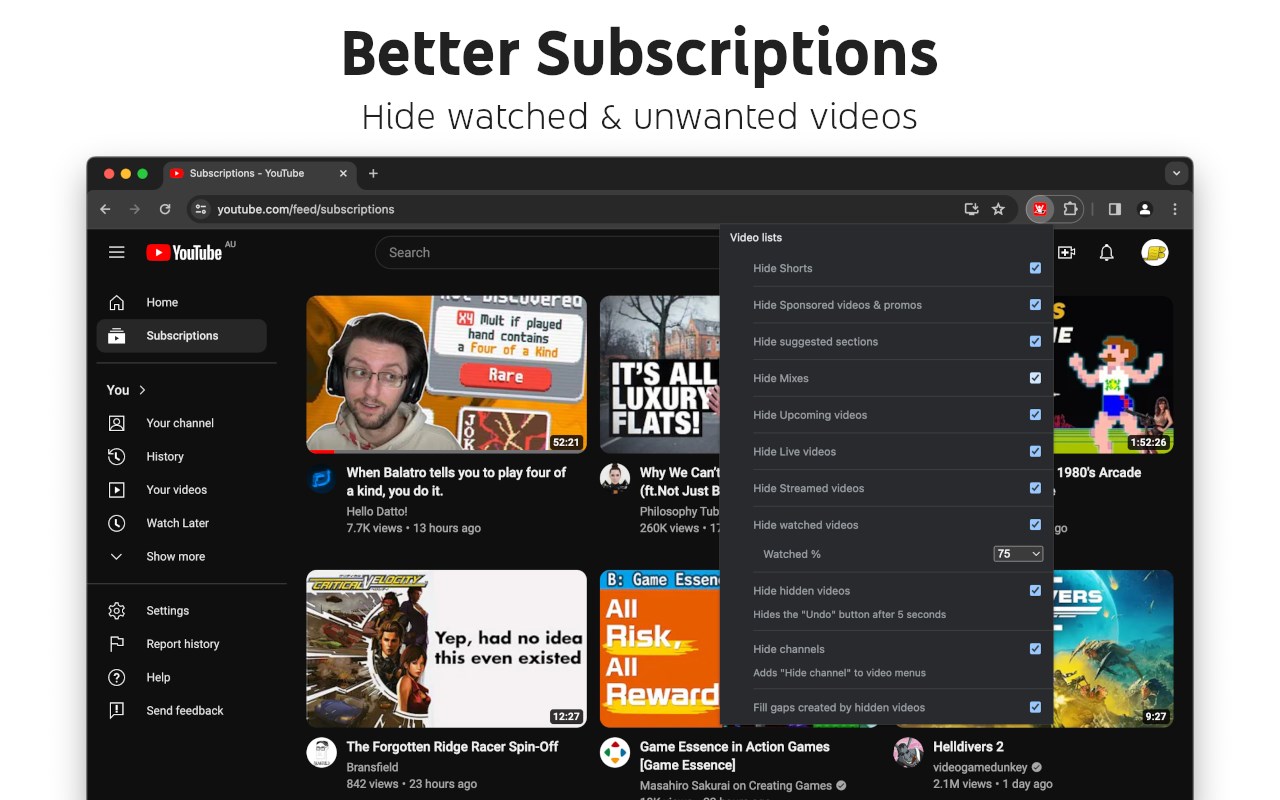
• Hide suggested sections
• Hide Live videos
• Hide Streamed videos
• Hide Mixes
• Hide Playlists
• Hide Movies and TV
• Hide Upcoming videos
• Hide Members only videos
• Hide Collaborations in Subscriptions
• Hide low view videos in Related
• Hide Auto-dubbed videos - Where explicitly labeled
• Hide watched videos
• Hide hidden videos - Hides the "Undo" button after 5 seconds
• Hide channels - Adds "Hide channel" to video menus
• Disable Home feed
• Search thumbnail size (desktop version)
• Minimum grid items per row (desktop version)
• Hide Posts in Home (mobile version)
Video pages:
• Disable Autoplay
• Disable Ambient mode
• Hide Related videos
• Hide the Next button
• Hide channel watermark
• Hide Share/Thanks/Clip etc.
• Hide Ask button
• Hide video metadata
• Hide Comments
• Always use theater mode (desktop version)
• Full size theater mode (desktop version)
• Disable enlarged UI in theater mode (desktop version)
• Always use original audio (desktop version)
• Hide video end cards (desktop version)
• Hide video endscreen content (desktop version)
• Hide Premium Jump ahead button (desktop version)
• Hide Chat (desktop version)
• Add Take snapshot to video menu (JPEG / PNG) (desktop version)
• Make Transcript downloadable (desktop version)
Shorts:
• Hide Shorts
• Redirect Shorts to the normal player
• Hide suggested actions
• Hide link to related Short by the same channel
• Always show progress bar
• Stop Shorts looping
• Hide Remix button (desktop version)
• Hide Shorts metadata until hover (desktop version)
• Minimum Shorts per row (desktop version)
UI tweaks:
• Show full video titles
• Use square corners for thumbnails and videos
• Hide categories in Home
• Hide channel banner images
• Hide Search with your voice
• Enforce theme (desktop version)
• Link YouTube logo to Subscriptions (desktop version)
• Tidy Guide sidebar (desktop version)
• Hide "Latest" bar in Subscriptions (desktop version)
• Use grid view for Subscriptions & Search (portrait only) (mobile version)
• Hide Explore button in Home (mobile version)
• Hide channel list in Subscriptions (mobile version)
Embedded videos:
• Hide Share button
• Hide pause overlay
Latest reviews
- RickyRoo
- Sort by date isn't on it anymore. Yes, I AM aware of why that is so save the explanation, but that feature was the main reason I actually got this extension and if it weren't for a number of other features that I find useful I would have uninstalled. So only 3 stars I'm afraid.
- Llewoj
- Sort by date doesn't work anymore.
- Liminal
- Brought back sort by upload date.
- Shahriar
- add playback speed control! love this <3
- Barry
- I got this for 2 reasons. Reason 1: control over the size of thumbnails and how much is shown on home page. This is wonderful for that. Reason 2: stop autoplay of all kinds, this has the option but currently it does not function. Autoplay is a really annoying peeve of mine and no matter what I do I can't stop youtube from autoplaying. This has some other awesome tools I didn't know I wanted until I had them. Its a good extension, but if you want to stop autoplay just know it presently isn't working.
- Sezer
- It should be default on youtube! Amazing!!!!
- Edward
- good!!!!