
Atom Views Tracker
Extension Actions
Tracks daily domain views changes on Atom.com dashboard
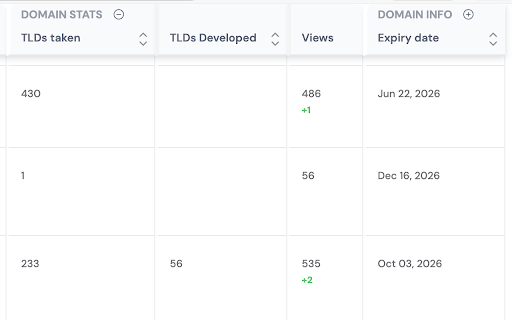
Keep an eye on views updates for your domains listed on Atom.com.
How to use:
– Enable the "Views" column in your domains dashboard (expand the "Domain Stats" column group).
– Browse through all pages with your domains, the extension can only save/update the data for domains visible on the current page. Give it a couple of seconds to process each page. A little longer if the device is slow and/or the 500-domains-per-page setting is being used.
– Visit again later to see the difference, if any.
The extension updates its saved data for each domain no less than 24 hours since the latest save point for that domain. If there is a visit in less than 24 hours and there is a difference, it will be displayed, however the next reference point will update only on a visit after the 24 hour period ends.
To avoid confusion in stats output, browse through all pages of the domain dashboard regularly so that all domains get their saved stats updated around the same time.