
색상 스포이드 도구
Extension Actions
CRX ID
lobiadjfmkomemokdfhiaaaidgdhcded
Status
- Extension status: Featured
- Live on Store
Description from extension meta
스포이드로 페이지에서 색상을 가져옵니다.
Image from store
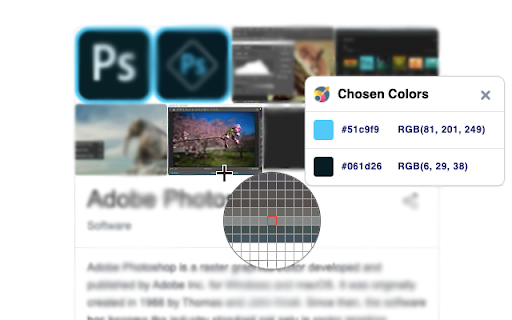
Description from store
❗ Shortcut: Shift + Alt + C
❗ Mac: Shift + Option + C
Features:
🚀 Single-click to start colour picking
🚀 Chrome DevTools like Colour Picker
🚀 Colors selecting History
🚀 Copy colors in RGB or HEX format
🚀 Zoom
If you looking for:
⭐️ Color Picker
⭐️ EyeDropper
⭐️ Photoshop Color Picker for Chrome
⭐️ The best tool for web designer
⭐️ 100% Free ColorPicker
⭐️ Most used color from web page palette
Color Picker doesn't collect or store any personal information.
Latest reviews
- YuCai Hwang
- Perfect color picker!I like it
- Iraq Tech
- You can not pick color in the top right area, because the cursor move out of the need area.
- Imran Ahmed
- I have used a lot of colour picker tools, but honsetly they added so many options with the colpur picker that picking colour is the most hard thing they offer while doing doing other stuffs which are not needed. But this one is easiest and instantly gives the colour without telling to do other things.
- Yasin Karimzadeh
- best color picker
- Sebastian Arias
- cHEVERE
- Bohdan Zaklunnyi
- Easy to catch a color
- Logan Maxwell Leibowitz
- w color picker
- tom abella
- It's lightweight and straitforward.
- mehdi vaezi
- Good app, with pixel picker
- Christoph Bernhard
- Very good and simple. Love it
- Ryan Palma
- Remove rate the extension
- Connor Jax
- its good just a little slow and feels clunky but works great
- Milad Lamri
- loved it
- Peace Azubuike
- best of all so far
- Musa Kh
- It doesn't work. Google Chrome, Ubuntu
- Léo Jelsperger
- Do not follow the scroll...
- Luís Almeida
- Fantástico e eficaz!
- CSPRODUCTIONS OFFICIALS
- PErfect
- CSPRODUCTIONS OFFICIALS
- PErfect
- Theo Clark
- Very useful, works very well
- Theo Clark
- Very useful, works very well
- Luck
- Muito útil pro meu trabalho, recomendo. Prático e rápido.
- Ivan Zath
- maravishoso
- Luke Richards
- Works really well
- Luke Richards
- Works really well
- Ashvin Silvestro
- Very useful
- Ashvin Silvestro
- Very useful
- PatriceL
- Seems good :)
- PatriceL
- Seems good :)
- Tim Vannson
- cool
- Tim Vannson
- cool
- Anonymous
- Utile, merci.
- remy catala
- how did you do such a so cool extansions but dont let us ctrlC+ctrlV
- remy catala
- how did you do such a so cool extansions but dont let us ctrlC+ctrlV
- Cornelius Lochipi
- An amazing picker. Love it
- Cornelius Lochipi
- An amazing picker. Love it
- Sergei T.
- г.но
- Miriam Verdú Teruel
- Muy útil
- jyun Kim
- 너무 좋아요
- Juan Pablo Oliva Flores
- re útil
- Analucia Meléndez
- MUY UTIL
- Сергій
- Не працює!
- Sergey Leshchev
- Удобно брать цвет у любого элемента. Есть увеличение и цвет можно взять очень точно вплоть до пикселя. Есть буфер с несколькими последними цветами, оттуда можно копировать одним кликом. Именно это я и искал, спасибо)
- Vernard Mercader
- Wow, finally, something other than Colorzilla that actually works. Click the icon > click on the webpage > I expect it to grab the hex or RGB. THIS–is how it should work. (at least, so far, 2023-JUL-11, unless it breaks at some point.)
- Bhabin Chamling Rai
- Awesome
- Bhabin Chamling Rai
- Awesome
- nicolas bastien
- oblige a mettre un avis ^^
- Tony Montan
- works great
- Tony
- works great
- Linar
- ВЕРНИТЕ ПИПЕТКУ В EDGE!!!