
Desktop app for Google Tasks
Extension Actions
- Extension status: Featured
- Live on Store
Standalone Desktop app for Google Tasks. Export and share your Google Tasks lists in one click.
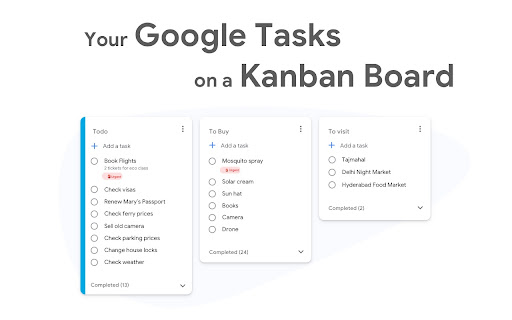
The TasksBoard Chrome extension let you add a task to your Google Tasks in one click from any page on Google Chrome.
✅ TasksBoard lets you manage, edit and share your Google Tasks on a full-screen interface.
👥 Collaborate with your team in real-time with the option to share the lists.
✨ TasksBoard offers a Premium plan with additional features such as unlimited shared lists, customisable boards, tags and more.
⭐️ FEATURES
👌 Increase your productivity: Drag and drop your tasks from one list to another
🤝 Collaborate with your team: Share your Google Tasks lists with anyone
🗄️ Keep everything organized: Create multiple boards for each of your projects
🌈 Better Task management: Set highlight color to your lists to find them instantly
🏷️ Easily organize and prioritize your tasks with custom labels
📁 Attach documents from Google Drive directly to your tasks
✉️ Make emails actionable by turning them into tasks from within your Gmail inbox
💻 Access your Google Tasks directly on the desktop by installing the desktop app
🔑 Ensure secure sign-on with your team's existing Google credentials through Single-Sign-On authentication
🛟 SUPPORT
Need a helping hand? Have a look to our extensive guides, the documentation on https://tasksboard.com/support and/or contact us at [email protected]
💰 PRICING
TasksBoard has individual and enterprise Premium plans available. Check our pricing options: https://tasksboard.com/pricing
🔐 PRIVACY
By design, your data stays at all times on Google servers. We have no access to your data, and we never copy your tasks on our server..
Here's all the data we need in order to make TasksBoard work:
- Your email address - to know who you are
- Campaigns sent metadata (spreadsheet name, date of sending - that's all)
- Emails sent metadata (date of sending, open / clicks events - that's all again)
TasksBoard / TaskBoard complies with privacy laws (especially GDPR) to protect your data.
Check out the full privacy policy on this page https://tasksboard.com/privacy
***********************************
WEBSITE: https://tasksboard.com
TWITTER: @tasksboard
SUPPORT: [email protected]
Latest reviews
- Wong Astrid
- Really helped with scheduling my revision
- Mark Glenn Lopecillo
- This is amazing because it lets me synchronize between devices which is very convenient and it even has a synchronization between Google apps like Google Calendar.
- Chase Cattrall
- Seriously, makes my tasks easier to share with the team, and the free version is quite nice for our little office. Eventually, we will expand, and this is definitely a great tool to do that! Syncs with my Workspace and Calendar.
- Shay Mauck
- Still assessing but initial looks great
- Jeff Jefferson Roxas
- Can't work without it. It's very easy to use. It works incredibly well with my calendar and email.
- Joshua Beach (M. Lé)
- This extension makes it so much easier for me to quickly add a task while I'm doing anything on the web. Conveniently pops out of the side of the browser window when I need it, and when I'm done with my task, I can quickly pop it right back out of sight. Love it!
- Brian Karen
- Perfect.
- Sales Team
- Love , Love , Love it. It makes my ADHD life so much easier
- LeeAnn Kampfer
- This tool helps our Small Business stay organized, assigning tasks and updates in real time.
- Abriana Johnson
- It really helps me to keep track of what I need to accomplish. It Is super duper helpful. I also love that it is connected to my calendar as well, so I can see everything in a clear manner.
- Jawad Charles
- Well, this service is just awesome, I get to access my task list very easily at any time I want when working on my computer. No matter what im working on, atleast one browser tab is open in chrome. You can add it on top there for quick access, its just lovely, I gave 4 stars (you deserve a 5) but perhaps that will be a room for improvement. L'chaim 🥂
- K7MAP
- This "app' is amazing. It allows me to sort my Task Lists. Most Task Apps that suck off of Google Tasks might let you rearrange tasks with in a specific List, but if you have a lot of different Lists, you can not rearrange them. They just stay in the order that you originally created them. With this app, you can rearrange your various task Lists.
- Murtaza Mukhtar
- useful
- gaytri sachdeva
- just what i needed
- Greg Cantori
- I love the simple, intuitive interface and the Add to Tasks feature, especially as I work through my emails! Sharing my tasks is also easy. Overall, outstanding and simple to use, and that means a lot with too many complex tasks out there!
- Muhammad Abdullah
- Very intuitive and easy to use, no complexity and straight up usability that matters!
- Omega Zero
- Very easy to use! Exactly what I needed!
- Conor Donahue
- Honestly, pretty great integration with desktop.
- Daesoo Lee
- I've been using it everyday for years. It allows me to organize my life better.
- Howie Levy
- Brings the best features of Google Tasks and expands on them with several great beneficial add ons.
- Jigar Kayastha
- Compact and beautiful
- Emir Balci
- Works as intended
- Alex Stoica - We Have A Tender
- Google should buy this product from this team and implement in Google Tasks. They did a great job!!!
- Ethan M. Galindo Raya
- It logs out often and you gotta open the main page to log in so it works, which is annoyong time to time, besides that it works fine.
- iman shah
- honestly great app, no nonsense, just does what it says.
- STUDIO GHATS
- very usefull,
- Kuldeep Patel
- very help full
- Daniel Düsentrieb
- 10/10 app!
- Vilas Pendse
- awesome
- Christian Griffith
- It doesn't recognize Google's built-in recurrence, and that has proven to be costly to me and the company significantly. The tool functions as promised; it is worth the small fee. But if I find something better, I will switch unless this integration improves.
- Josef Rozio
- Does what it claims to to do.
- Atulya Seemtosh
- simple design and integrated with google calendar. A good addition to a google ecosystem
- Dan Mihai Ionescu
- Very helpful and well designed. I recommend to anyone that want to stay organized .
- Jessica Blaire Berry
- Love it. I can keep all my clients organized and assign task to my employees in order of importance.
- Benjamin Attabra
- one of the best extensions out there. definitely recommend getting if you use google tasks
- Tubagus Wahyu H
- good app
- Christian Leal
- I LOVE IT
- Coordinateur Dimel
- Thanks to this awesome App
- j
- doesn't let you set a time for the tasks . i prefer the horizontal mouse scrolling available on the orginal google task available on internet browsers.
- Stirling Moss
- Having the ability to share a google tasks list has been priceless and really helped me to streamline the jobs I have coming in. Would highly recommend the app if you are working between two or more google accounts.
- Nick Romano
- Easy to use. Task integration from phone to compute is very useful.
- Samarth Singh Thakur
- Works very well
- Maxim Losev
- It provides tasks sharing!! Very useful.
- philip waring
- Simple, but does everything one could ask, and is synced across devices, and with Outlook
- Ezequiel Muns
- Great little tool to have Tasks as a board on my desktop. Easy and simple.
- Octavio Ruiz Miranda
- Works flawlessly
- artoon chen
- good !
- Max Krone
- Best free task manager that I can have synced anywhere. Others might be better, but free makes this my top choice.
- Martin Smith
- Really like it. Very intuitive and similar to the web-based Google to-do app, but has the advantage that it can live as a different window
- who amI
- good