
Find Better Job
Extension Actions
Automate LinkedIn connection requests to improve job search results
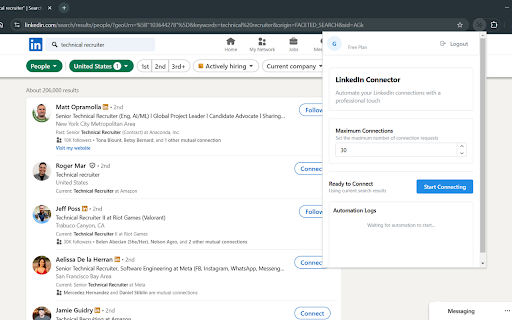
# LinkedIn Connection Automation Extension 🚀
> Streamline your LinkedIn networking with smart campaign management and automated connections
## 🌟 Key Features
### 📊 Smart Campaign Management
- **Save Search Campaigns**: Store your LinkedIn search URLs for quick access
- **Multiple Campaigns**: Organize different searches for various target audiences
- **Quick Navigation**: Switch between saved searches with a single click
- **Visual Organization**: Clear badges show your active campaign
- **Search & Filter**: Easily find your saved campaigns with built-in search
### 🤖 Connection Automation
- **Automated Outreach**: Send connection requests automatically from your search results
- **Customizable Messages**: Add personalized notes to your connection requests
- **Natural Behavior**: Random delays and scrolling to mimic human behavior
- **Progress Tracking**: Monitor your automation progress in real-time
- **Full Control**: Start, stop, and monitor the automation process
### 🔒 Safety & Security Features
- **Weekly Limits**: Free plan includes weekly connection limits for account safety
- **Confirmation Dialogs**: Prevent accidental campaign switches or deletions
- **Error Handling**: Smart error detection and clear error messages
- **Secure Storage**: Local storage of your campaigns and preferences
- **Account Recovery**: Easy password reset through secure email verification
- **Data Protection**: Your data is encrypted and securely stored
### 💎 Pro Plan Features
- **Unlimited Connections**: Remove the weekly connection limit restriction
- **Premium Support**: Access to priority assistance
- **Future Updates**: Early access to new features as they're released
## 💡 Perfect For
- **Recruiters**: Streamline your candidate outreach
- **Sales Professionals**: Connect with potential clients efficiently
- **Job Seekers**: Build your professional network strategically
- **Business Owners**: Grow your LinkedIn presence systematically
- **Marketers**: Reach your target audience effectively
## 🎓 Getting Started
1. Install the extension
2. Create your account or sign in securely
3. Navigate to LinkedIn and perform a search
4. Click "Add Campaign" to save your search
5. Set your connection message
6. Start the automation and monitor progress
## 🎄 Latest Updates
Recent additions:
- Enhanced security with password recovery system
- Campaign management system with search functionality
- Real-time automation progress tracking
- Customizable connection messages
- Pro subscription with unlimited connections
- Improved user interface with clear visual feedback