
Lumina TradingView Sidekick
Extension Actions
Smart calculator and economic news tool for TradingView.
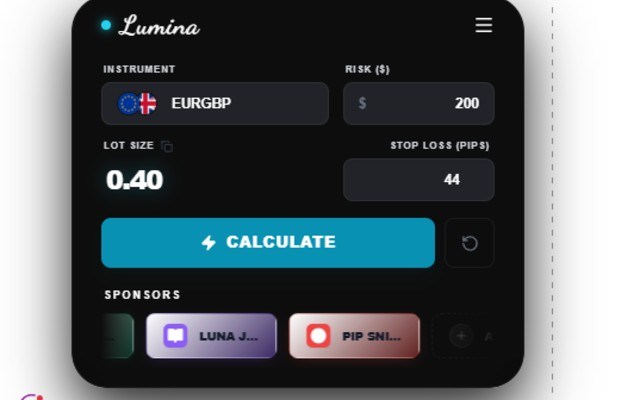
Lumina Position Sizer is a specialized browser extension tailored for traders who use TradingView and demand quick, accurate position size calculations directly on their trading charts. This tool provides a floating, real-time risk calculator that integrates smoothly within TradingView’s interface, enabling traders to manage their risk effectively, fine-tune their trade entries, and adjust position sizes confidently as market conditions change. Whether you are a seasoned professional or a novice learning about risk management, Lumina simplifies the critical process of calculating position size, ensuring every trade is placed with precise risk parameters in mind.
The extension operates as a floating overlay atop TradingView charts, providing advanced calculation capabilities without interrupting your trading workflow. Activated by a simple keyboard shortcut, it presents a clean and minimal interface that allows you to enter key data such as account balance, risk percentage per trade, stop loss level, and entry price. Lumina then instantly computes the optimal trade size, offering results in units or contracts. The calculator also displays recommended position size along with the associated risk metric, helping you avoid risking more than intended on any given trade.
Lumina’s design focuses on user accessibility and visual clarity. The “Lumina Launchpad” popup signals when the extension is active and offers quick access to open TradingView.com or toggle the calculator on any chart using a straightforward shortcut—typically the Alt key. Bright gradients, subtle shadows, and a color scheme that harmonizes with TradingView’s interface make Lumina visually appealing without intruding on chart space. Helpful status indicators, tooltips, and prompts guide both beginners and experienced traders, facilitating efficient use of its functions without confusion.
Security and privacy are paramount to Lumina’s architecture. It runs entirely on the client side, meaning no personal or sensitive trading data is sent outside your browser. The extension requests only minimal permissions to store simple user settings locally. It never collects your trading credentials, chart data, or any personal information, giving you peace of mind to focus on your trading sessions without concerns about data privacy.
Lumina Position Sizer saves traders time by eliminating manual calculation errors and helps maintain discipline by strictly enforcing pre-set risk criteria. It is suitable for scalpers, swing traders, and position traders alike—anyone looking to build professional habits in position sizing using TradingView as their main analysis platform. Integrated help prompts, unobtrusive activation controls, and an elegant design make Lumina an invaluable companion for serious traders aiming to optimize risk management.
Key Features:
- Floating position size calculator integrated directly on TradingView charts for seamless and instant risk assessment.
- Fast and accurate position sizing using variables including account balance, risk percentage, entry price, and stop loss.
- User-friendly popup (“Lumina Launchpad”) displaying extension status and providing quick access to TradingView.
- Convenient keyboard shortcut (typically Alt) to toggle the calculator overlay quickly without interrupting workflow.
- Beautiful, minimalistic user interface optimized to overlay charts without clutter or distraction.
- Real-time computation updates ensuring immediate feedback, reducing manual errors and missed risk targets.
- Strict privacy policy with no personal data collection; all calculations occur locally in the browser.
How It Works:
1. Download and install Lumina Position Sizer from your browser’s extension marketplace.
2. Navigate to TradingView.com and open a chart where you want to make a trade.
3. Press the designated keyboard shortcut (usually Alt) to launch the floating position size calculator.
4. Enter your current account balance, the percentage of risk you want to take per trade, the entry price, and the stop loss into the calculator fields.
5. View the instantly computed position size along with recommended trade units and risk details.
6. Modify parameters as desired; the calculator updates results live to reflect any changes.
7. Hide the overlay when finished or use the “Lumina Launchpad” popup to reopen TradingView or review extension status.
Privacy: - No personal data collected.
Latest reviews
- Salim
- best upgrade in my trading , it so fast and accurate, thank God am the first to get it , hope it will be popular